Magento to Shopify Plus Migration: Cost, Timeline and What Must Be Rebuilt

By Robin Laseur

A Magento to Shopify Plus migration rarely becomes difficult because product rows refuse to import. The complexity sits in everything the Magento estate has learned to do over time: product relationships, pricing rules, extensions, regional store views, B2B workflows and connections to systems that still need to work after launch.
Migrating from Magento or Adobe Commerce to Shopify Plus means transferring the data the business still needs, transforming structures that do not map directly, replacing platform-specific functionality and retiring inherited complexity. A well-scoped program typically covers discovery, target architecture, data, storefront, integrations, SEO, testing, cutover and post-launch stabilization.
That distinction matters. A team that treats the project as a larger CSV import can produce a functioning store while losing the operational logic that made the old one usable. A team that tries to reproduce Magento feature by feature can spend its Shopify budget rebuilding the constraints it wanted to leave.
The useful goal sits between those extremes: preserve the business, not the platform.
When does moving from Magento to Shopify Plus make sense?
Moving from Magento or Adobe Commerce to Shopify Plus makes sense when maintaining the current platform consumes time and budget that should support customer experience, merchandising and growth. The decision becomes stronger when upgrades, hosting, extensions or specialist development repeatedly delay commercial work, provided Shopify Plus can support the required business model without disproportionate custom development.
Magento remains a capable commerce platform. Its flexibility is valuable when a business needs deep control over the application, has the engineering capacity to operate that control and can justify the resulting infrastructure and release model. Migration should not begin from the assumption that Shopify Plus is automatically better.
The case for moving becomes clearer when the platform’s flexibility has turned into an operating burden. The ecommerce team may need a developer to change functionality that should be routine. An upgrade can trigger extension compatibility work. Infrastructure, security patching and deployment management take a standing share of the roadmap. Regional stores or B2B workflows have accumulated overlapping rules that only a small number of people understand.
Those signals are more meaningful than age alone. A six-year-old Magento installation with disciplined architecture, current versions and a strong internal team may be healthier than a three-year-old build carrying undocumented modules and manual workarounds.
The practical signals that the calculation has changed
Maintenance competes with growth work: Engineering capacity repeatedly goes toward patches, upgrades, hosting or extension conflicts before customer-facing improvements reach the roadmap.
Commercial releases have become slow: Campaign, merchandising and content changes depend on a release process that no longer matches the speed expected by marketing or ecommerce teams.
The operating model has outgrown the implementation: New markets, wholesale accounts, physical retail or additional brands require more duplication and manual coordination each time they are added.
Platform knowledge has concentrated in too few people: Critical rules exist in custom code or institutional memory, making every change more expensive to assess.
Three-year TCO is difficult to defend: Licensing, infrastructure, apps, development retainers and internal time add up to more than the value of keeping full platform control.
Flatline’s existing analysis of Magento and Shopify total cost drivers is useful before turning these signals into a migration decision. The key comparison is not Magento license versus Shopify subscription. It is the cost and opportunity value of operating both commerce environments over the same time horizon.
When staying on Magento may still be the better decision
Shopify Plus can be the wrong destination when the business depends on application-level control that would require extensive custom services around Shopify, when a stable Magento implementation already supports the roadmap efficiently, or when the organization has neither the capacity nor the reason to absorb a replatform now.
A migration is also difficult to justify when the real problem sits elsewhere. A dated storefront, unclear product data ownership or slow internal approvals will not disappear because the platform changes. Fixing those constraints may create more value than replatforming.
Why is a Magento to Shopify Plus project more than a data transfer?
A Magento to Shopify Plus migration is more than a data transfer because Magento stores relationships and business rules in structures that Shopify does not reproduce one for one. Products, customer groups, websites, store views, pricing rules and extensions must be interpreted against the target operating model before teams can decide whether to move, transform, replace or retire them.
Adobe Commerce supports simple, configurable, virtual, downloadable, bundle and grouped product types. A configurable product, for example, presents one parent while inventory sits against separate simple-product variations. Bundles can derive price and inventory behavior from their components. Grouped products organize standalone items without becoming a normal variant family.
Shopify has its own product, variant, collection and metafield model. The same customer-facing assortment can usually be represented, but the source relationships may need transformation. Copying rows without first defining the target model can leave teams with broken variant logic, duplicated products, unusable filtering or an integration that keeps recreating the old structure.
The same issue appears above the catalog. Adobe’s website, store and store-view hierarchy can scope domains, catalogs, configuration, pricing and languages at different levels. Shopify handles international and organizational requirements through a different combination of stores, markets, catalogs, localization settings and connected systems. The migration team must map the purpose of each scope rather than copy its label.
Custom modules add another layer. A module may control a visible storefront feature, but it may also change checkout, enrich product data, calculate pricing, route orders or synchronize an ERP. Its business purpose needs an owner in the target architecture. That owner might be Shopify, an app, middleware, an external system or a custom build.
This is why feature parity is a weak migration target. Business requirement parity is stronger. It asks what customers and internal teams must still be able to accomplish, then chooses the simplest reliable way to support that outcome on Shopify Plus.
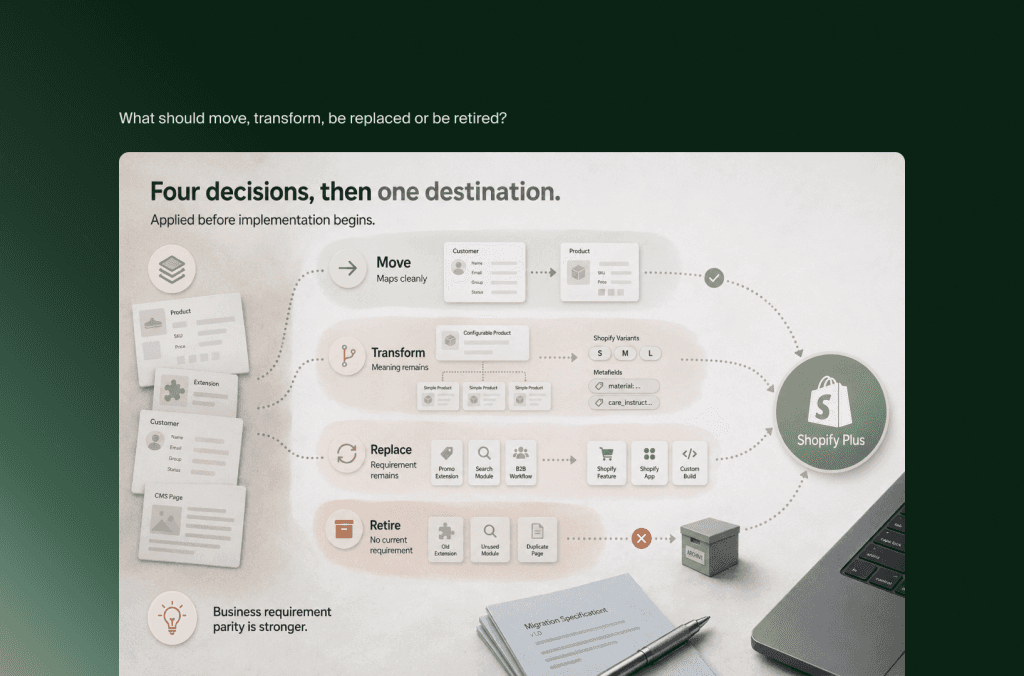
What should move, transform, be replaced or be retired?
Every Magento asset should receive one of four migration decisions. Move data that already fits the target model. Transform data whose meaning should remain but whose structure must change. Replace Magento-specific functionality with a Shopify capability, app or custom component. Retire anything that no longer supports a current customer, commercial or operational requirement.
This classification creates a more useful scope than a single inventory labelled “to migrate.” It also gives business owners a reason to review what the store does before developers start rebuilding it.
Products and catalog relationships
Begin with the commercial catalog, not the export format. Identify active products, variants, bundles, kits, related products, accessories, attributes, media and market-specific availability. Then map how merchandising, filtering, search, feeds, inventory and the PIM use those relationships.
The product count is only one measure of effort. Ten thousand simple products can be easier to migrate than two thousand products with dense configurable relationships, customer-specific assortments and several sources of enrichment. The test migration should validate relationships and behavior, not only the number of successful records.
Customers and account access
Customer records can move, but passwords generally cannot. Shopify’s store migration checklist explains that encrypted passwords are not imported, so the account transition needs a deliberate sign-in or reactivation plan.
This affects more than an email announcement. The team should decide which customers require an account, how duplicates will be handled, what happens to saved addresses and preferences, and how customer service will respond during the transition. For B2B customers, company membership, permissions, locations, tax treatment and payment terms need separate mapping.
Historical orders
The right amount of order history depends on how teams use it. Customer service may need warranty and return context. Finance may require statutory access. Marketing may rely on purchase history for segmentation. A data warehouse may already be the better long-term home for older transactions.
Moving every order into Shopify is not automatically the best answer. Define the operational use cases first, then decide what belongs in Shopify, what belongs in another system and what can remain in a compliant archive.
Content, URLs and merchandising assets
Pages, buying guides, campaign landing pages, category copy, media and metadata should be assessed through both commercial and organic performance. High-value content needs a destination in the new information architecture. Thin, duplicated or outdated content may be consolidated or retired with an appropriate redirect decision.
The same discipline applies to promotions and merchandising rules. Preserve the commercial intention, then decide how it should work under Shopify’s discount, catalog, search and application model.
How should Magento catalog, B2B and integration logic map to Shopify Plus?
Magento catalog, B2B and integration logic should be mapped by business capability and system ownership. Define where products, prices, inventory, customers and orders will be mastered after migration, then test each Magento rule against Shopify’s native capabilities. Use apps or custom development only where a verified requirement remains uncovered.
The target architecture becomes simpler when every important data object has one clear owner. The PIM may own product enrichment, the ERP may own stock and base pricing, Shopify may own the digital catalog and checkout, and the CRM may own sales activity. The exact pattern varies, but ambiguity creates predictable problems: two systems write the same field, synchronization overwrites manual changes, or nobody owns an exception.
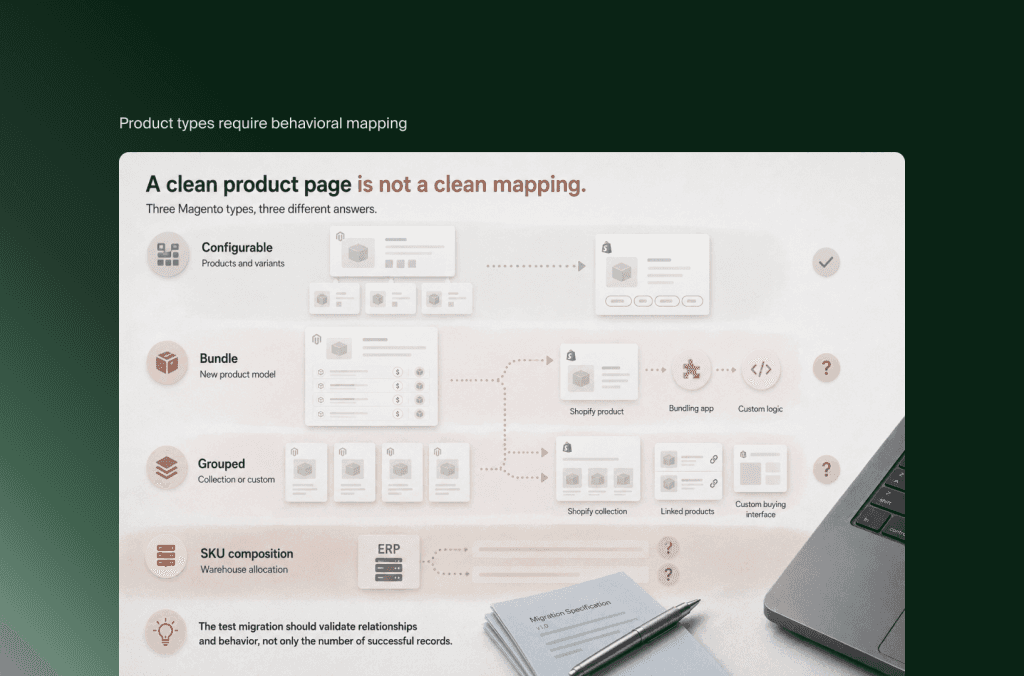
Product types require behavioral mapping
A configurable Magento product may map neatly to a Shopify product with variants. A bundle with dynamic component pricing and independent stock may need a different product model, bundling capability or custom logic. A grouped product may become a collection, a set of linked products or a purpose-built buying interface.
The correct mapping depends on how the customer buys and how fulfillment receives the order. A visual match on the product page is not enough if the ERP receives a different SKU composition or warehouse allocation than it did before.
Store views do not become markets automatically
Magento store views are often used for languages, while websites and stores can carry deeper differences in domains, catalogs, pricing and configuration. Shopify’s market and store structure should be designed from the actual regional requirements: legal entity, currency, tax, payment methods, catalog availability, language, fulfillment and team ownership.
Treating every store view as a separate Shopify store can create unnecessary duplication. Folding operations with separate legal, catalog or fulfillment requirements into one store can create the opposite problem. The discovery phase should state why each current scope exists before defining its Shopify equivalent.
B2B needs capability-level comparison
Adobe Commerce can use customer groups, company accounts, shared catalogs, negotiated purchasing workflows and advanced pricing. Shopify’s current B2B model supports companies, catalogs, payment terms and self-serve purchasing across eligible plans, while Shopify Plus adds capabilities such as unlimited catalogs, direct catalog assignment, deposits and partial payments.
That makes plan selection part of the migration design. A business should not select Plus merely because it sells wholesale, but a complex B2B operation may need the additional catalog, payment, checkout, automation or organizational control that Plus provides.
Map the workflows buyers use today: who can order, which location they order for, what they can see, how their price is calculated, whether approval or quotation is required, which payment terms apply and how the ERP records the order. Then compare those requirements with Shopify’s current capabilities. Older feature assumptions are especially risky because the B2B feature set has changed over time.
Integrations usually set the critical path
ERP, PIM, WMS, OMS, CRM, POS, search, tax, payments, reviews, loyalty and lifecycle marketing connections should be inventoried with direction, frequency, volume, ownership and error handling. “ERP integration” is not a sufficient requirement. The team needs to know which objects move, which system initiates them, how quickly they must arrive and what happens when the connection is unavailable.
For an established Magento store, this work often determines the timeline more than the storefront. The build can progress while integrations are being developed, but end-to-end testing cannot finish until the surrounding systems exchange realistic data reliably.
How long does a Magento to Shopify Plus migration take?
A Magento to Shopify Plus migration for an established ecommerce operation should usually be planned in months, not weeks. A contained project may fit inside roughly three months, while a complex Adobe Commerce, B2B, multi-market or integration-heavy program can require six months or longer. Discovery should set the range after dependencies and internal approval capacity are known.
Shopify’s own replatforming guidance cites a typical range of three to six months for mid-sized Shopify projects, while stressing that complexity, work required on both sides and stakeholder availability change the result. That is a more useful starting point than a promise based on SKU count.
These are planning ranges, not delivery commitments. A project can move faster when discovery is complete, decisions have owners and the source data is understood. It can also stall without a technical blocker because content is late, regional teams disagree on requirements or user acceptance testing does not receive enough client-side capacity.
A realistic sequence
Audit the current estate. Document platforms, modules, data, workflows, integrations, SEO assets and commercial requirements before choosing the migration method.
Define the target operating model. Assign system ownership, Shopify plan, market structure, catalog model, B2B approach and storefront architecture.
Run test migrations early. Use representative products, customers and orders to expose mapping problems while changes are still inexpensive.
Build the storefront and integrations. Develop against the approved target model, with content and operational work progressing in parallel.
Validate end to end. Test merchandising, checkout, payments, taxes, customer accounts, orders, fulfillment, analytics and exception handling with realistic scenarios.
Rehearse cutover. Confirm final data synchronization, redirects, DNS, system ownership, go-live criteria and rollback decisions.
Stabilize after launch. Monitor commerce flows, integrations, search visibility and customer-service signals before moving the team fully into growth work.
The sequence matters more than the phase names. Data mapping that begins after the theme is built can force the storefront to change. Integration testing that begins shortly before launch can expose structural issues when there is no time left to resolve them calmly.

How much does a Magento to Shopify Plus migration cost?
Magento to Shopify Plus migration cost is the combined investment in discovery, data transformation, design, development, integration, SEO, quality assurance, cutover and stabilization. Established Magento projects generally require a five-figure budget, while multi-market, B2B or integration-heavy programs can enter six figures. A defensible estimate needs a workstream-based scope rather than a per-product price.
That planning band should not be read as a Flatline quote. Clutch’s 2026 ecommerce development pricing data reports an average project cost of approximately $51,943 across its review dataset, which illustrates how little an unqualified average says about one Magento estate. The difference is usually not visual polish. It is how much business logic and operational connectivity the project must preserve.
The platform subscription is only one component. Shopify Plus pricing currently starts at €2,100 per month for a standard setup on a three-year term or €2,250 per month on a one-year term, with a variable fee applying to more complex or higher-volume business structures. Pricing can change, so the live Shopify terms should be checked during commercial assessment.
Build the migration budget across five lines:
Discovery and architecture: Current-state audit, requirements, target model, workstream ownership, migration specification and cutover plan.
Implementation: Storefront design and development, Shopify configuration, custom functionality and application setup.
Data and integrations: Extraction, cleanup, transformation, repeated test imports, ERP/PIM/WMS/CRM connections and validation.
Launch protection: SEO mapping, analytics, QA, user acceptance testing, performance checks, rehearsals and post-launch monitoring.
Operating change: Internal team time, content preparation, training, customer communication, app subscriptions and ongoing support.
Separating those lines makes proposals easier to compare. One quote may appear lower because it excludes data cleanup, customer account transition, content entry or post-launch monitoring. Another may include a redesign that the business could phase later. The scope and assumptions reveal more than the total.
The financial case should compare the one-time migration against three years of operating both options. Flatline’s TCO framework for ecommerce platforms covers platform fees, applications, infrastructure, support, internal effort and the commercial cost of a slow release model. Shopify also defines ecommerce TCO as including implementation, operating, support and opportunity costs, rather than subscription alone.
How do you protect SEO and business continuity during cutover?
Protecting SEO and business continuity requires one coordinated cutover plan covering URLs, data, integrations, transactions, analytics and customer communication. The team should rehearse the final synchronization, validate redirects and critical order flows before DNS changes, define go-live and rollback criteria, then monitor search and operational signals immediately after launch.
SEO work begins before the new information architecture is final. Crawl the Magento site, combine that inventory with analytics and search data, then decide the target for every indexable URL with material traffic, links, rankings or business value. Some URLs retain an equivalent destination. Others consolidate into a stronger page. Only content with no relevant replacement should reach a deliberate retirement decision.
Shopify supports URL redirects, but the existence of a redirect feature does not create the redirect strategy. Teams still need to map paths, prevent chains, preserve canonical intent, update internal links and validate behavior at scale. Product, collection, content and pagination structures deserve separate checks.
The launch runbook should cover:
Final and delta data synchronization
Order handling during the cutover window
DNS and domain changes
Redirect deployment and sampling
Checkout, payment, tax and shipping validation
ERP, inventory and fulfillment messages
Customer account access and communication
Consent, analytics and marketing event validation
XML sitemaps, canonicals, robots directives and structured data
Monitoring owners, escalation paths and rollback criteria
Zero interruption should be an objective backed by rehearsals, not a promise made before the architecture is known. A storefront can remain available while an order, inventory or customer event fails quietly behind it. End-to-end operational scenarios are therefore part of launch readiness, not a post-launch enhancement.
If you are still deciding whether to replatform, rebuild or hold, settle that before committing to a Magento exit, because a clean rebuild on Adobe Commerce sometimes solves the problem at lower cost. Once the move is decided, our Shopify migration service covers the scoping, data mapping and cutover described above.
Frequently asked questions
Can Magento customer passwords be migrated to Shopify?
Magento customer records can be migrated, but existing passwords generally cannot because they are stored as encrypted credentials outside Shopify. Plan an account activation, password-reset or passwordless sign-in journey before launch. Test the communication, support process and duplicate-account handling with real customer scenarios rather than treating account access as a data-import task.
Can historical Magento orders be imported into Shopify?
Historical orders can form part of a Shopify migration, but the correct depth depends on how service, finance, returns, loyalty and reporting use them. Define those use cases first. Older transactions may belong in Shopify, a data warehouse or a compliant archive. Validation should confirm customer relationships, line items, tax, currency and status meaning.
Can Magento configurable and bundle products move to Shopify Plus?
Yes, but they may not retain the same structure. Configurable products often map to Shopify products and variants. Dynamic bundles, grouped products and custom options may need a bundling application, a different product model or custom logic. Validate customer behavior, inventory treatment, ERP messages and fulfillment output before approving the mapping.
Can Adobe Commerce B2B move to Shopify Plus?
Many Adobe Commerce B2B capabilities can be represented through Shopify companies, catalogs, payment terms, permissions and Shopify Plus features. The mapping is not automatic. Shared catalogs, negotiated workflows, buyer roles, quotation, credit, purchasing rules and ERP dependencies should be assessed individually so the target design reflects buyer ordering workflows.
Can we keep Adobe Analytics, Adobe Target or other Adobe tools?
Potentially. Moving the commerce platform does not require every Adobe product to be removed, but each integration needs a new technical and commercial assessment. Document the data collected, consent requirements, activation use cases and current connection method. Then decide whether to reconnect it, replace it or move the capability elsewhere in the stack.
Should we redesign the storefront during the migration?
A redesign can run alongside migration, but it increases the number of variables being changed and tested at once. Combine them when the current experience is part of the business case and the organization can support the extra decisions. Separate or phase them when continuity and speed matter more than a complete customer-experience reset.
Can a Magento migration launch without interrupting orders?
A planned migration can keep disruption low, but the answer depends on transaction volume, data synchronization and connected systems. Define how new customers, orders, stock changes and content updates will move during the cutover window. Rehearse the sequence, set go-live criteria and assign authority for pausing or reversing the launch.
Is Shopify Plus always the right replacement for Adobe Commerce?
No. Shopify Plus fits businesses that benefit from managed infrastructure, a more standardized commerce core and a broad ecosystem while accepting defined extension boundaries. Adobe Commerce may remain the stronger fit when deep application control is strategically important and the organization has the engineering capability and budget to operate it well.
Key takeaways
A Magento to Shopify Plus migration should preserve business requirements, not reproduce the old platform feature by feature.
The four useful scope decisions are move, transform, replace and retire. Apply them to data, functionality, integrations and content before implementation begins.
Catalog relationships, B2B rules, store hierarchy and integrations usually determine complexity more than product count.
Three to six months is a sensible initial planning horizon for an established migration, with complex Adobe Commerce programs taking longer.
Cost becomes defensible when discovery separates data, storefront, integrations, SEO, launch protection and operating change into visible workstreams.
SEO and operational continuity belong in the same cutover runbook because a technically live storefront can still lose search signals or break back-office flows.
The platform decision is only the beginning. The quality of the migration depends on how clearly the business can distinguish what still matters from what Magento accumulated over time. Once those decisions are explicit, Shopify Plus can become a cleaner commerce core instead of a new home for old complexity.
Not sure which parts of your Magento environment should move, change or be retired? Flatline is a Shopify Platinum Partner with hands-on experience across ecommerce, custom development, ERP integrations and SEO. Get in touch, and we will walk through the migration scope with you.
Related articles


