Shopware to Shopify Plus Migration: Cost, Timeline and What Must Be Remapped

By Robin Laseur

The visible part of a Shopware to Shopify Plus migration is a new storefront. The difficult part sits underneath it: inherited product relationships, Rule Builder conditions, Shopping Experiences, sales-channel configuration, plugins, B2B workflows and connections to the systems that run the wider operation.
A Shopware to Shopify Plus migration transfers the commerce data the business still needs, remaps Shopware-specific rules and structures, rebuilds the storefront and reconnects essential systems. A complete program covers discovery, target architecture, data, functionality, integrations, SEO, testing, cutover and post-launch stabilization rather than treating the project as a catalog import.
Recreating Shopware feature by feature is rarely the strongest target. It carries historical implementation choices into a platform with a different operating model. The better target is business continuity with less avoidable complexity: preserve the capabilities that support customers and internal teams, then give each one the simplest reliable owner in the Shopify architecture.
How does the source version change a Shopware migration?
Shopware 5 and Shopware 6 require different migration assessments. Shopware 5 is an end-of-life legacy platform with a different technical foundation, while Shopware 6 may use Community Edition, a commercial plan, self-hosting, PaaS or SaaS. The source version, deployment model and feature set determine what data, code and operational responsibility must change.
Shopware ended official Shopware 5 security support in July 2024. Its own Shopware 5 migration guidance makes clear that Shopware 6 is a different destination rather than a routine version update. For a business still on Shopware 5, the decision is therefore broader than whether to modernize. It is whether to rebuild on Shopware 6 or use the required replatforming effort to move to Shopify Plus.
For Shopware 6, confirm whether the estate uses Community Edition or a Rise, Evolve or Beyond plan, and whether it is self-hosted, PaaS or SaaS. These choices change the commercial features, custom code and infrastructure responsibilities in scope.
Confirm these items before estimating the project:
Shopware major and minor version
Community Edition or current commercial plan
Self-hosted, PaaS or SaaS deployment
Number and purpose of sales channels
Storefront, headless or custom frontend architecture
Active plugins, applications and custom extensions
Rule Builder and Flow Builder usage
Shopping Experiences, CMS extensions and custom content blocks
B2B Suite, B2B Components or custom wholesale functionality
ERP, PIM, WMS, POS, marketplace and marketing connections
When does moving from Shopware to Shopify Plus make sense?
Moving from Shopware to Shopify Plus makes sense when infrastructure, upgrades, plugins and specialist development consume capacity that the business wants to direct toward commerce improvement. The case becomes stronger when Shopify can support the required B2C, B2B and multi-market model with fewer platform-specific dependencies and a lower three-year operating burden.
Shopware remains a serious option for European mid-market and enterprise commerce. It can fit organizations that value control over deployment and application architecture, use its rule and content capabilities deeply, and have the engineering model to operate that flexibility well. A migration should not start from the assumption that Shopify Plus is an automatic upgrade.
Signals that justify a formal replatform assessment include:
Maintenance repeatedly displaces commercial work: A material share of development capacity goes to hosting, upgrades, compatibility and defect resolution.
Routine change depends on scarce specialists: Merchandising, content or checkout improvements cannot move at the cadence expected by ecommerce teams.
Plugin ownership is unclear: Several extensions overlap, contain business-critical logic or have no named internal owner.
Sales channels have created configuration drift: Market, language, currency, pricing and navigation differences are difficult to govern consistently.
The B2B and D2C operating model has changed: The current setup no longer reflects how customers, sales teams and back-office systems work.
Three-year TCO no longer matches delivered value: Platform, hosting, development, plugins and internal time cost more than the control they provide.
Flatline’s Shopware versus Shopify comparison examines the broader platform decision. Once the migration route is being scoped, the more useful question is whether the target operating model removes enough responsibility and dependency to justify the switching cost.
When staying on Shopware may be the better decision
Staying can be the stronger choice when the current implementation is healthy, the internal team uses Shopware’s flexibility productively and the roadmap depends on control that would require extensive services around Shopify. A stable Shopware 6 environment should not be replaced because Shopify has a simpler feature narrative.

What should move, be remapped, be rebuilt or be retired?
Every Shopware asset should receive one of four target decisions. Move records that already fit Shopify’s model. Remap structures or rules whose business meaning remains but whose implementation changes. Rebuild capabilities that need a new Shopify-native owner. Retire data, plugins and workflows that no longer justify migration and ongoing support.
This classification turns a technical inventory into an accountable scope. A spreadsheet labelled “migration data” does not distinguish an active commercial rule from a dormant one, or a customer-visible feature from an extension installed years ago and no longer used.
Each decision needs a business owner. Ecommerce approves merchandising behavior, finance approves price and tax logic, operations approves order and fulfillment flows, and marketing approves consent and customer-event handling. This also separates launch-critical scope from improvements that can follow later.
How should Shopware products and catalog data map to Shopify?
Shopware products should map to Shopify according to sellable behavior and downstream system requirements. Parent-child variants, properties, options, categories, custom fields, media and channel availability do not have automatic one-to-one equivalents. The migration model must preserve what customers can select and what inventory, order and fulfillment systems need to receive.
Shopware’s product model distinguishes parent products and sellable variants, with inheritance between them. Its product documentation also separates properties, which describe a product, from options that define variants. Products can belong to several hierarchical categories and can be exposed through selected sales channels.
Shopify uses products, variants, collections, metafields and metaobjects. A standard size-and-color product may map cleanly. More complex relationships can require a different model, particularly when a configurator, bundle, unit conversion, tiered price or ERP message depends on the source structure.
Define the target catalog before transforming the export
Document active products, variants, properties, categories, media, custom fields and market availability. Then assign ownership after launch. The PIM may own enrichment, the ERP may own price and stock, and Shopify may own the digital assortment.
The product count does not measure mapping difficulty. A large catalog with consistent identifiers can be easier than a smaller catalog whose variant options, custom fields and ERP references have evolved without governance.
Representative test data should include:
A simple product and a maximum-complexity variant family
Products with inherited and overridden values
Products assigned to several categories or sales channels
Market-specific visibility and price examples
Bundles, sets, configurators or digital goods where used
Discontinued products, translated content and media
The order-line and fulfillment output expected by connected systems
Validate the customer-facing result and the operational record together. A product page can appear correct while the SKU, tax class, inventory unit or component composition arriving in the ERP is wrong.
Treat custom fields as business data, not generic metadata
Shopware allows custom fields on products, customers, orders and other entities. Inventory each field with its type, source, users and downstream purpose. A field used only by a retired plugin may not need a destination. A field driving filters, feeds or fulfillment needs an explicit Shopify metafield, metaobject or external-system mapping.
How do Rule Builder, promotions and automation map to Shopify?
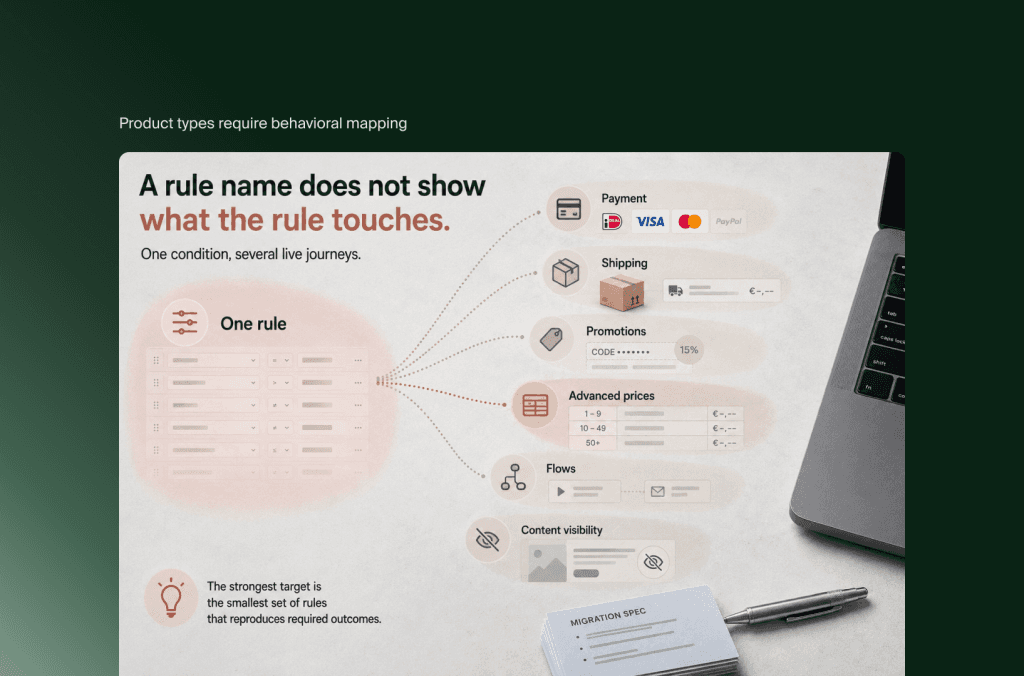
Shopware Rule Builder logic should be decomposed into conditions, effects and assignment points before it is mapped to Shopify. One rule may influence shipping, payment, promotions, advanced prices, flows or content visibility. The target may use Shopify configuration, discounts, Functions, Markets, Flow, an app or an external service, depending on the requirement.
Shopware’s Rule Builder assignment model shows why a rule-name export is insufficient. Rules can affect payment and shipping availability, shipping cost, promotions, discounts, advanced pricing, flows and content visibility. Changing one reused condition can therefore alter several customer or operational journeys.
Create a rule register with these fields:
Do not convert each Shopware rule into a custom Shopify Function by default. Some conditions belong in Markets, catalogs, shipping profiles, payment configuration or standard discounts. Others may be clearer in the ERP or middleware if that system already owns the underlying commercial policy.
The strongest target is the smallest set of rules that reproduces required outcomes. This is also an opportunity to remove contradictions. If two Shopware rules can affect the same cart through different assignments, discovery should establish precedence before any target build begins.
Promotions need behavioral validation: eligibility, stacking, coupons, time windows, product exclusions, shipping effects, gross or net calculation and reporting. The discount visible in the browser is only one result. Finance, analytics and customer service need the same interpretation after launch.

How should Shopware sales channels map to Shopify Markets and stores?
Shopware sales channels should be mapped by audience, transaction and governance requirements rather than copied into the same number of Shopify stores. A sales channel can control language, currency, tax, payment, shipping, domains and navigation. Shopify Markets, catalogs, channels and expansion stores divide those responsibilities differently, so each source channel needs a purpose-led assessment.
Shopware defines sales channels as the way a catalog reaches a specific audience, including storefronts, headless clients, feeds or applications. Each channel can carry defaults for language, currency, taxes, payment, shipping, domains and navigation.
Shopify Markets can vary product availability, pricing, currency, language, domains, theme content and tax-related experience for regional or customer groups. Other channel types, feeds and separate stores may handle requirements that do not belong in one market structure.
For each Shopware sales channel, record:
Audience, countries, brand and domain
Legal entity and payment settlement
Language, currency, tax and duties
Catalog, pricing and inventory ownership
Payment, shipping and fulfillment
Navigation, content and operational ownership
Several Shopware storefront channels may consolidate into one Shopify store with Markets. A channel used for a marketplace feed may become an app or feed connection rather than a store. Separate legal entities, brands or deeply different operations may still justify separate Shopify stores.
The mapping should minimize duplication without centralizing requirements that need independent ownership. An architecture diagram is useful, but the decision comes from transaction and governance details rather than visual neatness.
What happens to Shopping Experiences, themes and headless storefronts?
Shopware Shopping Experiences, themes and headless frontend code do not move directly into Shopify. Reusable content and design assets can be migrated, while layouts, CMS blocks, Twig templates, Store API connections and custom rendering logic need a new implementation. Choose Liquid or headless Shopify according to current requirements rather than source architecture.
Shopware Shopping Experiences organize landing pages, shop pages and category layouts through sections, blocks and elements. Custom CMS elements or extensions can add business-specific editorial capability. The content inside them may remain valuable, but their structure and rendering are tied to Shopware.
Build a content-component inventory rather than taking screenshots and rebuilding pages one at a time. For every block, record its content fields, placements, market variations, scheduling, dynamic data, personalization, SEO role and frequency of use. Then decide whether it becomes:
A Shopify theme section, block or native page
A metafield or metaobject-driven component
An external CMS, application or custom storefront feature
Retired or consolidated content
This approach preserves the editorial system, not only the published appearance. Marketing teams should be able to create the next campaign after launch without asking developers to duplicate a hard-coded page.
Liquid versus headless is a fresh decision
A custom or headless Shopware storefront does not make headless Shopify mandatory. A theme-based Shopify Online Store can still support a distinctive design, reusable content system and strong performance with less infrastructure and integration ownership.
Headless remains justified when verified experience, channel or organizational requirements exceed the theme model. Examples can include a commerce experience shared across several applications, a frontend governed as an independent product or complex content orchestration. Choose it because the target business needs it, not because the source team already invested in a decoupled frontend.
Reusing frontend components also needs caution. A component may be written in a portable JavaScript framework but still depend on Shopware Store API schemas, session context, routing and plugin behavior. Code reuse should follow a dependency review, not a visual similarity check.
How should plugins and integrations be assessed?
Shopware plugins and integrations should be assessed by the business capability they provide, the data they exchange and the consequence of failure. Plugins do not translate into Shopify apps one for one. Some requirements become native Shopify configuration, some need an app or custom integration, and others should move to the system that already owns the process.
Create separate inventories for storefront plugins and system integrations, even when the same extension appears in both. A review widget and an ERP connector have different operational consequences, testing needs and ownership models.
For every plugin, capture:
Business purpose and named owner
Support status, data read and written, and evidence of active use
Storefront, checkout, administration or scheduled-job impact
Dependencies, contract and exit requirements
Target decision and acceptance criteria
Integrations usually determine the critical path
ERP, PIM, WMS, OMS, CRM, POS, search, tax, payments, marketplaces and lifecycle marketing connections need contracts rather than labels. “Connect the ERP” does not state which system owns product, inventory, price, customer or order data.
Document direction, frequency, volume, transformations, identifiers, error handling, reconciliation and service-level expectations for each flow. Then design the Shopify contract around the target data owners. A migration can remove point-to-point connections that duplicate middleware, but it should not centralize logic in Shopify merely because the commerce platform is new.
Run end-to-end tests through realistic exceptions: partial inventory, canceled orders, price changes, returns, failed messages, duplicate customers and unavailable downstream systems. Happy-path tests do not show whether the operation can recover when a connection fails.
How should Shopware B2B map to Shopify Plus?
Shopware B2B should be mapped as complete buyer workflows rather than a list of features. Company structures, roles, approvals, order lists, individual order numbers, budgets, customer-specific catalogs, pricing and sales-assisted processes may come from B2B Suite, B2B Components, plugins or custom code. Each workflow needs a verified Shopify and back-office owner.
Shopware’s current B2B Components can support company roles and contacts, order approvals, order lists and individual order numbers. Older environments may use B2B Suite, which Shopware says is no longer being developed in favor of B2B Components, or a custom combination of customer groups and extensions.
Shopify supports companies and company locations, catalogs, payment terms, quantity rules and volume pricing. Shopify Plus adds direct company catalog assignment and advanced payment capabilities that are not available in the same form on lower plans. These capabilities create a strong foundation, but they do not prove parity with every Shopware B2B implementation.
Map the full purchase journey:
Account and identity: Who creates the company, invites contacts and controls access?
Entitlement: Which products, content and prices can each company location see?
Buying controls: Are minimums, increments, budgets, approval or purchase-order references required?
Checkout and payment: Which terms, deposits, tax rules and payment methods apply?
Sales involvement: Can representatives prepare carts, quotations or orders on a buyer’s behalf?
Order operations: How do changes, backorders, returns, credit and fulfillment reach the ERP?
Shopify should own only the capabilities that fit its role in the target architecture. Contract pricing may remain in the ERP, while Shopify catalogs control presentation. Approval logic may need an application or workflow layer. Customer service may remain in the CRM. A clean B2B storefront can still depend on several systems, but each dependency should be deliberate.
How long does a Shopware to Shopify Plus migration take?
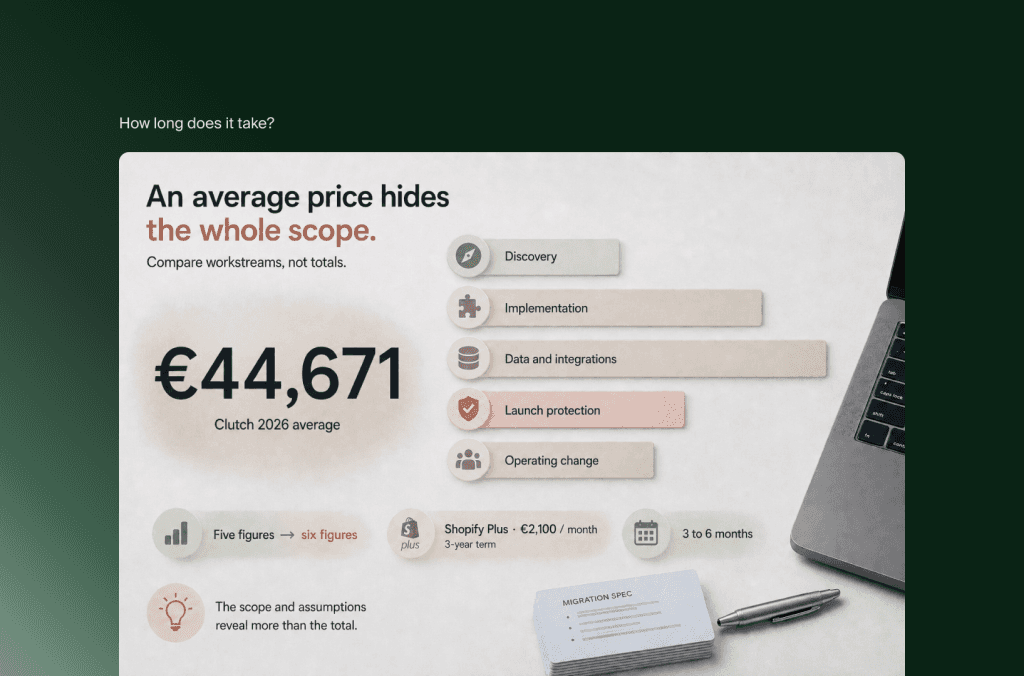
A Shopware to Shopify Plus migration for an established operation should usually be planned in months. A contained B2C project may fit within 12 to 16 weeks, while multi-market, B2B, headless or integration-heavy programs often need 18 to 28 weeks or longer. Discovery should set the range after source complexity and decision capacity are known.
Shopify’s 2026 enterprise migration guidance gives a 12-to-16-week range for migrations with complex integrations, while its broader modernization guidance places some enterprise replatforming programs at six to twelve months. Both can be true because project boundaries differ.
Use these bands for initial planning, not as delivery commitments:
A practical sequence includes:
Audit the estate: Version, deployment, products, rules, content, plugins, integrations, SEO and workflows.
Approve the target model: Shopify plan, Markets, data ownership, B2B, storefront and application decisions.
Prove difficult mappings: Test representative products, prices, customers, orders and integration events.
Build the workstreams: Progress storefront, data, integrations, content and SEO against shared acceptance criteria.
Validate end to end: Test accounts, checkout, payment, tax, orders, fulfillment, service and analytics.
Rehearse cutover: Confirm final synchronization, redirects, DNS, go-live criteria and rollback authority.
Stabilize: Reconcile data and monitor commerce, search and service signals before optimization.
How much does a Shopware to Shopify Plus migration cost?
Shopware to Shopify Plus migration cost combines discovery, data transformation, storefront development, rule and plugin replacement, integrations, SEO, testing, cutover and stabilization. Established projects generally require a five-figure implementation budget, while multi-market, B2B or integration-heavy programs can move into six figures. A workstream-based scope is more reliable than a per-product estimate.
These are directional planning bands, not a Flatline quote. Product count affects migration effort, but custom rules, content components, channel structure, B2B and integration contracts usually have greater influence on total scope.
Shopify Plus platform fees form one line of the target budget. Shopify Plus currently starts at €2,100 per month for standard setups on a three-year term or €2,250 per month on a one-year term, with variable pricing for more complex or higher-volume businesses. Confirm current commercial terms before approval.
Build the migration budget across these workstreams:
Discovery and architecture: Current-state audit, requirements, target ownership, migration specification, risk register and delivery plan.
Storefront and configuration: Design, theme or headless implementation, Markets, checkout, search, navigation and merchandising.
Data: Extraction, cleanup, transformation, test loads, reconciliation and final synchronization.
Rules and functionality: Promotion, price, shipping, payment, automation, content and custom-feature replacement.
Integrations: ERP, PIM, WMS, OMS, CRM, POS, tax, payments, marketing and analytics.
Launch protection: SEO, accessibility, performance, QA, user acceptance testing, cutover rehearsals and monitoring.
Operating change: Content preparation, training, customer communication, parallel platform cost and post-launch support.
Compare the one-time investment with at least three years of current and target operating cost. Include Shopware plan or license, hosting, platform upgrades, development support, plugins, Shopify apps, internal time and the commercial cost of a slow release model. Flatline’s ecommerce TCO framework can support that wider calculation.
How do you protect SEO and operations during cutover?
Protecting SEO and operations requires one cutover plan for URLs, content, data, customer access, orders, inventory, integrations and analytics. Crawl the Shopware estate before changing architecture, rehearse final synchronization and critical transactions, validate redirects at scale, define launch and rollback authority, then monitor search and operational signals immediately after traffic moves.
Shopware can generate SEO URLs by sales channel, domain and language. The same content may therefore have several regional paths, custom route patterns or historical aliases. Build a URL inventory from crawls, sitemaps, analytics, Google Search Console and backlink data rather than relying on a database export alone.
Assign every valuable indexable URL a target decision:
Retain an equivalent page and intent
Consolidate into a stronger destination
Redirect to the closest relevant replacement
Retire only when no useful destination exists
Shopify supports bulk URL redirect import. The migration team still needs to prevent chains and loops, preserve locale intent, update internal links and validate status codes. Also compare canonicals, hreflang, metadata, structured data, pagination, faceted navigation, sitemaps and robots directives between platforms.
The operational runbook should cover:
Content and configuration freeze windows
Final and delta product, customer and order synchronization
Price and inventory authority during cutover
Customer account access and communication
Payment, tax, shipping and promotion tests
ERP, PIM, fulfillment and service messages
Consent, analytics and marketing events
Redirect deployment, DNS and domain changes
Go-live criteria, escalation routes and rollback authority
Reconciliation and monitoring during stabilization
Customer passwords require a deliberate transition. Shopify explains that encrypted passwords from another platform cannot be imported through a customer CSV, so the team must plan account invitations, passwordless customer accounts or another approved identity approach. Customer service should know the journey before customers encounter it.
A site returning a successful page response is not proof of business continuity. Orders, stock updates, customer events or regional redirects can fail behind a functioning storefront. Launch approval should depend on evidence from complete customer and operational journeys.
If you run Shopware 5 and face an upgrade anyway, deciding whether to replatform, rebuild or hold is the first call to make, because a move to Shopware 6 is also a rebuild. If Shopify Plus comes out ahead, our Shopify migration service maps the Rule Builder logic, sales channels and cutover covered here.
Frequently asked questions
Is migrating from Shopware 5 different from migrating from Shopware 6?
Yes. Shopware 5 has reached end of life and uses a different technical foundation, so its project often includes legacy and support-risk assessment. Shopware 6 scope depends on edition, deployment model, sales channels, rules, plugins, Shopping Experiences, B2B features and integrations. Both require replatforming rather than a direct code transfer.
Can Shopware customer passwords be migrated to Shopify?
Customer records can move, but encrypted passwords generally cannot be imported into Shopify. Plan an account activation or passwordless sign-in journey, assess external identity requirements where relevant and prepare customer-service scripts. Test duplicate profiles, saved addresses, consent and communication before launch.
Can Shopware Rule Builder logic be copied into Shopify?
Not directly. Export or document each rule’s conditions, assignments, priorities and effects, then map the business outcome to Shopify Markets, catalogs, discounts, Functions, Flow, shipping or payment configuration, an app or an external system. Shared and conflicting rules need explicit test cases.
Can Shopware Shopping Experiences be migrated to Shopify?
The content and media can be migrated, but Shopware sections, blocks, elements and custom CMS logic require a new implementation. Map reusable components to Shopify theme sections, blocks, metafields, metaobjects, an external CMS or custom storefront components so editors retain practical publishing capability.
Can Shopware B2B Components move to Shopify Plus?
Many requirements can map to Shopify companies, company locations, catalogs, payment terms, quantity rules and volume pricing. Roles, approvals, budgets, quotations, individual order numbers, contract prices and ERP processes still need workflow-level assessment. Some capabilities may require an app, integration or different system owner.
Should every Shopware sales channel become a Shopify store?
No. Map each channel’s audience, catalog, currency, tax, domain, legal entity and operations first. Several regional storefronts may consolidate through Shopify Markets, while separate brands or legal and operational models may justify additional stores. Feeds and applications may become channels or integrations rather than stores.
Can historical Shopware orders be imported into Shopify?
Historical order scope should follow operational use. Customer service, returns, finance, loyalty and reporting may need different depths of history. Some orders can belong in Shopify, while older records may remain accessible through an ERP, CRM, data warehouse or compliant archive.
Is Shopify Plus always the right replacement for Shopware?
No. Shopify Plus fits businesses that want a managed commerce core and can meet differentiating requirements within its extension model. Shopware may remain stronger when deployment control, deep platform customization or current commercial features create enough value to justify their operating responsibility.
Key takeaways
Shopware 5 and Shopware 6 need different source assessments. Version, plan and deployment model belong in discovery before effort is estimated.
Use four scope decisions: move, remap, rebuild and retire. Apply them to data, rules, content, plugins and integrations.
Product variants, properties, custom fields and categories require behavioral mapping, not only field matching.
Rule Builder can influence pricing, promotions, shipping, payment, automation and visibility. Map assignments as well as rule definitions.
Shopware sales channels do not become Shopify stores automatically. Design Markets and store structure around audience, transaction and governance needs.
Shopping Experiences and storefront code need new implementation, while valuable content and editorial requirements can be preserved.
B2B should be evaluated as complete buyer and back-office workflows rather than a feature checklist.
A 12-to-28-week planning horizon suits many established projects, while complex programs can take longer.
Cost becomes defensible when data, storefront, rules, integrations, SEO and organizational change are scoped separately.
SEO and operational continuity belong in the same cutover plan because the storefront can appear live while search or back-office flows are broken.
The decision to leave Shopware becomes useful only when the business can name what the new architecture will simplify. A structured migration preserves the commercial and operational capabilities that still matter, gives each one a clear owner and leaves unsupported or unnecessary complexity behind.
Not sure how your Shopware rules, plugins, sales channels and integrations should map to Shopify Plus? Flatline is a Shopify Platinum Partner with hands-on experience across ecommerce architecture, custom development, ERP integrations and SEO. Get in touch, and we will walk through the migration scope with you.
Related articles


