Sidekick Pulse: How Shopify’s AI turns store data into decisions

By Robin Laseur

Most merchants do not struggle with access to data. They struggle with deciding what deserves attention first. Dashboards explain performance, but they rarely clarify which action will move the business forward.
Sidekick Pulse changes that dynamic. Built as part of Shopify AI, it sits directly inside the Shopify admin and proactively surfaces prioritised recommendations based on store performance, customer behaviour, and emerging trends. Instead of waiting for a question, Sidekick Pulse highlights what needs attention and why.
Each recommendation appears as a clear, actionable card. It identifies a specific opportunity or risk, explains the supporting context, and guides the merchant toward the next step. The goal is not to replace analytics, but to shorten the distance between insight and execution.
Introduced during Shopify Editions Winter ’26, Sidekick Pulse reflects a broader shift in how Shopify AI supports daily operations. For brands operating at scale, this approach reduces interpretation time, sharpens weekly planning, and creates a more structured path from data to decision.
What is Sidekick Pulse and why it matters now
Sidekick Pulse represents a shift in how merchants interact with Shopify AI. Instead of actively searching for answers in dashboards or running manual queries, teams are presented with prioritised signals directly inside the admin.
The change is subtle but important. Rather than starting the week by reviewing reports, merchants can begin with surfaced opportunities. These may range from declining add-to-cart rates on a key product to signals that customers respond strongly to specific incentives.
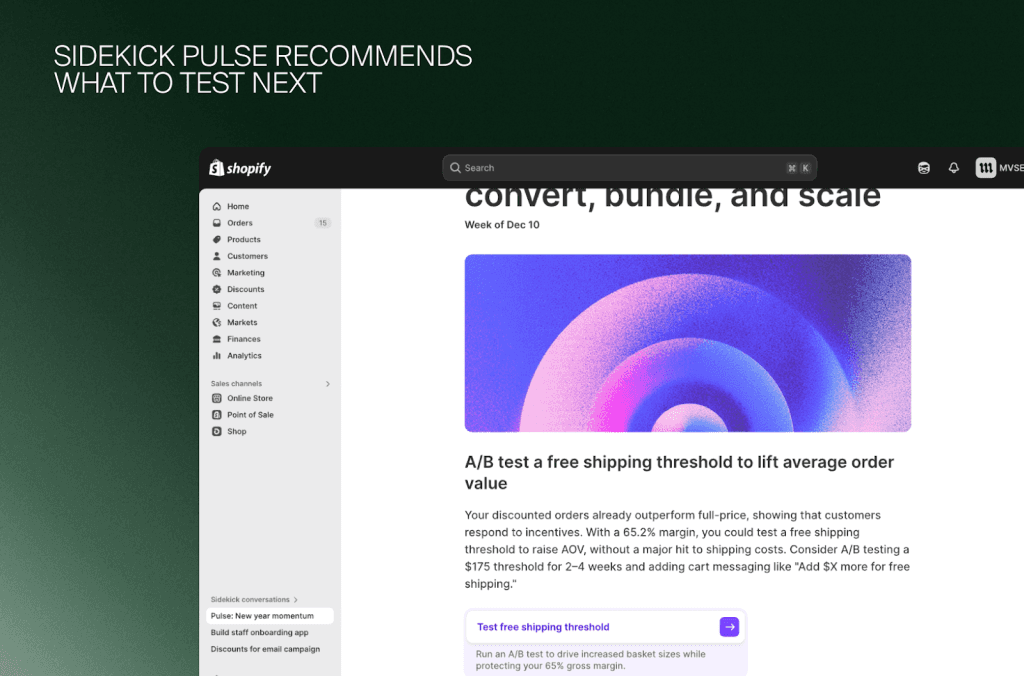
For example, Pulse may recommend testing a free shipping threshold if data suggests customers increase basket size when prompted. The recommendation appears as a card on the admin homepage, outlining the signal, the reasoning behind it, and a suggested next step.
This alters the workflow. Decisions are no longer reactive responses to visible problems. They become structured experiments initiated earlier in the performance cycle.
Sidekick Pulse does not replace analytics. It changes where optimization begins.
What Sidekick Pulse recommends: Real decision workflows
The clearest way to understand Sidekick Pulse is to look at the types of decisions it surfaces inside a Shopify store. Rather than presenting dashboards, Pulse highlights operational signals and connects them to concrete next steps.
Below are examples of workflows it may initiate across different parts of a store.
1. Conversion friction on key pages
Signals Pulse may surface:
Declining add-to-cart rates on a bestseller
Increased bounce on a product page
Shifts in mobile behaviour
Typical actions:
Reviewing product media hierarchy or content density
Testing alternative titles or merchandising angles
Evaluating page load performance
Comparing conversion across segments or traffic sources
Small drops on high-volume SKUs compound quickly. Detecting friction early protects margin and paid acquisition efficiency.
2. Underperforming product lines
Signals Pulse may surface:
Excessive reliance on a narrow SKU set
Emerging slow-mover patterns
Mismatch between traffic and purchase behaviour
Typical actions:
Adjusting pricing tiers
Repositioning collections or hero placements
Testing bundles or volume incentives
Reviewing product messaging after demand shifts
Here, Pulse connects performance decline to potential merchandising or positioning gaps, rather than simply reporting the drop.
3. Inventory and fulfilment signals
Signals Pulse may surface:
Growing overstock in specific categories
Repeated low-stock risk on fast movers
Inconsistent fulfilment lead times
Seasonal compression patterns
Typical actions:
Reorganising collection structures
Creating bundles to accelerate sell-through
Revising reorder points or safety stock logic
Adjusting shipping expectations on product pages
Operational signals often have a direct profitability impact, making early intervention especially valuable.
4. Checkout and payment behaviour changes
Signals Pulse may surface:
Increased cart abandonment from specific regions
Higher payment decline rates
Friction created by updated shipping rules
Market-level shifts in payment preference
Typical actions:
Simplifying checkout layout
Reviewing payment configurations
Adjusting shipping thresholds
Localising messaging for specific markets
For multi-market merchants, these insights help identify structural friction rather than blaming traffic quality.
5. Marketing and traffic quality patterns
Pulse evaluates not only what converts, but why conversion shifts occur.
Signals Pulse may surface:
Sudden changes in traffic composition
Performance differences between first-time and returning users
Misalignment between campaigns and landing pages
Channel-level volatility
Typical actions:
Refining landing page experiences
Aligning product emphasis with campaign intent
Revising creative or messaging cues
Applying segment-specific merchandising adjustments
Below is an example of how Pulse translates traffic signals into structured campaign recommendations inside the Shopify admin.
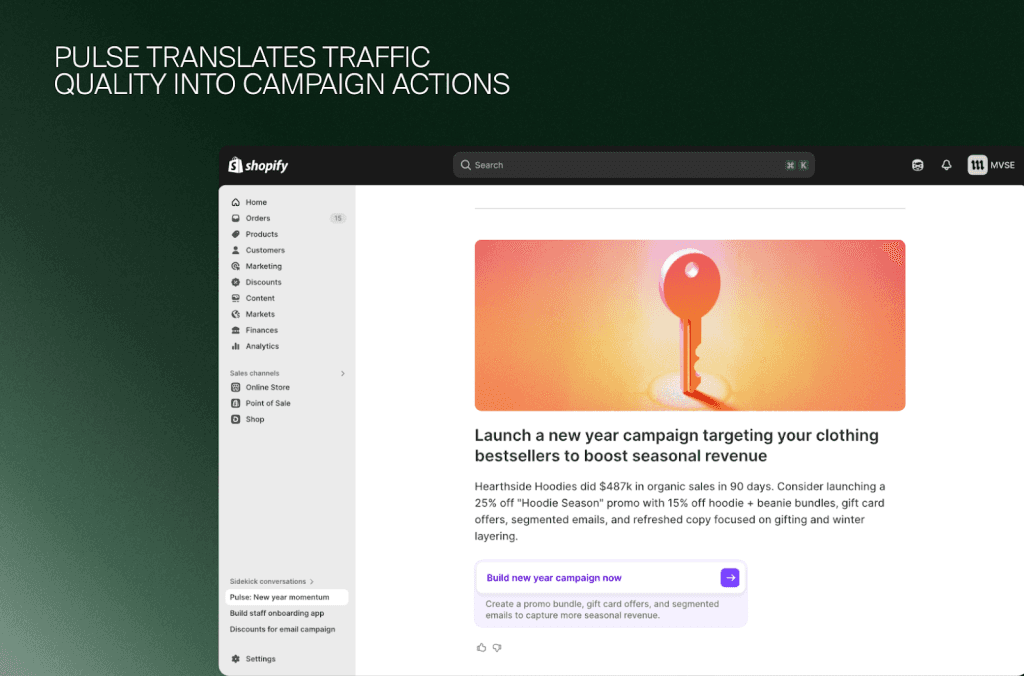
These recommendations help teams avoid misdiagnosing performance issues as “channel problems” when the underlying friction sits within the storefront.
Why these workflows matter
Pulse recommendations are structured to:
Highlight a specific issue
Explain the context behind it
Support the signal with data
Propose a clear response path
Guide execution inside the Shopify admin
This makes them actionable rather than observational. Instead of identifying a metric movement, Pulse frames the decision that follows.
How Sidekick Pulse works under the hood
Sidekick Pulse operates continuously inside the Shopify admin, analysing store performance across sales, conversion, inventory, and customer behaviour. Rather than producing static reports, it monitors patterns as they evolve and highlights signals that warrant attention.
When a meaningful shift occurs; such as declining conversion on a high-volume product or repeated abandoned checkouts, Pulse goes beyond surfacing the metric. It reviews surrounding context, compares current performance against historical patterns, and generates a recommendation with a clear explanation and next step.
In practice, this means Pulse is constantly assessing:
Sales and product momentum
Conversion performance across key pages
Checkout completion behaviour
Inventory and merchandising signals
If checkout completion drops despite steady traffic, for example, Pulse may suggest setting up abandoned cart emails or reviewing payment configurations. The recommendation appears as an actionable card, supported by data and linked directly to a guided Sidekick workflow.
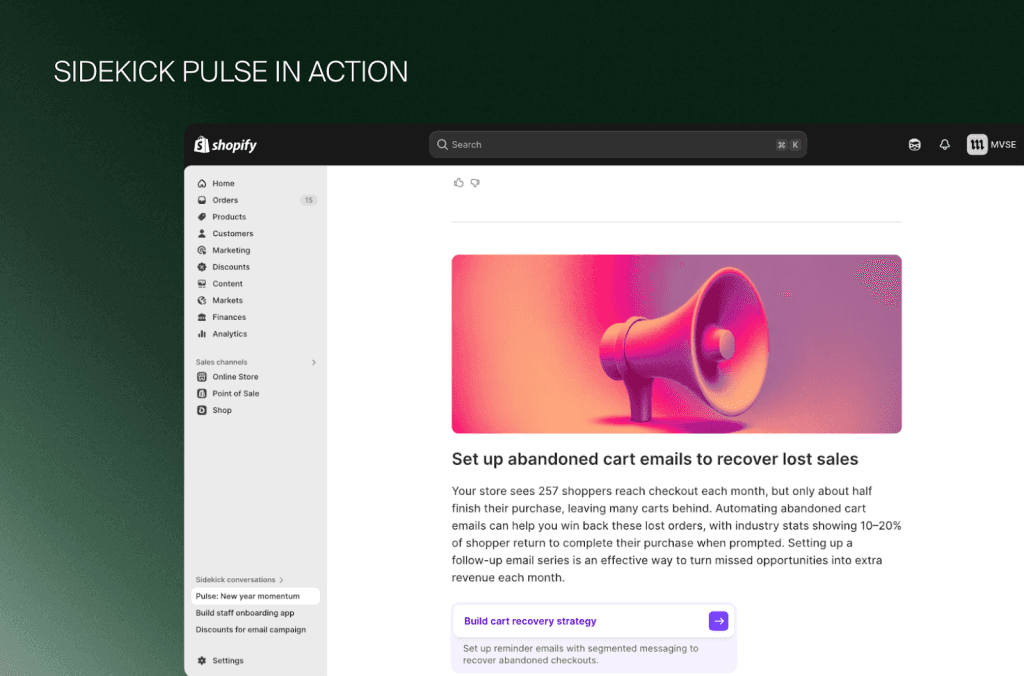
Pulse prioritises which insights appear based on potential business impact. It is designed to reduce noise, not increase it. Focusing attention on signals most likely to influence revenue, margin, or operational efficiency.
Limitations and blind spots merchants should know
Sidekick Pulse introduces a powerful layer of intelligence on top of Shopify data, but like any AI-driven system, it operates within constraints. Understanding these limits helps merchants apply Pulse responsibly and avoid decisions made on incomplete information.
1. Pulse depends heavily on the quality of store data
If the underlying inputs are inconsistent, Pulse will have a limited view.
Examples of weak signals:
Incomplete product metadata
Inconsistent tagging or collection logic
Gaps in attribution or tracking
Fragmented international setups
Poorly structured inventory rules
When data hygiene is weak, Pulse may miss opportunities or misinterpret patterns. The insight is only as reliable as the architecture it stands on.
2. Not all insights reflect operational nuance
Pulse can detect patterns, but it does not fully understand:
Constraints within fulfillment operations
Business model tradeoffs
Margin structures or negotiated rates
Brand-specific merchandising principles
This means teams should still validate recommendations against internal processes before executing.
3. Over-automation can create false confidence
Because Pulse presents insights with citations and reasoning, some teams may:
Take recommendations as instructions rather than hypotheses
Run changes without QA
Assume broader applicability than intended
AI-driven suggestions should initiate a conversation, not replace human oversight—especially for high-impact updates.
4. Pulse cannot see constraints outside Shopify
The system does not automatically account for:
ERP limitations
Third-party app behaviour
Custom integrations
Physical operations such as warehouse capacity or returns workflows
Recommendations may require cross-team coordination before implementation.
5. Experimental insights carry natural volatility
Pulse often highlights emerging opportunities. By definition, early signals can be:
Noisy
Short-lived
Influenced by temporary traffic spikes
Correlated but not causal
Teams should treat early insights as experimental prompts and test them within controlled cycles.
6. Not every recommendation should be executed immediately
Pulse ranks insights by impact, but it does not know:
Your broader roadmap
Constraints like resource availability
Upcoming campaigns
Priorities across markets
Some insights may be strategically correct but poorly timed.
What this means for merchants
Pulse is a strong accelerant, not a substitute for judgment. When combined with a well-structured Shopify setup and clear internal workflows, it reduces noise and amplifies focus. But the best outcomes come from treating recommendations as context-aware hypotheses, validated, tested, and calibrated by human teams.
Building the foundation for smarter decisions in 2026
Sidekick Pulse represents a broader shift inside Shopify AI. Decision-making is no longer confined to dashboards or periodic reviews. Signals are surfaced earlier, prioritised automatically, and connected to clear next steps inside the Shopify admin.
For scaling brands, this shifts compounds. Faster signal detection leads to earlier experimentation. Earlier experimentation leads to more consistent optimization cycles. Over time, the advantage is not a single recommendation, but a structured approach to improvement.
However, AI recommendations are only as strong as the foundation beneath them. Clean data architecture, clear merchandising logic, and stable storefront performance determine how accurate and actionable those insights become. When product structures are inconsistent or operational workflows are fragmented, even the best AI system operates with limited visibility.
This is where foundation matters. Tools like Sidekick Pulse perform best when the underlying Shopify setup has been intentionally designed for scale.
As a Shopify Plus Partner, Flatline works with brands to build that structure, aligning data, workflows, and performance architecture so that Shopify AI can operate with clarity and precision.
This same foundational work sits at the core of our ecommerce agency offering, from data architecture to storefront performance.
In 2026, the competitive edge will not come from access to AI alone. It will come from how well that AI is integrated into a disciplined operational framework.
Related articles
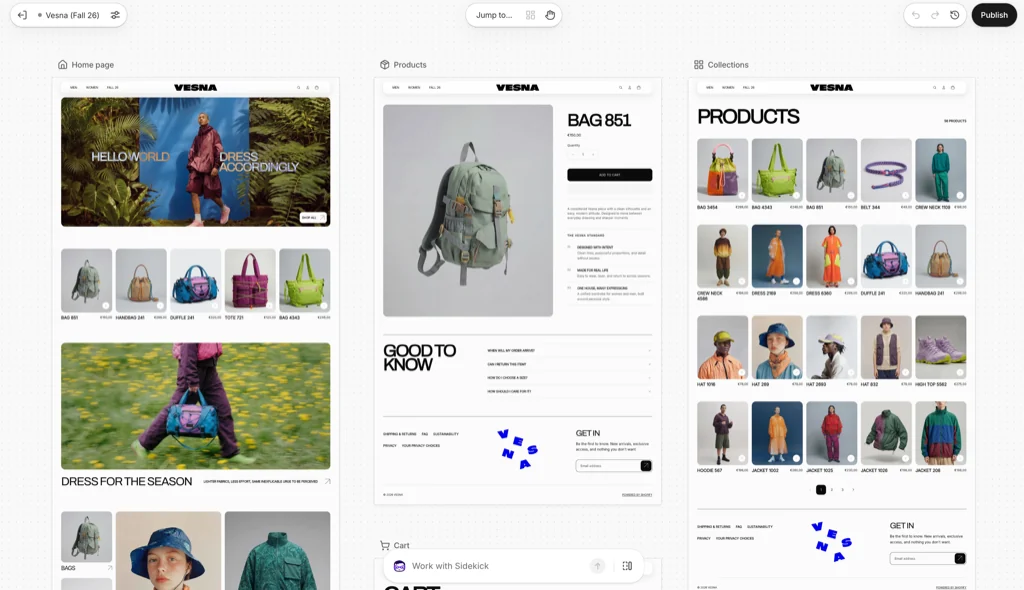


F.A.Q.

What is Shopify Sidekick Pulse?
Sidekick Pulse is a proactive Shopify AI capability that monitors store performance and surfaces prioritized signals inside the admin. Instead of waiting for teams to search dashboards, it highlights opportunities and issues that may need attention.
What types of recommendations can Sidekick Pulse provide?
Pulse can surface conversion friction, underperforming products, inventory and fulfillment signals, checkout changes, and marketing traffic-quality patterns. It connects those observations to suggested next steps rather than presenting isolated metrics.
How does Sidekick Pulse generate its insights?
It continuously analyzes sales, conversion, inventory, and customer-behavior patterns, compares current results with historical performance, and identifies meaningful shifts. When it detects a signal, it provides context, an explanation, and a recommended action.
What are the limitations of Sidekick Pulse?
Its recommendations depend on the quality of the store's data and may not reflect operational constraints outside Shopify. Experimental signals can also be volatile, so merchants should validate recommendations before automating or implementing them.
How should merchants prepare to use Sidekick Pulse effectively?
Merchants need clean product structures, reliable analytics, consistent operational data, and a disciplined testing process. Pulse is most valuable when its recommendations feed a structured cycle of review, experimentation, measurement, and improvement.