Salesforce Commerce Cloud to Shopify Plus Migration: Cost, Timeline and How to Unbundle the Stack

By Robin Laseur

A Salesforce Commerce Cloud to Shopify Plus migration is rarely contained within the storefront. Commerce data may be connected to Marketing Cloud, Service Cloud, Order Management, Data Cloud, middleware and custom cartridges. Changing the commerce core therefore means deciding which parts of that ecosystem should remain, reconnect, move or disappear.
Migrating from Salesforce Commerce Cloud to Shopify Plus means transferring viable commerce data, rebuilding the storefront, replacing platform-specific cartridges and reconnecting the systems the business still needs. The program should begin with dependency mapping, then cover target architecture, data, integrations, SEO, testing, cutover and post-launch stabilization.
This is an unbundling decision as much as a replatforming project. Treating it as a catalog import hides operational dependencies; replacing every Salesforce product can discard useful integrations. The objective is to preserve valuable capabilities, assign each one a clear target owner and remove complexity the business no longer wants to fund.
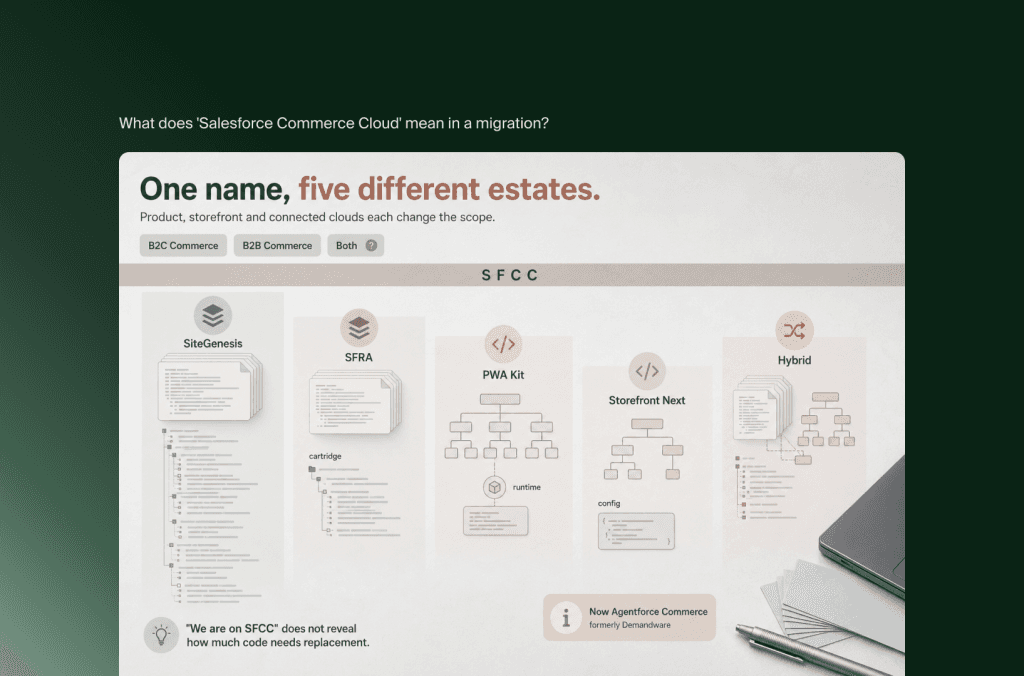
What does “Salesforce Commerce Cloud” mean in a migration?
Salesforce Commerce Cloud, now marketed as Agentforce Commerce, can still mean different source estates. B2C Commerce, formerly Demandware, has its own storefront frameworks, Business Manager, data structures and APIs. B2B Commerce follows a different model. Migration scope must identify the product, storefront architecture and connected Salesforce services before estimating effort.
Salesforce now states that Commerce Cloud is called Agentforce Commerce, while its product suite still supports B2C and B2B commerce. The new name matters for current architecture and procurement discussions. Salesforce Commerce Cloud, SFCC and Demandware remain useful search and estate-identification terms because legacy implementations, documentation and specialist teams still use them.
This guide primarily addresses Salesforce B2C Commerce. Its storefront may use SiteGenesis, Storefront Reference Architecture (SFRA), PWA Kit on Managed Runtime, the newer Storefront Next option or a hybrid of traditional and headless routes. Salesforce’s current storefront guidance distinguishes these architectures, which is why “we are on SFCC” does not reveal how much code needs replacement.
For B2B Commerce, discovery must also inspect the Salesforce Platform data model, Experience Cloud components, account relationships, entitlements, negotiated purchasing, sales workflows and Apex or Lightning customization. Those assets cannot be estimated from a B2C cartridge inventory.
Before proposals become comparable, each should state whether the estate includes B2C Commerce, B2B Commerce or both; its storefront framework; active sites, locales and price books; connected Salesforce products; systems of record; and the cartridges, jobs, APIs and middleware flows that affect operations.
Without that baseline, a timeline based on SKU count is not an enterprise migration estimate. It is an import estimate.
When does moving from Salesforce Commerce Cloud to Shopify Plus make sense?
Moving from Salesforce Commerce Cloud to Shopify Plus makes sense when the organization wants a more standardized commerce core, faster commercial iteration and less platform-specific development overhead. The case is strongest when the business uses only part of the Salesforce commerce stack, provided Shopify and the retained systems can support the required markets, merchandising and operations.
Salesforce Commerce Cloud remains a capable enterprise platform, particularly with deep Salesforce integration, sophisticated multi-site operations and a mature delivery organization. Migration should not begin from the claim that one enterprise platform is universally better than another.
The calculation changes when operating burden grows faster than benefit: releases need scarce specialists, cartridges overlap, routine merchandising waits for developers or teams still bridge an expensive Salesforce footprint with manual processes.
Formal assessment is warranted when legacy integrations dictate architecture, capability ownership is unclear, implemented features see little use or three-year platform and support costs no longer match the value produced.
Flatline’s existing Shopify and Salesforce Commerce Cloud comparison covers the broader platform choice. At migration stage, the sharper question is not which feature list wins. It is whether the target architecture can support the business with fewer dependencies and a more productive operating model.
When staying on Salesforce may be the better decision
Staying can be rational when the environment performs reliably, the company uses the integrated Salesforce ecosystem and its roadmap benefits from existing control. A replatform is difficult to justify if it recreates SFCC through custom Shopify services. Poor product data, governance and ownership will also follow the business, so fix the operating model first when Salesforce is not the constraint.
Why is an SFCC migration an ecosystem unbundling project?
An SFCC migration unbundles an ecosystem because storefront behavior, customer data, campaigns, service workflows and order operations may cross several Salesforce products. The migration team must decide which capabilities Shopify will own, which Salesforce services remain valuable, how retained services reconnect and which integrations or licenses can be retired after the new store is stable.
Commerce Cloud can sit inside a wider Salesforce ecosystem rather than act as an isolated application. Order Management may receive orders and product or pricing data from B2C Commerce. Service Cloud may use order information. Marketing services may consume catalog, behavioral or transaction events. Data Cloud may ingest commerce data, while MuleSoft coordinates ERP, PIM and fulfillment connections.
None of those relationships proves that a Salesforce product must stay or go. It proves that the dependency must be understood before the commerce endpoint changes.
A useful discovery model assigns every capability one of four decisions:
This model prevents two expensive assumptions. The first is that moving away from Commerce Cloud requires abandoning Salesforce CRM, service or marketing tools. The second is that those tools can remain untouched. A retained system still needs a new source contract, event model, error process and owner.
Create a dependency register, not only an integration list
An integration list might say “Marketing Cloud” or “OMS.” A dependency register explains what passes through the connection, in which direction, at what frequency, under whose ownership and with what consequence if it fails.
For each dependency, record the systems, objects, events, transfer method, frequency, volume, transformations, identity rules, retry and reconciliation behavior, operational owners, peak constraints and target decision.
That information exposes the real critical path. A storefront can look complete while an untested customer identity or order-status flow makes the launch unsafe.
What SFCC data and functionality need to be remapped?
SFCC data should be remapped according to its business meaning, not copied according to its source container. Catalogs, price books, promotions, customer groups, content, custom objects and order history can each influence live behavior. The target model must preserve required relationships while avoiding a one-for-one reconstruction of Business Manager inside Shopify.
Salesforce B2C Commerce exposes distinct structures for catalogs, products, price books and promotions. Price and promotion eligibility can also depend on sites, source codes, customer groups or shopper context. Those relationships make a raw export an incomplete specification of what the store does.
Products, catalogs and variation models
Identify master and variation products, bundles or sets, categories, attributes, media, search refinements, market availability and upstream identifiers, then confirm how the PIM, ERP, feeds and storefront use them. Shopify products, variants, collections, metafields and metaobjects can represent broad assortments, but validate customer behavior and operational output together. A correct-looking page is insufficient if order or inventory identifiers change meaning.
Price books, promotions and customer groups
Price books require commercial interpretation. Document inheritance, currency, effective dates, tiering, eligibility and the system publishing each price. Shopify Markets and catalogs can control availability and pricing, while B2B catalogs support company-specific arrangements, but they are not automatic equivalents to every SFCC pattern.
Promotions need the same treatment. Record qualification, stacking, exclusions, coupon behavior, shipping effects, customer eligibility and reporting expectations. Preserve the commercial rule, then decide whether Shopify discounts, Functions, an application or an external pricing service should own it.
Customers, identity and consent
Customer profiles require deduplication, identity matching and a consent review. Salesforce customer groups or attributes may drive pricing, promotions, personalization and service workflows. In Shopify, some of those purposes may move to customer segments, tags, metafields, Markets, B2B companies or an external customer platform.
Passwords need a specific transition plan. Shopify states that customer passwords cannot be migrated through CSV because they are encrypted outside Shopify. Brands can plan reactivation, use Shopify’s passwordless customer accounts or, on Plus, assess an external identity provider. The right journey depends on current identity architecture and support capacity.
Consent should not be inferred from the presence of an email address. Map source, timestamp, purpose, region and suppression state, then validate how the target systems will honor those records.
Orders and operational history
Historical order scope should follow real use cases across customer service, finance, loyalty and analytics. Define which history customers and internal teams need during live interactions, and which only needs compliant retention in a warehouse, service interface or archive. That decision shapes migration method and cost.
Custom objects, jobs and scheduled processes
Custom objects and jobs can support imports, exports, feeds, cleanup or external services. Because custom job steps can execute cartridge-based scripts, review the Business Manager job inventory with code and integrations. For each item, identify the business process and assign its outcome to Shopify, an app, middleware, an external system or retirement. Avoid copying custom data without a governed use.
What happens to Storefront Next, SFRA, SiteGenesis, PWA Kit and cartridges?
Storefront Next, SFRA, SiteGenesis, PWA Kit and SFCC cartridges do not move into Shopify as reusable applications. Their requirements must map to Shopify’s storefront, checkout, app and integration model. Design assets and content may remain useful, but React components, controllers, ISML templates, Page Designer definitions and server-side cartridge logic require assessment.
The target storefront choice should start with business requirements, not the assumption that an existing headless build requires another headless build.
An SFRA or SiteGenesis site combines templates, controllers, scripts and cartridges around the B2C Commerce runtime. PWA Kit and Storefront Next use React-based components, but still depend on Salesforce commerce contracts, identity, routing, Managed Runtime and platform behavior. Selected components may be reusable, yet their surrounding state and APIs change.
On Shopify, the principal decision is usually between a theme-based Online Store using Liquid and a headless storefront using Hydrogen or another framework. Theme-based does not mean generic, and headless does not automatically mean more advanced. Choose the lowest-complexity model that satisfies experience, localization, content, performance and delivery requirements.
Page Designer content needs a component-level plan
Salesforce Page Designer lets developers create reusable page and component types that merchants arrange, schedule and publish. The content inside those instances may remain valuable, but the component definitions and rendering logic are platform-specific.
Inventory Page Designer pages, content assets, slots, schedules and personalization rules. For each component, determine whether to recreate it as a Shopify theme section or block, move its content into a metaobject or CMS, implement it through an app, or retire it. The goal is to preserve editorial capability, not screenshots of the old pages.
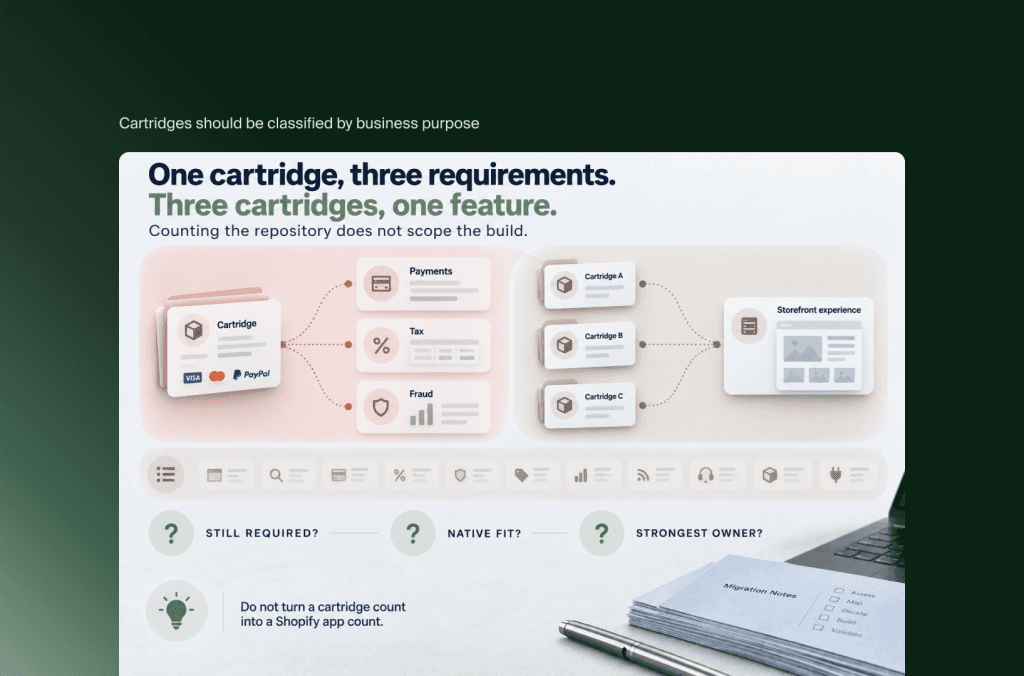
Cartridges should be classified by business purpose
Do not turn a cartridge count into a Shopify app count. One cartridge can serve several requirements, while several cartridges may support one customer-facing feature. Classify them across storefront experience, search, payments, tax, fraud, promotions, analytics, feeds, customer service, order management and integrations.
Then ask three questions:
Does the requirement still exist?
Can Shopify support it natively within acceptable constraints?
If not, is an app, retained external service or custom component the strongest owner?
This avoids recreating years of accumulated code simply because it is present in the source repository.
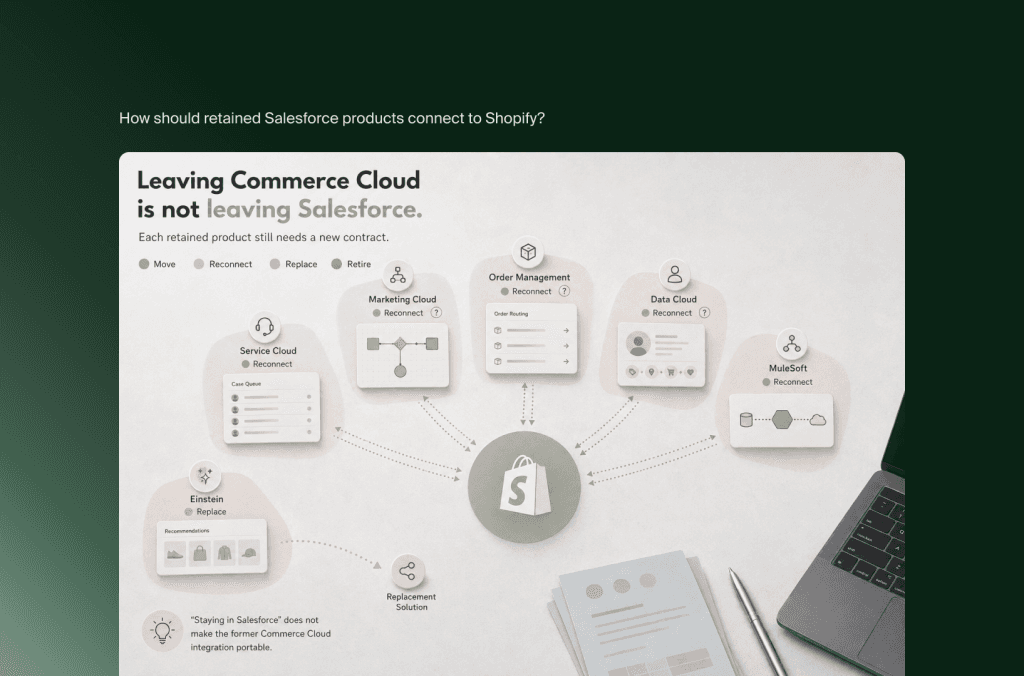
How should retained Salesforce products connect to Shopify?
Retained Salesforce products should connect to Shopify through explicit data contracts and ownership rules. Keeping Marketing Cloud, Service Cloud, Order Management, CRM or Data Cloud can be sensible, but each connection needs redesigned events, identifiers, consent handling, reconciliation and support ownership. “Staying in Salesforce” does not make the former Commerce Cloud integration portable.
The target architecture should be decided capability by capability.
Salesforce documents that its Order Management connection receives orders and product or pricing data from B2C Commerce. Replacing the commerce platform therefore changes more than an endpoint. The team must validate the Shopify order model, edits, cancellations, returns, fulfillment updates, tax treatment and status mapping against the retained OMS workflows.
The same principle applies to customer service. An agent may need a consolidated view, but that does not prove every historical record belongs in Shopify. A service integration can surface current Shopify data and retained history in the place agents already work.
How should B2B and multi-market requirements be handled?
B2B and multi-market requirements should be mapped at workflow level before selecting the Shopify store, Markets and catalog structure. Companies, buyer permissions, price logic, payment terms, tax, currency, legal entities and fulfillment may span Salesforce products. Shopify can support many of these needs, but their source relationships rarely convert one for one.
For B2C Commerce with wholesale-like customer groups, first separate genuine business accounts from consumer segmentation. For Salesforce B2B Commerce, inspect account hierarchies, contacts, entitlements, negotiated price, contract products, buyer roles, approval, quotation, reorder and sales-assisted workflows.
Shopify’s B2B model uses companies and company locations, with catalogs, payment settings and customer access around those entities. Core Shopify B2B features are now available across plans, while Plus adds capabilities such as unlimited catalogs and direct assignment to company locations. Shopify Markets can vary currency, products, pricing, domains and languages. These are useful building blocks, not guaranteed parity.
Map each buyer journey from authentication to ERP receipt:
Who is allowed to buy and for which company location?
Which assortment and price should that buyer receive?
Are quantity breaks, contract prices or negotiated exceptions required?
Does the order need approval, a purchase order number or payment terms?
Can a sales or service agent order on the customer’s behalf?
Which legal entity takes the order and which warehouse fulfills it?
How do returns, credit and order changes work after checkout?
For international architecture, avoid assuming that every SFCC site becomes a Shopify store. Some sites may be consolidated through Markets. Others require separation because of brands, legal entities, catalogs, operations or team ownership. The right structure follows governance and transaction requirements, not a one-to-one site count.
How long does an SFCC to Shopify Plus migration take?
An established SFCC to Shopify Plus migration should normally be planned in months. A contained B2C program may fit within approximately four months, while a multi-site, integration-heavy or Salesforce-unbundling program can require six to nine months or longer. Discovery must confirm the range after the storefront, cartridges, data and ecosystem dependencies are understood.
These are planning bands, not delivery commitments. Public agency estimates vary widely because “SFCC migration” can describe anything from a contained storefront and catalog to a global program spanning Salesforce clouds, B2B and an OMS. A credible estimate should explain which dependencies put the project in its range.
The critical path often runs through decisions and integrations rather than theme development. A typical sequence covers estate audit, target architecture, difficult data proofs, storefront and integration build, end-to-end validation, cutover rehearsal and monitored stabilization. Each gate needs named acceptance criteria before the next phase becomes committed scope.
Timeline pressure should lead to prioritization, not hidden scope. A phased rollout can separate markets, content redesign or noncritical capabilities, but only if data ownership and customer journeys remain coherent during the transition.
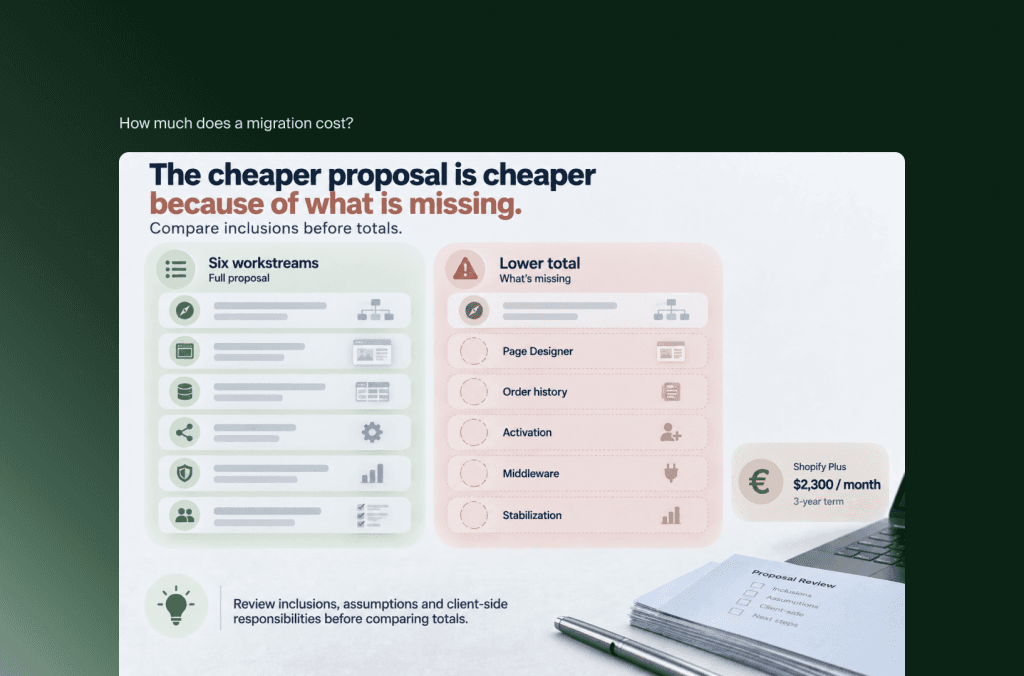
How much does a Salesforce Commerce Cloud to Shopify Plus migration cost?
Salesforce Commerce Cloud to Shopify Plus migration cost combines discovery, storefront implementation, data transformation, cartridge replacement, Salesforce reconnection, SEO, testing, cutover and stabilization. A contained enterprise migration commonly requires a five-figure investment, while multi-market or ecosystem-heavy programs can move well into six figures. Only a dependency-based scope can produce a defensible estimate.
Those ranges are directional market-planning context, not a Flatline quote. Complexity changes the number more than catalog size. A business with 100,000 well-governed products and stable integrations can be easier to migrate than a smaller catalog supported by undocumented price rules, custom jobs and overlapping Salesforce services.
Shopify Plus is one budget line. [Official pricing currently starts at $2,300 USD per month](https://www.shopify.com/plus/pricing) for standard setups on a three-year term or $2,500 USD per month on a one-year term. More complex or higher-volume businesses can move to a variable platform fee, so current terms still need commercial confirmation.
Build the project budget across six visible workstreams:
Discovery and architecture: Estate audit, requirements, system ownership, data contracts, migration specification and program plan.
Storefront and commerce configuration: Experience design, theme or headless development, checkout, search, merchandising, markets and B2B.
Data migration: Extraction, cleanup, transformation, repeated test loads, reconciliation and final synchronization.
Ecosystem change: Salesforce, ERP, PIM, OMS, WMS, payments, tax, marketing and analytics integrations, including retirement work.
Launch protection: SEO, accessibility, performance, QA, user acceptance testing, security review, cutover rehearsal and monitoring.
Operating transition: Content, training, customer communication, parallel platform cost, application subscriptions and post-launch support.
This structure makes proposals comparable. A lower total may exclude Page Designer migration, order history, consent, customer activation, middleware changes or stabilization. Another may include a full redesign that can be phased. Review inclusions, assumptions and client-side responsibilities before comparing totals.
The business case should compare at least three years of target-state cost with the cost of continuing on SFCC. Flatline’s ecommerce TCO analysis provides a broader framework for considering implementation, licenses, development, maintenance and organizational overhead. Include opportunity cost as well: a cheaper platform is not cheaper if it weakens the operating capabilities that drive revenue.
How do you protect SEO and operations during cutover?
Protecting SEO and operations requires a single cutover plan for URLs, data, identity, orders, inventory, retained Salesforce systems, analytics and customer communication. Rehearse the final synchronization and critical journeys, deploy validated redirects, define go-live and rollback authority, then monitor search, revenue and back-office flows from the moment traffic moves.
Start SEO work before the target information architecture is locked. Crawl every active SFCC site and combine the result with analytics, search-console, backlink and revenue data. Create a decision for each valuable indexable URL: retain, consolidate, redirect to a relevant replacement or retire deliberately.
SFCC URLs may include locale, category, product or campaign patterns generated by custom controllers and routing. Shopify supports bulk URL redirect import, but redirect functionality does not create the map. Validate loops, chains, query behavior, canonicals, alternate-language signals, internal links, sitemaps, robots directives and structured data.
The operational runbook must define source freeze windows, final and delta synchronization, inventory and price authority, customer access, transaction tests, OMS and ERP validation, consent and analytics checks, domain activation, go-live criteria, rollback authority and post-launch reconciliation.
“Zero downtime” is not a useful promise without defining what must remain uninterrupted. A storefront can return pages while orders fail to reach fulfillment or customer events stop reaching service and marketing. Launch readiness therefore requires evidence from end-to-end scenarios, not only frontend availability.
Unbundling Salesforce Commerce Cloud touches every Salesforce product you keep, so if you are still deciding whether to replatform, rebuild or hold, get a structured answer before the cartridge inventory begins. If the move goes ahead, our Shopify migration service runs the dependency register, data remapping and cutover as a single plan.
Frequently asked questions
Can Salesforce Commerce Cloud customer passwords be migrated to Shopify?
Customer records can be migrated, but passwords generally cannot be imported because they are encrypted outside Shopify. Plan a reactivation journey, use Shopify’s passwordless customer accounts or assess an external identity provider on Shopify Plus. Test duplicate handling, communications and customer-service scripts before launch.
Can we keep Salesforce Marketing Cloud or Service Cloud?
Yes. Moving the commerce core does not require every Salesforce product to be removed. Retained products need a redesigned Shopify connection, identity model, event contract, consent process, reconciliation method and support owner. Confirm the business use cases before recreating the former Commerce Cloud integration.
Can Salesforce Order Management stay after the migration?
Potentially. First map order capture, routing, allocation, cancellation, returns, fulfillment and service workflows. Then validate Shopify’s order model and events against those requirements. Retaining the OMS means rebuilding and testing the commerce connection; it does not mean the current integration remains unchanged.
Can SFCC price books and promotions move directly to Shopify Plus?
Their data can be extracted, but the relationships rarely transfer directly. Document currencies, inheritance, effective dates, eligibility, stacking and source systems. Then map the commercial rules to Shopify Markets, catalogs, discounts, Functions, applications or an external pricing service.
Can an SFCC PWA Kit storefront be reused on Shopify?
Selected design assets or React components may be reusable, but PWA Kit depends on Salesforce APIs, identity, routing and Managed Runtime. Treat reuse as a code-level assessment, not an architecture assumption. A Shopify theme may be the simpler target unless the headless requirements remain commercially justified.
Is Shopify Plus suitable for Salesforce B2B Commerce migration?
It can be, but Salesforce B2B Commerce requires a separate capability audit. Map accounts, contacts, entitlements, catalogs, negotiated pricing, buyer roles, approvals, quotations, payment terms and sales-assisted ordering. Compare those workflows with Shopify companies, locations, catalogs, Markets and the surrounding ERP or CRM.
Key takeaways
Salesforce Commerce Cloud is now marketed as Agentforce Commerce, but migration scope must still confirm whether the source estate is B2C Commerce, B2B Commerce or both.
Treat the migration as ecosystem unbundling. Every capability should move, reconnect, be replaced or be retired.
Catalogs, price books, promotions, customer groups, custom objects and jobs require semantic mapping, not only export and import.
Storefront Next, SFRA, SiteGenesis, PWA Kit, Page Designer components and cartridges are platform-specific. Preserve their business purpose rather than attempting code parity.
Retained Salesforce products still need new data contracts, identity rules, monitoring and operational ownership.
A planning horizon of four to nine months is more credible for established SFCC estates, with complex global or B2B programs potentially taking longer.
Cost becomes defensible when storefront, data, integrations, Salesforce dependencies, SEO and operating change appear as separate workstreams.
SEO and operational continuity belong in the same launch runbook because a visually live store can still break search equity or back-office processes.
The central migration decision is not “Salesforce or Shopify?” It is which architecture lets the business operate and improve commerce without carrying more dependency than it needs. Once every capability has an owner and every retained connection has a tested contract, Shopify Plus can become a cleaner commerce core rather than another layer in the stack.
Not sure which Salesforce dependencies should stay, reconnect or be replaced? Flatline is a Shopify Platinum Partner with hands-on experience across ecommerce architecture, custom development, integrations and SEO. Get in touch, and we will walk through the migration scope with you.
Related articles


