BigCommerce to Shopify Plus Migration: Cost, Timeline and the Parity Plan

By Robin Laseur

A BigCommerce to Shopify Plus migration can look straightforward because both platforms are managed SaaS products. That similarity is deceptive. Products and customers may be exportable, but product modifiers, channel assignments, customer-group pricing, B2B companies, checkout rules and integration contracts do not automatically retain their meaning.
A BigCommerce to Shopify Plus migration should transfer valid commerce data, rebuild the storefront and translate every required business rule into Shopify’s model. The safest plan inventories the source estate, proves difficult mappings early, rebuilds integrations, rehearses delta migration and launches only after scenario-based parity checks pass.
The central question is not whether Shopify can store the same records. It is whether the new operation produces the correct price, product, checkout, order and fulfillment outcome for each important customer scenario. That is the parity plan this guide explains.
Should you migrate from BigCommerce to Shopify Plus?
Migrate when BigCommerce is a verified constraint on commercial change, international operations, B2B delivery or stack simplification, and Shopify Plus has passed the difficult use cases. Stay when the current store performs well, its capabilities fit the roadmap and migration would merely recreate the same complexity on another platform.
BigCommerce remains a credible SaaS commerce platform. It supports multi-storefront operations, product options and modifiers, price lists, customer groups, B2B accounts and an extensible API surface. A migration case should therefore be based on the economics and operating model of the specific estate, not a generic claim that one platform is universally better.
The case to move becomes stronger when routine campaigns wait on specialist development, duplicate storefront configurations create governance work, apps or custom scripts overlap, checkout requirements are increasingly difficult to maintain or the business wants to consolidate more commerce operations in the Shopify ecosystem.
Use observable evidence. Review the previous 12 months of delivery tickets, production incidents, integration failures, platform and application costs, release lead time, manual catalog work and abandoned initiatives. Then separate platform constraints from process, data and ownership problems. Poor product governance will move with the catalog.
Flatline’s BigCommerce versus Shopify comparison covers the commercial platform decision, including transaction-fee assumptions. This migration guide starts after that comparison and asks whether the target can support the live operation without importing avoidable debt.
When staying on BigCommerce is the better decision
Staying is sensible when the current store is stable, the team can ship at the required pace and BigCommerce’s channel, catalog or B2B model closely matches how the company works. It can also be safer when a critical requirement would need substantial custom development on Shopify and delivers no offsetting commercial or operational value.
Not for you if the migration is being used to avoid a product-data cleanup, unclear process ownership or a stalled redesign. Resolve those causes first, then test whether the platform still constrains the roadmap.
Do you need Shopify Plus for a BigCommerce migration?
Not every BigCommerce store needs Shopify Plus. Standard Shopify plans can support many D2C migrations and now include most B2B foundations. Plus becomes easier to justify when the target requires granular B2B catalogs, advanced checkout control, high-volume organizational access or multi-entity and enterprise operating requirements that standard plans do not cover.
Do not use revenue alone as the plan selector. Build a requirements matrix and mark which capabilities are mandatory at launch, required later or merely present in the source. Then compare those requirements with current plan entitlements and the complete target-state cost.
Shopify’s current B2B plan matrix states that companies, catalogs, payment terms and self-serve ordering are available across supported plans. It also identifies Plus-only differences, including unlimited B2B market catalogs, direct catalog assignment to companies or company locations and advanced payment capabilities. Shopify also reserves checkout app extensions on the information, shipping and payment pages for Plus, according to its checkout customization comparison.
Plus is usually the stronger candidate when several of these conditions apply:
BigCommerce B2B Edition companies, buyers and granular price assignments are in scope.
The store needs many B2B catalogs or direct company-location catalog assignments.
Checkout logic must operate on the information, shipping or payment steps.
The organization needs enterprise permissions, several stores or coordinated market operations.
International retail requires multiple business entities. Shopify documents that multi-entity local-currency retail is limited to Plus and Enterprise Commerce.
Subscription payment credentials or card data require a supported Plus migration route.
A standard plan may be sufficient for a primarily D2C store with a conventional catalog, limited markets, a manageable integration stack and no Plus-only checkout requirement. Price both paths before signing. An unnecessary Plus contract is waste; choosing a lower plan and then rebuilding missing capabilities through apps and custom code can cost more.
What is the real portability gap between BigCommerce and Shopify?
The portability gap is the distance between transferable records and reproducible behavior. A product title can move cleanly while its option logic, channel visibility, customer-specific price or shipping treatment changes. Migration discovery must therefore document rules, dependencies and outcomes, not just count products, customers and orders.
BigCommerce and Shopify use different concepts to organize the same commercial intent. BigCommerce distinguishes variant options from modifier options: variants represent sellable inventory items, while modifiers change a shopper’s selection without necessarily creating an inventory-tracked SKU. Treating both as Shopify variants can create unnecessary combinations, broken inventory or an unusable product setup.
Channel and storefront context add another layer. BigCommerce’s multi-storefront model can associate products, category trees, pricing and settings with channels and sites. The target may use one Shopify store with Markets, several Shopify stores or a mixed architecture. A one-to-one storefront conversion is not automatically correct.
Pricing is similarly relational. BigCommerce price lists can be assigned by customer group, channel or both, and prices are specified at variant level. A price export without its assignments and fallback behavior does not reproduce what a signed-in buyer sees.
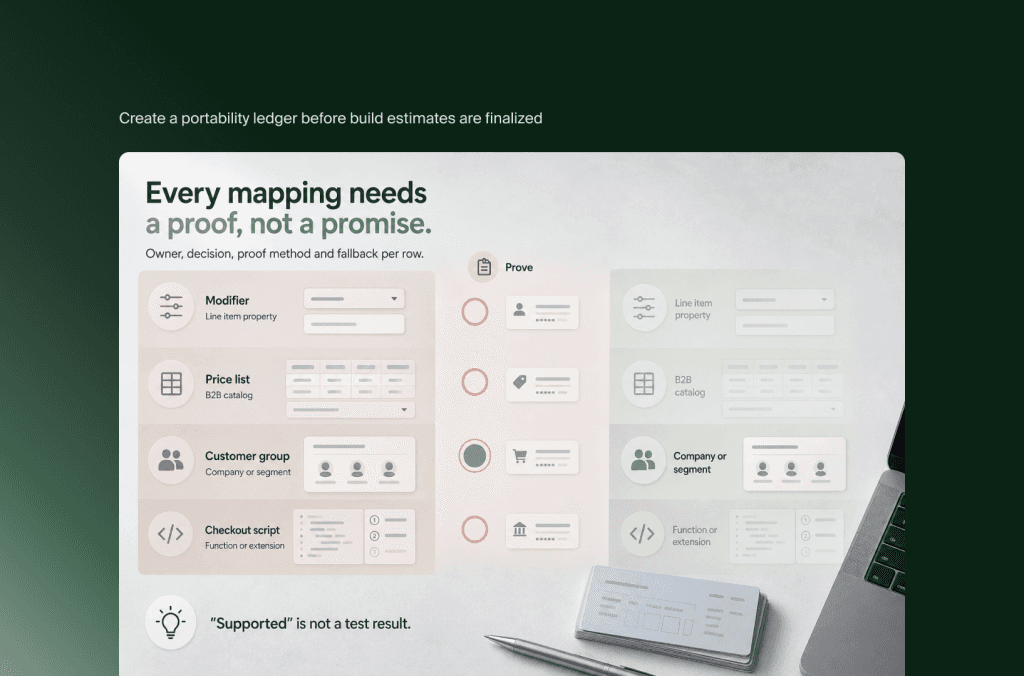
Create a portability ledger before build estimates are finalized:
The ledger should include an owner, decision, proof method and fallback for every row. “Supported” is not a test result. For a wholesale buyer, proof might mean logging in at a specific company location, viewing the expected assortment and price, applying payment terms, placing an order and confirming the ERP receives the intended identifiers.
How should products, categories and merchandising be mapped?
Map the catalog by sellable identity, shopper choice and downstream use. Separate inventory-bearing variants from configurable selections, design the Shopify taxonomy deliberately and place governed attributes in typed custom data. Run representative proofs before bulk transformation because catalog exceptions multiply quickly at migration scale.
Start with source profiling rather than CSV cleaning. Count products, variants, options, modifiers, custom fields, categories, brands, images, videos, files and channel assignments. Measure nulls, duplicates, invalid identifiers, inconsistent values, orphaned relationships and unusually complex products. The objective is to find patterns that require different transformation rules.
Shopify currently allows up to 2,048 variants and three options per product. That is enough for many BigCommerce catalogs, but the headline limits are not the whole decision. Some themes, applications and sales channels may have lower support thresholds, while a BigCommerce modifier may not belong in the variant matrix at all.
For each complex product family, choose among four target patterns:
Native variants: Use when each combination is a sellable, priceable or inventory-bearing item.
Customer input: Use line item properties or a compatible application when the shopper supplies text, engraving or another non-inventory choice.
Structured configuration: Use a configurator, bundle model or custom interface when selections have dependencies, pricing rules or production output.
Separate products with combined presentation: Use when each item needs independent merchandising or Shopify Combined Listings fits the Plus use case.
Do not let category migration dictate the new information architecture. BigCommerce categories may act as navigation, SEO landing pages, product grouping and storefront-specific assortment controls at once. Shopify collections, menus, Markets, catalogs and search merchandising divide those responsibilities differently. Preserve valuable page intent and product discoverability, but remove inherited branches that no longer serve customers or search demand.
Custom fields need contracts. Record the source name, type, allowed values, ownership, localization, channel scope and consumers. Then create typed Shopify metafields or metaobjects before import. Moving every source field into ungoverned text preserves clutter, not capability.
Validate the mapping with a deliberately difficult sample: the product with the most variants, the deepest category assignment, a modifier-heavy configurable product, a product restricted to one storefront, a product with customer-specific pricing and an item that drives special tax or shipping behavior. Bulk migration should not begin until those proofs have owners and accepted results.
How do B2B companies, customer groups and price lists move?
B2B migration should convert buyer relationships and commercial rules, not merely customer rows. BigCommerce companies, buyers, customer groups and price-list assignments must be mapped to Shopify companies, locations, users, catalogs, terms and permissions. The test is whether each account receives the correct buying context after authentication.
In BigCommerce B2B Edition, companies and customer groups connect business accounts and buyers to curated purchasing experiences. Customer groups can also influence pricing, category access and other rules. The source estate may therefore contain overlapping uses of groups for B2B entitlement, retail segmentation, tax treatment, discounts or operational routing.
Classify each group before mapping it. Consumer marketing segments may become Shopify segments or remain in a customer data platform. Wholesale companies should usually become Shopify companies with appropriate locations and buyers. Pricing and product access may become B2B catalogs, while tax, shipping or internal routing may require configuration, automation, applications or ERP logic.
Shopify catalogs control B2B product availability and pricing. Plus supports unlimited catalogs and direct assignment to companies and locations, but that does not guarantee a one-to-one translation of every BigCommerce price-list combination. Document fixed prices, percentage adjustments, volume tiers, currencies, effective dates, channel assignments, group assignments and fallback prices. Decide how conflicts resolve before loading data.
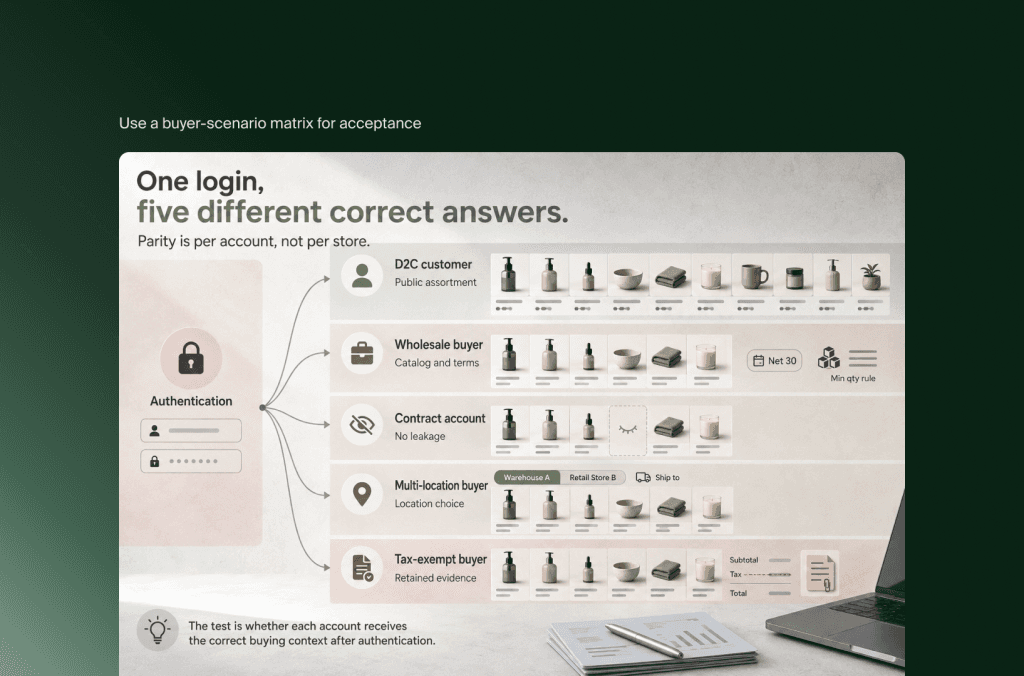
Use a buyer-scenario matrix for acceptance:
Customer identity needs its own launch plan. Shopify states that passwords cannot be migrated through customer CSV because they are encrypted outside Shopify. Choose account invitations, passwordless customer accounts or an approved identity design, then prepare support scripts and monitor activation.
Consent is not implied by an email address or customer-group membership. Preserve the source, purpose, timestamp, region and suppression state required by the business and its legal basis. Validate how the target marketing, analytics and service systems will honor those records.
What happens to checkout, promotions, subscriptions and stored value?
Checkout rules, promotions, subscriptions, gift value and store credit should be treated as active financial behavior. Their source configuration is not portable code. Rebuild each requirement through Shopify capabilities, approved applications or external services, then test qualification, payment, tax, refund and customer-service outcomes before launch.
Inventory every checkout customization and explain why it exists. Include custom fields, address validation, delivery restrictions, payment or shipping filtering, order minimums, fraud checks, consent, B2B purchase-order handling, analytics and post-purchase behavior. Some rules can move to Shopify’s checkout editor, Checkout Blocks, Functions or app extensions. Others require an application, an upstream policy change or retirement.
The critical distinction is checkout step. Shopify allows broader app-based customization on Plus than on standard plans, but extensions operate within Shopify’s supported surfaces and constraints. Do not promise code parity with a BigCommerce checkout SDK implementation. Write the requirement as an outcome and validate it in the intended plan and payment configuration.
Promotions need a rule sheet covering qualification, customer eligibility, products, quantities, currencies, date windows, usage limits, coupon generation, stacking, free shipping and refund treatment. Rebuild the smallest set of live commercial rules. Expired coupon history and unused experiments rarely justify target complexity.
Subscriptions require coordination among the source provider, Shopify, the target subscription application and payment parties. Shopify’s official guidance states that payment-token migration requires the subscription app developer, while credit-card-data migration requires Shopify Support and a Plus or Enterprise plan. Product and customer records must exist before subscription contracts are recreated. Treat token portability as a governed dependency, not an assumption.
Gift certificates, store credit, loyalty points and return value need financial reconciliation. Decide whether each balance becomes Shopify store credit, a gift card, an external loyalty balance or a retained liability in another system. Record the source balance, transformed balance, activation date and exception status so finance and support can explain differences.
Historical orders should follow service and compliance use cases. Some history may need to appear in Shopify; older records may be more useful in a data warehouse, service console or read-only archive. Importing everything is not inherently safer if the target representation confuses tax, refunds, loyalty or revenue reporting.
How should storefronts, markets and integrations be redesigned?
Redesign the target around systems of record and operating boundaries. Decide which BigCommerce storefronts consolidate into Shopify Markets, which require separate stores and which channels remain external. Then rebuild integrations with explicit identifiers, event contracts, retries, reconciliation and support ownership instead of copying point-to-point connections.
For each current storefront, document brand, domain, language, currency, legal entity, catalog, price, tax, payment, fulfillment, content and team ownership. Shopify Markets can absorb some regional variation in one store. Separate stores may still be justified when brands, legal entities, catalogs, operations or teams need stronger isolation.
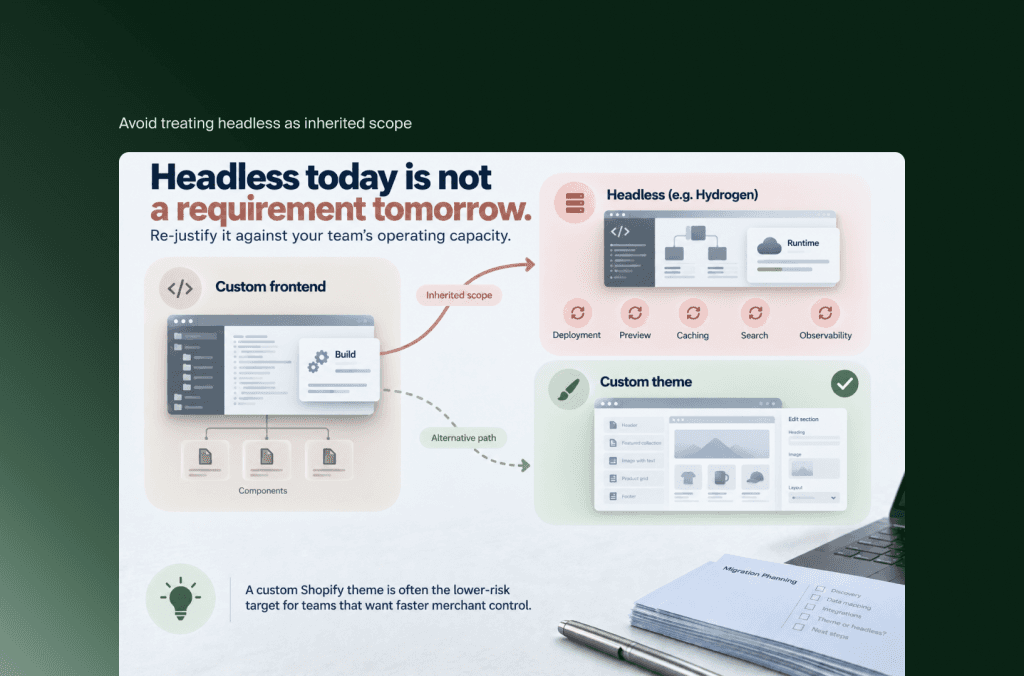
Avoid treating headless as inherited scope. A BigCommerce storefront built with Catalyst, another React framework or a custom frontend does not automatically require Hydrogen or another headless Shopify build. Preserve headless only when its current requirements, team capability and expected value still justify the additional deployment, preview, caching, search and observability responsibilities. A custom Shopify theme is often the lower-risk target for teams that want faster merchant control.
Map integrations by capability, not vendor logo. For ERP, PIM, OMS, WMS, CRM, tax, search, reviews, loyalty, marketing and analytics, document:
system of record and downstream consumers;
source and target identifiers;
objects, fields and transformations;
direction, frequency, volume and peak behavior;
create, update, cancel, refund and delete semantics;
retry, idempotency and reconciliation behavior;
monitoring, alerts and business owner;
launch dependency and fallback procedure.
Replacing a BigCommerce application with a Shopify application may still require data export, identifier matching, template work, consent review and historical-data decisions. “Native integration” describes a connection option, not operational readiness.
Use queues and idempotent consumers for important event flows where appropriate. Shopify explicitly advises applications not to rely on webhooks alone and recommends periodic reconciliation jobs because events can be missed or mishandled. That pattern matters for inventory, orders and customer updates where silent drift becomes a business problem.
What is a safe migration sequence and timeline?
A safe sequence starts with discovery and hard proofs, then builds the target, rehearses complete and delta migrations, validates end-to-end scenarios and performs a controlled cutover. A contained project may fit roughly 10 to 14 weeks, while B2B, multi-storefront, headless or integration-heavy programs may need 16 to 28 weeks or more.
These are planning bands, not delivery commitments. Public migration pages use ranges from weeks to several months because the same keyword can describe a simple catalog move or an enterprise replatform. The reliable estimate comes after data profiling, dependency mapping and target architecture.
Use this gated operating sequence:
Discover and decide: Inventory storefronts, data, applications, custom logic, integrations and operational owners. Confirm whether migration is justified and select the Shopify plan and store architecture.
Prove difficult mappings: Test complex products, customer and B2B relationships, price rules, identity, subscriptions and critical APIs before the main build absorbs an incorrect assumption.
Build and connect: Implement the storefront, Markets or store structure, checkout, search, analytics and integrations against versioned mapping rules.
Rehearse migration: Run full test loads, measure duration, reconcile record counts and values, fix repeatable transformations and prove the final delta process.
Validate scenarios: Execute functional, accessibility, performance, security, SEO, operational and user-acceptance testing across representative D2C, B2B and market journeys.
Cut over and stabilize: Freeze controlled source changes, run final deltas, switch traffic, reconcile live orders and integrations, triage against clear severity rules and delay retirement until stability is proven.
An illustrative 16-week plan might look like this:
Run workstreams in parallel only after the contracts between them are stable. Building catalog templates while the product model is undecided creates rework. Integrating orders before identifiers and status semantics are agreed creates false progress.
If the deadline is immovable, reduce scope visibly. Phase a redesign, a market, historical data or noncritical applications when the business can operate coherently without them. Do not compress reconciliation, security, payment testing or rollback planning to preserve a cosmetic feature.
How much does a BigCommerce to Shopify Plus migration cost?
Cost depends more on rule and integration complexity than raw record count. Budget discovery, storefront implementation, data transformation, B2B and checkout rebuilding, integrations, SEO, testing, cutover, stabilization and internal change. A transparent workstream model is more defensible than a flat figure based on products or annual revenue.
Project estimates should distinguish recurring platform and application fees from one-time migration work. They should also show client responsibilities, exclusions, contingency and parallel-running cost. Flatline’s ecommerce TCO analysis is useful when comparing the multi-year target state with the cost of staying.
Shopify Plus is a separate recurring budget line. Official US pricing currently starts at $2,300 USD per month for standard setups on a three-year term or $2,500 USD per month on a one-year term, with variable platform fees for more complex businesses. Currency, region, business structure, payment costs and contract terms can change the total, so confirm a current commercial proposal before approval.
The following model is an illustrative planning exercise, not a Flatline rate card, benchmark or quotation:
At a purely hypothetical blended rate of €120 per hour, that model yields €73,200 to €128,400. Adding a 15% planning contingency produces €84,180 to €147,660. The arithmetic is shown so a buyer can replace every assumption; it is not evidence of what a particular project should cost.
Scope can fall below that model for a contained D2C store using standard patterns and a focused theme. It can exceed it for several storefronts, headless delivery, B2B Edition, subscription credentials, custom checkout behavior, large SEO estates or complex ERP and OMS flows.
Compare proposals by inclusions. Ask whether they cover source discovery, difficult-data proofs, application data, customer activation, historic orders, redirect implementation, analytics validation, integration monitoring, full rehearsal, rollback, launch support and source retirement. A lower estimate often represents a smaller definition of “migration.”
How do you protect SEO, operations and retirement?
Protect launch by combining SEO, data, customer access and back-office operations in one runbook. Create a URL-level redirect map, rehearse the final delta, define go-live and rollback authority, monitor live transaction paths and keep BigCommerce available until financial, operational and search checks remain stable for an agreed period.
Start with a complete URL inventory from the live BigCommerce storefronts, analytics, Search Console, backlink data, paid landing pages and business-owned lists. Decide whether each valuable URL is retained, consolidated into a relevant destination, redirected or intentionally retired. Do not bulk-send obsolete URLs to the homepage.
Google’s site-move guidance recommends preparing and testing the new site, mapping old URLs to their new counterparts, configuring redirects and monitoring both old and new URLs. Shopify provides URL redirect management, but the platform cannot infer the correct destination for each source page.
Validate status codes, redirect chains and loops, canonicals, internal links, alternate-language signals, sitemaps, robots rules, structured data, indexability and the content of high-value landing pages. Record pre-launch baselines for organic sessions, rankings, index coverage, revenue and conversion so the team can distinguish expected reprocessing from an implementation defect.
The operational runbook should name the authority for products, price and inventory during the freeze; the last source order included in migration; final customer and order deltas; payment and tax checks; ERP or OMS acknowledgments; analytics events; DNS change; support communications; rollback conditions; and owners for each live dashboard.
Retire BigCommerce only after agreed evidence is stable. Export required data and configuration, preserve invoices and contracts, confirm webhook and API consumers have moved, revoke obsolete credentials, archive code and documentation, cancel applications in dependency order and keep the evidence required for finance, tax, support and legal retention.
The shortest safe route is simple to state: prove the exceptions before bulk build, launch from a rehearsed runbook and decommission from evidence rather than a calendar date.
BigCommerce and Shopify are close enough that the move can look like a formality, so if you are still deciding whether to replatform, rebuild or hold, test that assumption against where your problem actually lives. When the answer is to move, our Shopify migration service covers the B2B price lists, checkout logic and retirement plan set out above.
Frequently asked questions
Can BigCommerce product data be imported directly into Shopify?
Core product data can be exported and transformed, but direct import does not guarantee functional parity. BigCommerce modifiers, custom fields, category relationships, channel assignments and price-list logic need explicit target mappings. Test difficult product families before bulk migration and validate storefront plus downstream behavior.
Can BigCommerce customer passwords be migrated to Shopify?
Passwords cannot be migrated through Shopify’s customer CSV because they are encrypted outside Shopify. Plan account invitations, passwordless customer accounts or an approved identity architecture. Test duplicate handling, buyer-company relationships, communication timing and customer-service procedures before launch.
Can BigCommerce B2B Edition companies and price lists move to Shopify Plus?
The underlying data can be extracted, but companies, buyers, customer groups and price assignments require semantic mapping. Rebuild them through Shopify companies, locations, users, catalogs, terms and any required external pricing logic, then test representative buyer scenarios from login through ERP receipt.
Will a BigCommerce storefront theme work on Shopify?
No. BigCommerce Stencil themes, Catalyst components and platform templates do not run as Shopify themes. Design systems, assets and selected frontend code may be reusable after review, but routes, data fetching, account behavior, checkout integration and content components must be rebuilt for the chosen Shopify architecture.
Can subscriptions and stored payment methods be migrated?
Potentially, but not through a normal data import. Payment-token migration requires coordination with Shopify and the selected subscription application. Credit-card-data migration requires Shopify Support and an eligible Plus or Enterprise plan. Confirm gateway, region, consent and contract constraints before promising continuity.
How long should BigCommerce remain available after launch?
Keep it accessible until operational, financial, customer-service and SEO checks remain stable for an agreed period and required records are archived. The precise duration depends on order and return cycles, accounting close, support needs, integration reconciliation, contracts and legal retention requirements.
Key takeaways
BigCommerce and Shopify are both SaaS platforms, but their commerce objects do not carry identical business meaning.
Decide whether migration is justified before treating Shopify Plus as the default target plan.
Build a portability ledger for variants, modifiers, categories, channels, customer groups, price lists, promotions and checkout behavior.
Map B2B from company and buyer outcomes, not customer rows alone.
Prove complex products, exceptional pricing, identity, subscriptions and critical integrations before bulk transformation.
Use systems of record, legal entities and team ownership to decide between Markets, channels and separate Shopify stores.
A contained program may fit roughly 10 to 14 weeks; B2B, multi-storefront or integration-heavy work commonly needs a longer planning horizon.
Make cost assumptions visible by workstream and compare proposals by what their definition of migration includes.
Treat SEO, data deltas, operational validation, rollback and platform retirement as one controlled launch program.
The useful definition of parity is not that the old and new admin screens contain similar records. It is that the important customer and operational scenarios produce an accepted outcome, and that the team can observe and recover the flow when something fails.
If your BigCommerce estate has accumulated storefront, B2B, catalog or integration exceptions, Flatline can help turn them into a migration scope with explicit mappings, proofs and launch gates. Get in touch to assess the route to Shopify Plus before committing to the build.
Related articles


