WooCommerce to Shopify Migration: Costs, Timeline and What Your Plugins Leave Behind

By Robin Laseur
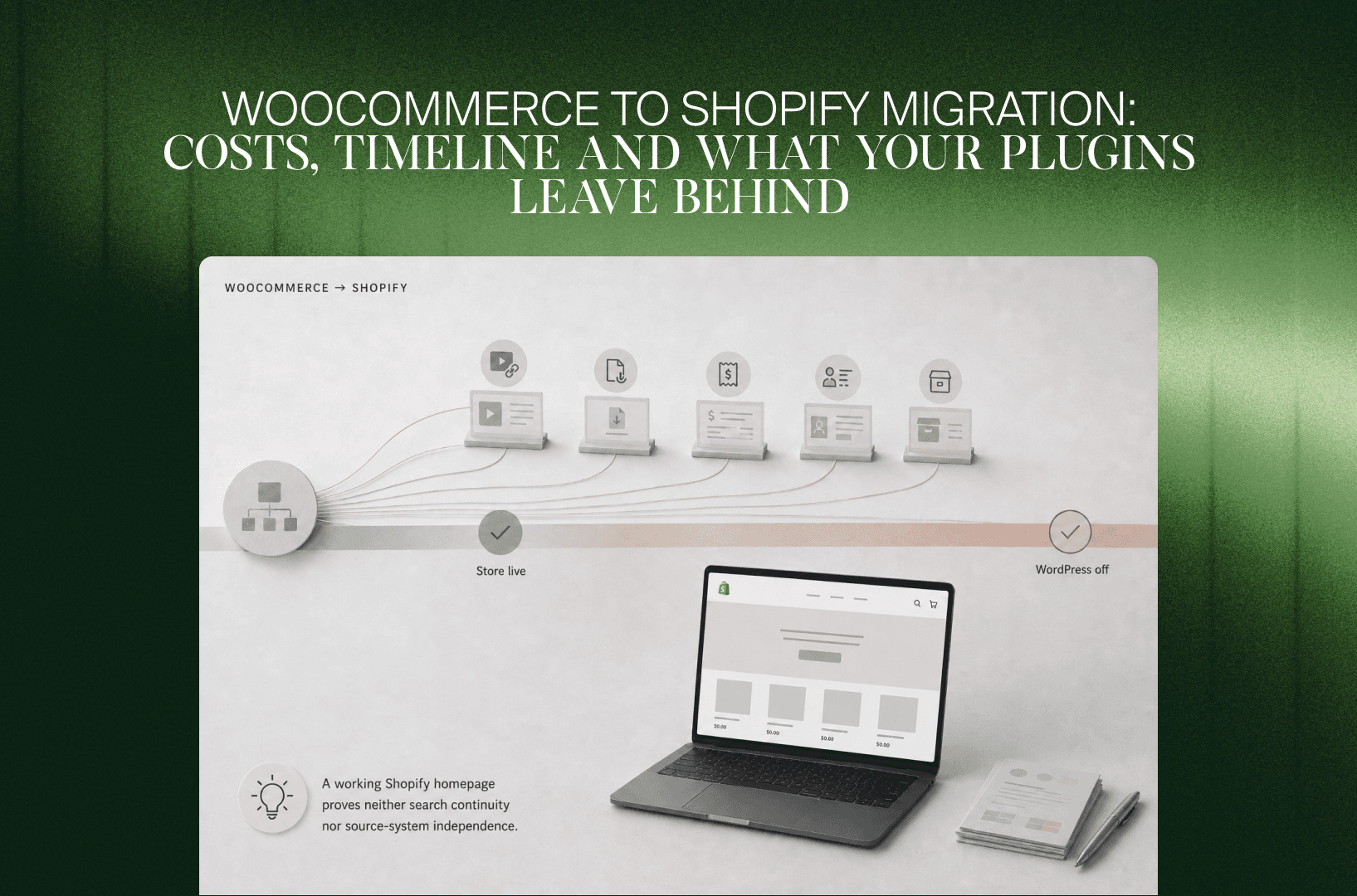
Your product export is ready. The harder decisions are still inside a subscription plugin, a custom checkout field and the WordPress pages that bring buyers into the store.
A WooCommerce to Shopify migration is the transfer of commerce data and customer journeys into Shopify, alongside rebuilding the storefront and replacing WordPress-dependent functionality. A complete migration covers products, customers, orders, subscriptions, integrations, content, SEO and cutover, with explicit decisions about which parts of WordPress remain in use.
The useful starting point is the business behavior behind your current setup. A successful import can reproduce records while leaving a wholesale price rule, a member entitlement or a renewal payment without a working destination. Those differences determine the project scope, budget and launch date.
When does moving from WooCommerce to Shopify make sense?
Moving from WooCommerce to Shopify makes sense when maintaining the current store absorbs capacity your team needs for merchandising, customer experience and growth. The business case depends on whether Shopify supports your essential workflows with an acceptable operating cost. A slow website or a long plugin list alone does not establish that case.
WooCommerce gives teams control over their WordPress environment. That control can be valuable when content publishing, unusual product configuration or custom purchasing workflows are central to the business. A capable team with well-managed hosting and documented extensions may have little reason to move.
The case changes when your team spends release after release reconciling plugin updates, fixing checkout regressions or waiting for technical support before publishing routine changes. Review the maintenance backlog, support invoices and release history. Separate work that improves the store from work that keeps the current setup running.
Shopify’s hosted model transfers infrastructure responsibilities to the platform. Your team still owns theme quality, app selection, integrations, access controls and commercial configuration. Reducing server administration can free capacity, but replacing WooCommerce plugins with an equally tangled app setup will limit that benefit.
Fix the source of the problem before choosing the destination
A performance problem caused by oversized images, third-party scripts or an unreliable ERP feed can survive a platform change. Compare a scoped WooCommerce improvement with a scoped migration, including the work each option leaves behind.
Staying is a credible choice when your current architecture supports the roadmap and changing it would require expensive substitutes for valuable custom behavior. Moving is more compelling when standardizing commerce removes recurring work without weakening the journeys customers depend on. Use that distinction to define measurable acceptance criteria before discussing a new design.
Do you need Shopify Plus, or is another Shopify plan enough?
A WooCommerce migration does not automatically require Shopify Plus. Select the plan after mapping checkout requirements, B2B pricing, operational permissions and integration needs. Standard Shopify plans can support many growing stores. Plus becomes relevant when specific capabilities or commercial terms justify the additional recurring commitment, rather than because the source store feels complex.
Avoid treating revenue as the only routing rule. A larger catalog with conventional purchasing can be less demanding than a smaller business with account-specific prices and unusual checkout requirements.
For example, Shopify currently reserves apps that customize the information, shipping and payment pages of checkout for Plus. Other checkout and account extension surfaces are available on lower plans. A custom WooCommerce checkout field therefore needs a surface-specific capability check, not a broad statement that Shopify checkout is either customizable or closed.
B2B also needs current information. Shopify B2B is available across Basic, Grow, Advanced and Plus, with plan-dependent limits. Plus supports unlimited B2B market catalogs and direct catalog assignment to companies or company locations. Core B2B availability does not prove that a WooCommerce wholesale plugin’s rules will translate unchanged.
Build the target journey with representative customers and orders. Confirm the plan requirement for each non-negotiable capability, then compare recurring cost. Keep Shopify Plus as a fit decision, separate from the decision to leave WooCommerce.
What happens to your WooCommerce plugins and WordPress website?
WooCommerce plugins, WordPress themes and PHP customizations do not transfer into Shopify as working software. Their content and business rules need separate destinations. Inventory the storefront, checkout, background jobs and non-commerce website functions, then decide which requirements Shopify will cover, which need another service and which can be retired.
The installed-plugin screen is only part of the audit. Developers may have added behavior through a child theme, must-use plugins, code-snippet tools, webhooks or scheduled jobs. Document the outcome each customization produces and the person who relies on it.
Use a requirements map to make the replacement decision explicit:
A plugin’s advertised feature name is insufficient evidence. Two discount tools might both support bundles but differ in tax treatment, discount stacking or what the warehouse receives.
Decide whether WordPress is leaving with WooCommerce
For a commerce-led website, moving both the store and supporting content into Shopify can reduce the number of systems the team operates. A WordPress site that also runs a publication, course platform or member portal deserves a separate assessment.
Keeping WordPress while moving commerce is possible, but it leaves hosting, patching, content governance and cross-system customer journeys to manage. Define the domain or subdomain structure, navigation and analytics behavior. Do not assume DNS alone can route individual URL paths between two platforms.
Elementor layouts, Gutenberg blocks, shortcodes and custom-field structures need template-level review. Copying the visible text does not recreate the editing experience. Ask the content team to rebuild a campaign page in the proposed target before approving the architecture.
For the exit plan, distinguish between “WooCommerce checkout is closed” and “WordPress can be switched off.” A retained publication or membership application can make the second date much later, or remove it from scope entirely.
Which data can move, and what needs a different structure?
Products, customer profiles, historical orders and content can usually move through an appropriate migration method, but their relationships and custom fields require mapping. Passwords, payment credentials, plugin behavior and customer entitlements need separate treatment. Define what must remain usable in Shopify, what belongs in another application and what only needs accessible retention.
Shopify’s WooCommerce migration guide distinguishes product and customer imports from reviews and historical-order workflows. Its Store Migration app is still described as early access for eligible stores and focuses on products. Treat its availability and coverage as one option, not the specification for your whole project.
Products, variations and custom fields
Preserve SKUs, barcodes, prices, tax classifications, stock ownership and external identifiers before refining presentation. Map WooCommerce categories and attributes to the intended Shopify collections, options and structured fields.
Shopify currently supports up to 2,048 variants and three options per product. Some themes, apps and channels still have lower compatibility limits. A product accepted by the admin may therefore need additional testing in search, merchandising and fulfillment.
Separate selectable specifications from inventory-bearing variants. An engraving message should not necessarily become a stock item. Conversely, moving a stocked configuration into a free-text field can remove the distinction your warehouse needs. Test an ordinary product, the most complex configurable item and a discontinued item referenced by historical orders.
Customers, order history and identifiers
Deduplicate customer records and define how guest purchases connect to known customers. WordPress user IDs, WooCommerce order IDs and Shopify IDs are different identifiers; retain a cross-reference wherever integrations or service teams need to search historical records.
Shopify’s customer CSV cannot import external passwords or order history, and its Total Spent and Total Orders columns are not imported as customer details. Use the customer import documentation to distinguish profile migration from transactional history.
Shopify’s current customer accounts support passwordless sign-in with email codes. Plan the access journey around the chosen account model, including recognizable communications and support scripts. Import marketing preferences from recorded consent and suppression states, not from the existence of an email address.
WooCommerce’s High-Performance Order Storage, or HPOS, uses dedicated order tables. Confirm which storage mode is authoritative and whether the extraction method supports it. A custom export reading legacy WordPress tables can be incomplete if those tables are not the current source.
Define the historical-order period by use: returns, warranty, service, finance or analytics. Imported records do not automatically recreate the original payment transaction or make it refundable through the new gateway.
Reviews, balances and media
Review migration depends on the receiving review application’s schema. Preserve product matching and available provenance; do not invent verified-purchase status. Gift-card balances, store credit and loyalty points require separate reconciliation because they represent obligations, not descriptive customer fields.
Include embedded images, downloadable files and product-description links in the content inventory. The Matrixify WooCommerce migration documentation specifically addresses moving images embedded in descriptions. Check remaining source-host references before canceling hosting, even if the main product gallery looks complete.
How do you preserve subscriptions, memberships and unfinished orders?
Subscriptions, memberships and unfinished orders need continuity plans beyond the initial data import. Subscription contracts must connect to supported payment methods and correct renewal dates. Membership access must follow its own entitlement rules. Open orders need a single fulfillment owner so the migration does not create duplicate shipments, billing or conflicting customer updates.
Start this work before committing to launch. A subscription business can have a ready storefront while the billing transition remains unresolved.
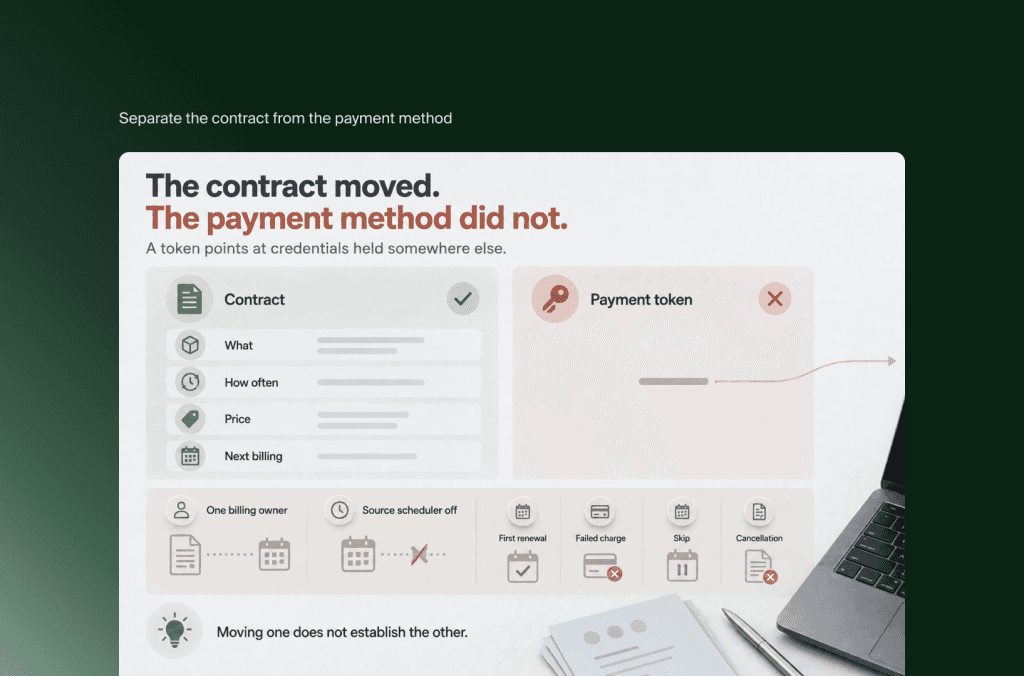
Separate the contract from the payment method
A subscription contract records what the customer receives, how often, at what price and when billing happens next. A saved payment token references credentials held by a payment provider. Moving one does not establish the other.
Shopify documents separate routes for payment-token and card-data migration. Token migration can be supported across plans through the subscription app developer. Direct card-number migration has different eligibility and uses Shopify Professional Services. Some supported gateways can remain connected for existing subscription billing while new or updated contracts use the primary gateway.
Confirm the route with the subscription provider and Shopify before promising customers that payment details will carry over. Never pass raw cardholder data through ordinary exports or email.
The Shopify Subscriptions app also supports contract CSV imports, but that does not establish a universal WooCommerce subscription transfer. Verify identifiers, payment compatibility and the receiving app’s requirements.
Rehearse the first renewal, a failed charge, a skip and a cancellation. Check prepaid delivery schedules and discounts that expire after a specified number of renewals. Assign one billing owner per contract during the transition, and confirm that the source scheduler cannot bill the same obligation again.
Preserve access and work already in progress
Memberships can grant access without recurring payment, or continue until an already-paid period expires. Map entitlement separately from billing status. A canceled renewal should not automatically erase prepaid access.
For open orders, decide whether WooCommerce finishes fulfillment or Shopify takes ownership. Record the boundary by order ID and status. If historical imports trigger an ERP connector or customer email flow, an old order can look new to the receiving system. Test suppression and reconciliation before loading production history.
Which migration method should you use, and in what order?
Choose a migration method by supported data, repeatability and exception handling. Manual entry or CSV can suit a contained catalog, while migration apps and custom integrations handle broader requirements. Regardless of method, prove difficult records first, build and test the target, then synchronize changes and launch against documented acceptance criteria.
Shopify lists manual transfer, CSV, migration apps and partner-managed projects as distinct approaches. The right selection can mix them: a migration app for core records, a specialist subscription process and a separate content workflow.
For a straightforward store, CSV offers visibility into the mapping. It also makes your team responsible for formatting, relationships, corrections and repeat loads. An app reduces some transfer work, but you still need to inspect its object coverage, error reporting and behavior when the same records are imported again.
Matrixify, for example, documents separate entity selection and date-based order filters. Those controls can help define a migration batch. They do not prove that a custom field or downstream automation will behave as intended.
Use this sequence to keep implementation evidence ahead of launch commitments:
Capture the baseline and scope. Back up the source, inventory dependencies, record current SEO and commercial performance, and name the owners who can approve changes.
Prove the difficult cases. Test a complex product, a returning customer, a historical refund, a subscription and an unusual shipping destination where relevant.
Build the target experience. Configure the theme, apps, checkout, shipping, tax settings and integrations around approved requirements.
Run repeatable test migrations. Compare source and target counts, sample totals and relationships. Investigate differences instead of accepting a success message.
Rehearse operational journeys. Test purchase, cancellation, refund, partial fulfillment, customer access and integration recovery.
Synchronize and launch. Apply the final changes, validate redirects and live transactions, then begin monitored stabilization.
A delta sync is the transfer of records created or changed since an earlier migration snapshot. Specify which objects your method can update, its cutoff time and how it handles changed or deleted records. “We will sync again before launch” is incomplete without those rules.
How long does a WooCommerce to Shopify migration take?
A WooCommerce to Shopify migration timeline depends on approved scope, delivery capacity and external dependencies. Data transfer is only one part of the schedule. Storefront work, plugin replacement, subscriptions, content, integrations and acceptance testing determine the launch date. Build the estimate from those workstreams instead of treating catalog size as a reliable proxy.
There is no single duration that describes both a small theme-led move and a multi-market rebuild with recurring billing. The useful estimate names its assumptions and the work that can happen in parallel.
For illustration, a team could construct a ten-week plan for a contained rebuild as follows. This is a scheduling example, not a measured industry average or a Flatline delivery commitment:
A simpler project can remove workstreams. A subscription gateway transition, bespoke configurator or delayed ERP access can extend the critical path beyond this example.
Separate initial stabilization from the full observation period. Monthly renewals, returns and delayed fulfillment may need monitoring after the project team has finished daily launch checks. Choose the launch window around your commercial calendar and support capacity, not only developer availability.
How much does a WooCommerce to Shopify migration cost?
WooCommerce to Shopify migration cost combines implementation effort, platform and app charges, data work and transition support. A transfer-tool price covers only part of that scope. Build a budget from explicit hours and assumptions, then add recurring operating costs and the temporary cost of keeping both environments available.
Separate three budgets: building the target, operating it, and retiring the source. This makes a theme-led implementation comparable with a proposal that also includes integrations, subscription work or a redesign.
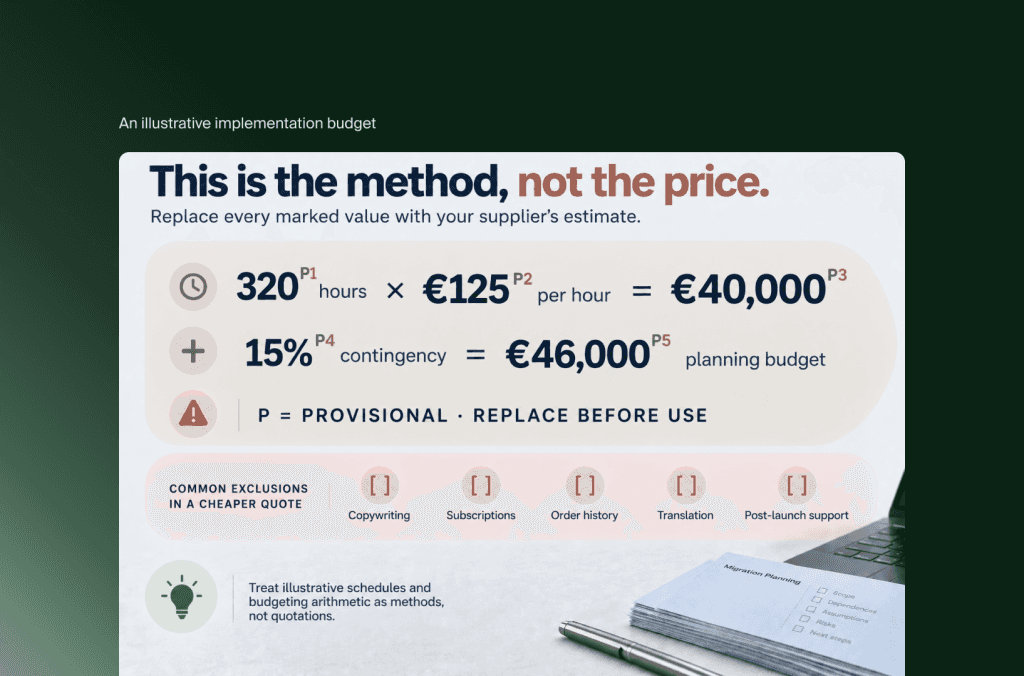
An illustrative implementation budget
Suppose a contained rebuild is scoped at 320 hours and the assumed blended delivery rate is €125 per hour. The labor calculation is 320 × €125 = €40,000. If the buyer chooses a 15% contingency allowance, that adds €6,000, producing a €46,000 planning budget before taxes and separately charged services.
These are hypothetical inputs to demonstrate the method. They are not Flatline rates, a quotation or evidence that your migration should cost €46,000. Replace them with supplier estimates for discovery, storefront, data, integrations, testing, project coordination and launch support.
Require each estimate to state exclusions. Copywriting, subscription-provider assistance, historical-order transformation, translation and post-launch support can change the total even when two proposals describe the same number of products.
Compare the ongoing cost on both sides
Use the current Shopify pricing page for the chosen plan, billing term and region. On the euro-denominated Plus page checked for this article, Shopify lists starting prices of €2,100 per month on a three-year term or €2,250 on a one-year term, with variable platform fees possible for more complex structures. Confirm the applicable Shopify Plus commercial terms during scoping.
Add apps, payment processing, any applicable third-party transaction fees, integration hosting, development support and internal administration. Compare that with WooCommerce hosting, extension renewals, maintenance and the resources needed to deliver the same roadmap.
Include overlap costs until source-dependent refunds, billing, content and records have a working home. Flatline’s ecommerce total-cost-of-ownership framework provides broader context for organizing implementation and recurring expenditure. A platform subscription comparison alone will miss much of the migration decision.
How do you protect SEO and know when WordPress can be switched off?
Protecting SEO during a WooCommerce migration requires a URL and content plan before launch, followed by redirect testing and search monitoring. Retiring WordPress requires additional evidence: assets, billing, customer access, integrations and historical records must no longer depend on it. A working Shopify homepage proves neither search continuity nor source-system independence.
Crawl the source and combine that inventory with Search Console, analytics and backlink data. Map valuable product, category, article and landing-page URLs to relevant target destinations. Preserve useful content and internal links alongside titles, canonicals and language relationships.
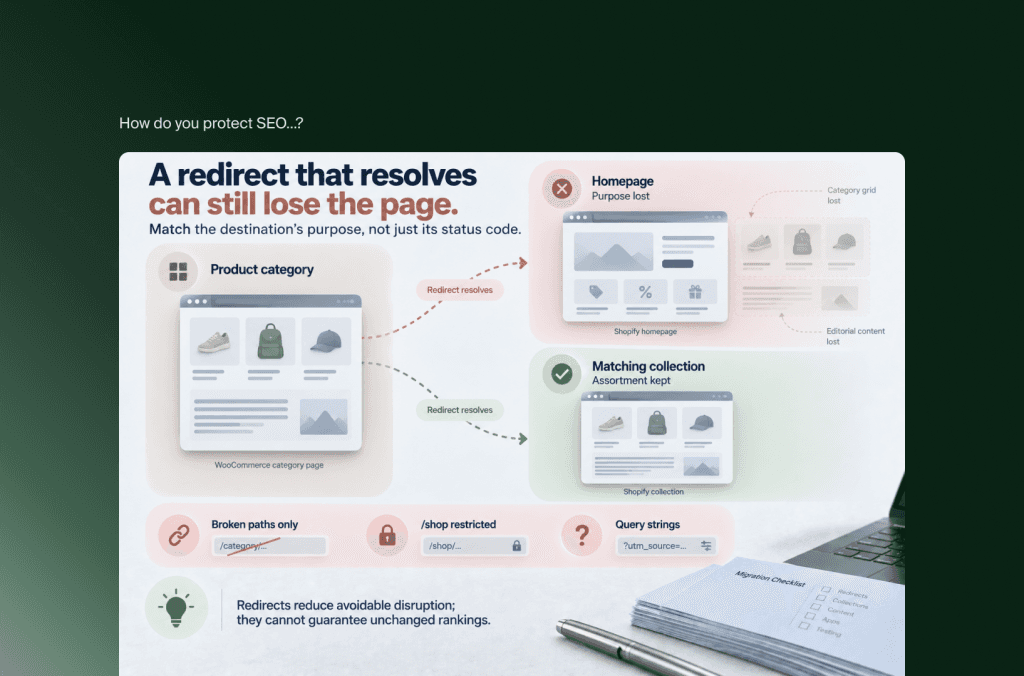
For example, a WooCommerce product-category page may become a Shopify collection. Map it to the matching assortment and preserve its relevant editorial content. Sending a useful category page to the homepage changes the destination’s purpose.
Shopify’s native redirect rules have constraints: redirects generally require broken source paths, certain prefixes such as /shop are restricted, and query-string behavior needs testing. A WooCommerce permalink structure can therefore need more planning than uploading a redirect spreadsheet. Have the implementation team prove the handling of problematic paths before approving the target architecture.
Google’s site-move guidance explains that rankings can fluctuate during recrawling and reindexing. Redirects reduce avoidable disruption; they cannot guarantee unchanged rankings. Retain relevant redirects long term, monitor indexing and compare performance by page type rather than only sitewide totals.
Launch with a transaction and recovery plan
Define the final data cutoff, source checkout closure, inventory authority and who approves the domain change. Preserve required email DNS records when changing web hosting. Run a live order through payment, confirmation, fulfillment and reporting, then test the agreed refund route.
Control imported-order notifications and marketing automations. Keep historical transactions from being counted as new purchases in analytics or sent to fulfillment again.
A rollback needs more than restoring DNS. Orders and payments created after cutover must still be accounted for if traffic returns to WooCommerce. State who reconciles them and how the team prevents conflicting writes.
Use an exit checklist for the old environment
Before canceling source hosting, verify that embedded media and downloads no longer depend on it, retained WordPress applications have a deliberate home, legacy billing and refund processes remain accessible, and required records have an approved retention route.
Also confirm that renewal jobs and connectors cannot create duplicate activity, and that the team has backups, access records and a documented support handover. Keep any retained environment secured and maintained. An abandoned but internet-accessible WordPress installation is not a completed retirement.
Some WooCommerce problems are really hosting, plugin or build problems that would follow you to any platform, so if you are still deciding whether to replatform, rebuild or hold, separate those first. Once Shopify is the destination, our Shopify migration service covers the subscriptions, data mapping and WordPress exit described in this guide.
Frequently asked questions
Can I keep my existing domain when moving to Shopify?
Yes. You can connect an existing domain to Shopify without automatically transferring its registration. Plan the web DNS changes separately from email and other services using that domain. Keeping the domain name does not preserve individual page paths, so the URL mapping and redirect work still need to be completed.
Can WooCommerce stay open while the Shopify store is built?
Yes. Building and testing Shopify alongside the live WooCommerce store is a practical approach. Define how new orders, customer updates and inventory changes will be captured during that period. At cutover, establish one transaction owner and a final synchronization boundary rather than allowing both stores to accept overlapping operational responsibility.
Can customers keep their WooCommerce passwords?
Not through Shopify’s standard customer CSV import. Customer profiles and account authentication are separate migration tasks. Plan the sign-in journey around the selected Shopify account model, which may use email verification codes instead of passwords. Test access, duplicate records and customer communications before asking returning buyers to use the new store.
Will imported WooCommerce orders be refundable in Shopify?
Do not assume so. Importing an order record does not move its original payment transaction to a new processor. Confirm the refund route with the migration tool and payment provider, and retain source access where needed. Customer service also needs a clear way to identify which system owns each historical transaction.
Should every WooCommerce plugin be replaced with a Shopify app?
No. Start with the business requirement, then check native Shopify capability, the target theme, existing external services and selective custom development. Some plugins only support WordPress infrastructure and have no equivalent requirement on Shopify. Others contain valuable commercial rules that need deeper treatment than choosing an app with a similar name.
Key takeaways
Migrate when the target operating model improves the business, not because WooCommerce has a long plugin list. Verify the cause of current constraints first.
Choose Shopify Plus for specific capability and commercial requirements. A complex source implementation does not automatically require the highest plan.
Map business rules and customer obligations alongside data. Subscriptions, membership access, open orders and stored balances need explicit owners.
Estimate time and cost from workstreams, capacity and external dependencies. Treat illustrative schedules and budgeting arithmetic as methods, not quotations.
Separate launching Shopify from retiring WordPress. Search, media, billing and historical operations each need evidence that the source is no longer required.
The strongest migration scope lets your team explain what will change for a buyer, a merchandiser and a service agent, then demonstrate those journeys before launch. That is a more useful definition of readiness than a completed product import.
Not sure how to scope your WooCommerce migration? Flatline is a Shopify Platinum Partner with hands-on experience in ecommerce development, integrations and technical SEO. Get in touch, and we will walk through the platform choice, dependencies and launch requirements with you.
Related articles


