Meta Is Now a Shopify AI Channel: What Merchants Can Control

By Robin Laseur

Meta is now a Shopify AI channel in Agentic Storefronts. Merchants can manage Shopify Catalog access and direct checkout, then review Meta performance in the admin. These controls govern different parts of participation, so your team should record product-access and checkout decisions separately, with an owner for each.
Deciding whether to keep direct checkout enabled for Meta? See how to decide whether your store is ready for Meta direct checkout.
For a brand running several markets and a complex catalog, an active channel deserves a business review. The control map below gives your eCommerce, catalog and analytics teams a shared place to document the settings they find, the decisions they make and the evidence still needed.
What the Meta announcement changes for merchants
Shopify’s September 8 announcement places Meta alongside other AI channels in the merchant admin. It describes default product sharing through Shopify Catalog and gives merchants controls for Catalog access, direct checkout and performance review. The immediate task is to inspect the configuration that applies to your store and assign responsibility for it.
The Shopify announcement is concise. Its practical consequence is a new item for your channel review: establish who is authorized to decide how the business participates before treating the default configuration as an approved operating choice.
Agentic storefronts are Shopify’s way of making products discoverable and purchasable through AI channels. Orders retain channel or referrer attribution in Shopify, and merchants continue to own the customer relationship and post-purchase experience.
For a hypothetical fashion brand, the Head of eCommerce might own participation while the catalog manager owns product accuracy. Customer service needs to understand the purchase route so staff can handle an order without assuming the shopper used the website.
Write those responsibilities into the channel record. A setting can be technically correct while the people supporting the resulting orders have yet to review it.
Review the management mode before editing individual settings
Agentic Storefronts offers a Shopify-managed mode and manual controls. Review that mode before editing Meta because it determines how individual settings and future channel enrollment are handled. Record the existing state first, then document any intended change at the scope your business has approved: one channel or the broader agentic setup.
Shopify’s management documentation explains that “Allow Shopify to manage for me” includes automatic enrollment in future channels. Turning it off exposes manual controls; turning it back on reactivates agentic settings, including direct checkout where applicable.
That makes the management mode a continuing policy decision. Assign its owner the responsibility to review a new channel against your business requirements, or to approve Shopify-managed enrollment with those consequences understood.
The separate Agentic plan serves businesses using an existing storefront outside Shopify. Direct checkout starts deactivated on that plan and requires setup and activation. Its Meta setup also calls for the Facebook and Instagram by Meta channel with product syncing enabled.
Identify your plan and actual configuration before applying an instruction from another merchant’s setup. Save a dated screenshot and a short explanation of the intended policy so the next administrator can distinguish a deliberate choice from an inherited default.
Catalog access controls a distribution route
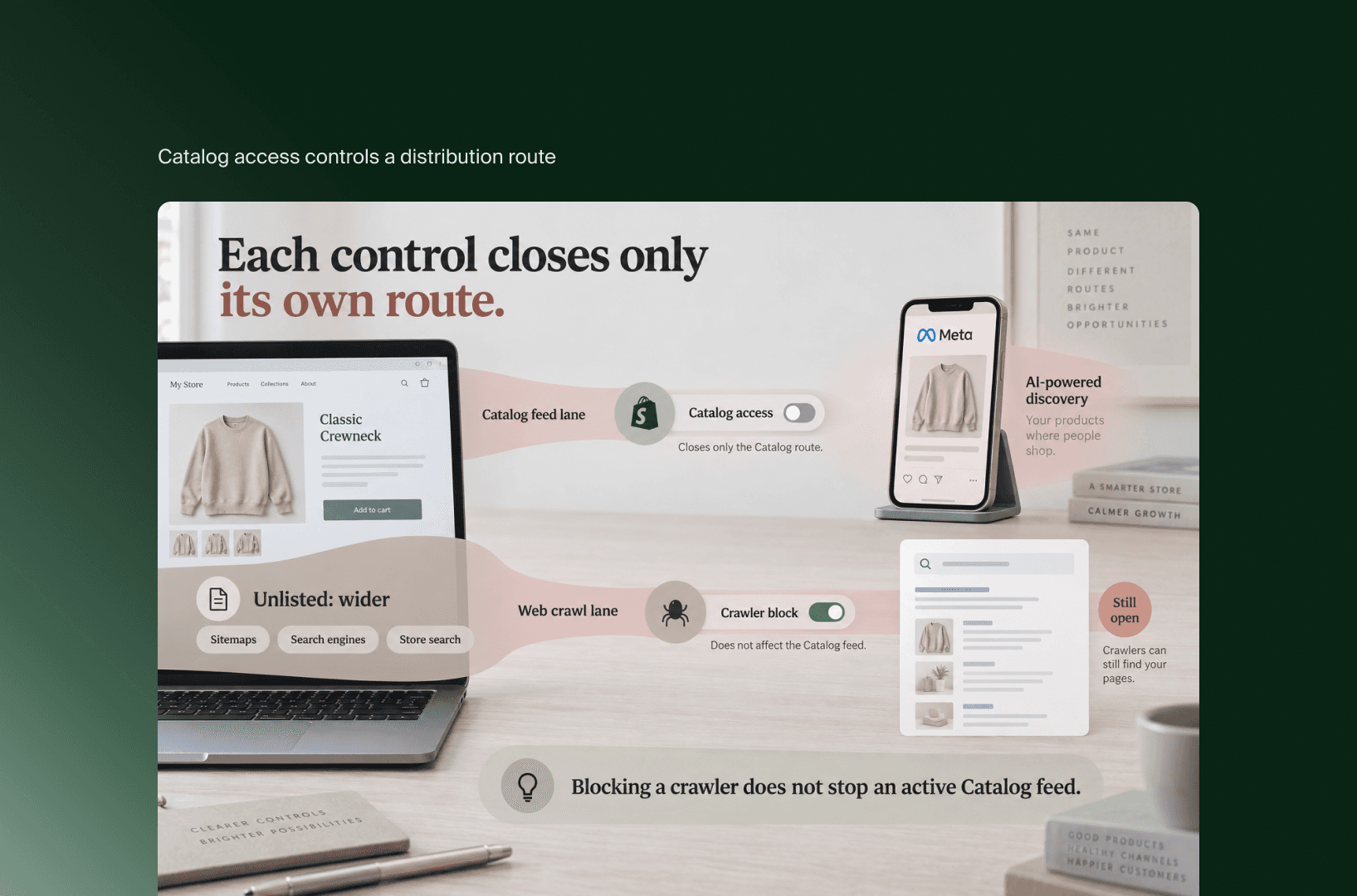
Shopify Catalog access concerns a route through which AI channels receive product information. Removing that access does not establish that a publicly available product has disappeared from external discovery. A merchant seeking narrower distribution should identify the route involved before changing product visibility or broader search settings.
Shopify Catalog guidance distinguishes Catalog distribution from web crawling and indexing. Blocking a crawler does not stop an active Catalog feed. Conversely, Catalog opt-out does not control every way an external platform might find public product information.
The same documentation explains that Unlisted product status also affects sitemaps, search engines and online store search. That is a wider merchandising decision than changing one AI-channel setting.
Consider a hypothetical brand preparing a limited product launch. Its team should describe the actual requirement, such as restricting a distribution route or limiting public discovery, before choosing a setting. The catalog owner can then inspect the channels, product status and visibility measures that address that requirement.
Custom B2B arrangements also deserve inspection. Shopify notes that app-based or theme-based access restrictions may not be recognized as B2B-only arrangements by its detection methods. If your store mixes wholesale and consumer products, review the affected records with the person who owns those access rules.
Keep the approved visibility objective in the change record. A future colleague restoring a product’s normal search visibility should understand the other consequences of that change.
Direct checkout needs its own decision
Meta direct checkout is a Shopify-powered purchase experience inside Meta surfaces. Its availability depends on eligibility, and Shopify currently documents it for customers in the United States. Merchants can deactivate direct checkout while retaining product discovery, with shoppers directed to the online store to complete their purchase instead.
For a Netherlands-based brand, the relevant geography is the customer market being served. A Dutch headquarters does not establish whether the intended US purchase flow is eligible or suitable. Check the store’s status and the requirements in Shopify’s Meta documentation.
That page lists restrictions, including subscriptions, product bundles, customizable products and B2B-only products. It also specifies the Facebook and Instagram by Meta channel and product syncing for shoppable ads. The Agentic entry should therefore be reviewed alongside the relevant sales-channel configuration.
At the ownership stage, record the buying requirements that matter to your business and assign someone to validate them. Detailed acceptance testing belongs in the checkout review. The channel-control decision can then refer to its outcome instead of assuming eligibility establishes compatibility.
Read performance in the context of the purchase route
Agentic reporting should be interpreted alongside the shopper’s route and the measurement method. Channel-attributed sales, website visits and browser events describe different things. Before comparing Meta with other acquisition channels, record what each report includes and which part of the purchase journey the measurement can observe.
Shopify’s management documentation says agentic sales data combines referral-based sales and direct-checkout sales. It also notes that agentic performance analytics are not yet available for headless stores. Those limitations belong in the reporting specification used by your analytics team.
Google Analytics and custom client-side pixels do not fire in Meta’s direct checkout, according to the Meta documentation. A completed purchase outside your website therefore should not be expected to produce the same browser-event trail as your standard website checkout.
Ask the analytics owner to record the report name, date range, attribution basis and known exclusions before interpreting a change in performance. A difference between dashboards is a question to investigate against those definitions; it does not, by itself, identify a tracking defect or a conversion improvement.
For a new channel, keep the first reporting review narrow: reconcile a documented order route with the available records. Expand the analysis once the team understands what it can measure reliably.

Copy this control map into your channel review
A useful channel-control record connects a business decision with an accountable owner and evidence. Copy the table below, replace suggested roles with names, and record your current configuration separately from the intended one. Keep unresolved checks visible until the responsible team has inspected the relevant setup or purchase flow.
This is a proposed review worksheet, not a completed store audit. Use Recorded, Needs review or Not applicable in the final column, then add the observed setting and next action.
Decision area | Question to resolve | Suggested owner | Evidence to retain | Record / status |
|---|---|---|---|---|
Management mode | Who approves Shopify-managed participation or manual administration? | Head of eCommerce | Current mode, approved policy and change date. | Needs review |
Future enrollment | Who reviews newly available channels? | Channel lead | Enrollment choice and review responsibility. | Needs review |
Meta Catalog access | Does this distribution route match the catalog policy? | Catalog manager | Current access setting and rationale. | Needs review |
Product visibility | Does the intended restriction have wider discovery consequences? | Catalog and SEO owners | Affected products, required visibility and observed configuration. | Needs review |
Checkout route | Has the business reviewed the available route against essential buying needs? | eCommerce operations | Eligibility evidence and checkout-review outcome. | Needs review |
Reporting | Which records support the channel’s performance interpretation? | Analytics owner | Report definitions, route evidence and exclusions. | Needs review |
The worksheet helps expose gaps between teams. A catalog owner may have recorded participation while the analytics owner still needs to establish the reporting basis. Keep those as separate statuses so one completed task does not imply the whole review is finished.
Save the completed record with a review trigger, such as a documented feature change, a new customer market or a change to the catalog’s purchase requirements. If someone later changes a setting, the business can revisit the reasoning that setting was meant to express.
Key takeaways
Record participation, catalog distribution and checkout decisions with named owners. Each decision needs its own evidence.
Match instructions to your store’s plan and configuration. A default described for another setup may not apply to yours.
Review visibility changes and performance reports within their actual scope. External discovery and browser measurement have boundaries that a channel setting alone cannot resolve.
Bring the control map to your next channel review and fill it from the configuration your team can inspect. Leave with a recorded choice for each relevant area and a named owner for every open check.
Related articles