VAT number validation in Shopify checkout: What this update means

By Robin Laseur

Cross-border B2B transactions in Europe rarely fail because of product demand. They fail at compliance. VAT treatment depends on where goods are fulfilled and shipped, and reverse charge eligibility often requires manual checks that slow down operations.
With the introduction of VAT number validation in Shopify checkout, Shopify enables automatic validation of VAT numbers during checkout and applies the reverse charge exemption on eligible orders. When the exemption applies, VAT is removed at checkout and the customer becomes responsible for reporting and paying VAT on their own tax return. Crucially, eligibility is determined by the fulfillment location country, not the store address.
This update directly affects how VAT is calculated, how invoices are generated, and how fulfillment configuration interacts with tax logic.
This article explains:
How VAT number validation in Shopify checkout works
When the reverse charge exemption applies and when it does not
What merchants need to configure in Shopify Tax and checkout settings
Operational implications for fulfillment and fraud control
Understanding these elements is essential before enabling the feature, especially for merchants managing cross-border B2B orders across multiple fulfillment locations.
What VAT number validation in Shopify checkout actually changes
At its core, VAT number validation in Shopify checkout embeds VAT number checks directly into the transaction flow for merchants using Shopify Tax in the EU or UK. Customers can enter their VAT number during checkout, and the system validates it automatically.
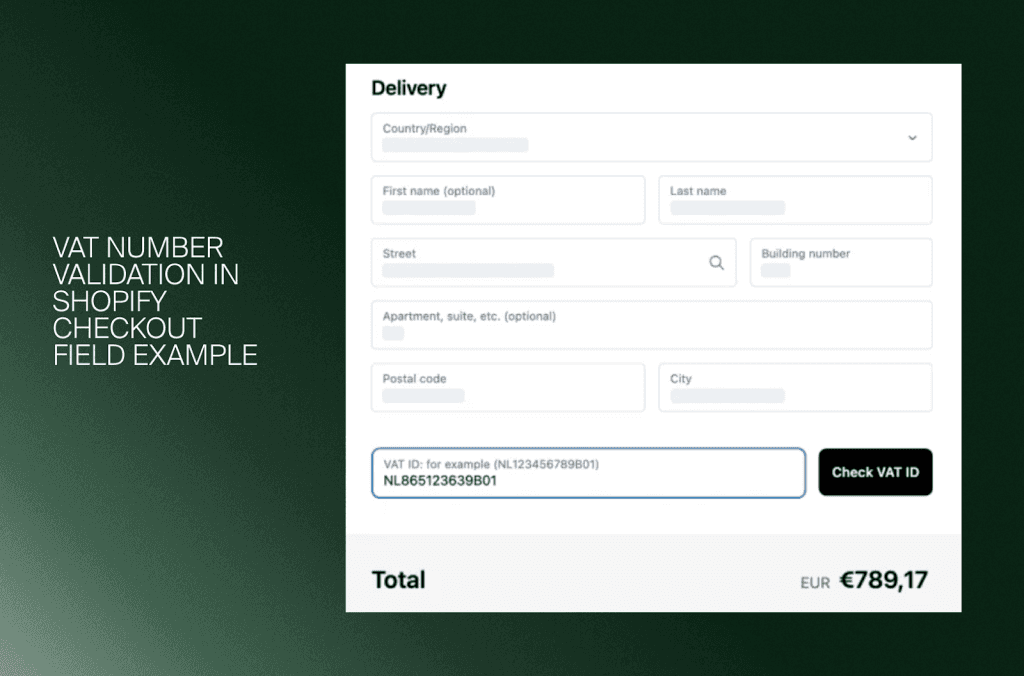
When the number is valid and the order meets reverse charge criteria, VAT is removed before payment is completed. The customer then becomes responsible for reporting and paying VAT through their own tax return.
Here is what changes in practice.
1. VAT numbers are validated automatically
When a customer enters a VAT number:
The system checks formatting and validity at the time of entry
The VAT number is stored in the customer profile for future orders
If left empty, that data state is also saved
This reduces manual verification steps but does not eliminate the need for operational oversight.
2. Reverse charge can be applied automatically
If eligibility conditions are met:
VAT is removed from the order at checkout
The order total updates in real time
The VAT invoice includes the required reverse charge statement
This moves reverse charge logic from back-office correction to front-end automation.
3. The feature is tied to Shopify Tax
VAT number validation in Shopify checkout is available only to stores using Shopify Tax in the EU or UK. It is not a generic checkout customization.
It currently supports:
Guest checkout
Shop Pay checkout
It does not support:
B2B-specific checkout flows
Merchants using separate B2B storefront logic should review how this aligns with their current setup.
This update shifts VAT handling from a reactive accounting adjustment to a structured checkout configuration. To configure it correctly, merchants must understand exactly when the reverse charge exemption applies and when it does not. That eligibility logic depends primarily on fulfillment location.
How reverse charge eligibility works in VAT number validation in Shopify checkout
Enabling VAT number validation in Shopify checkout does not mean every order with a valid VAT number becomes tax exempt. The reverse charge exemption applies only under specific cross-border conditions.
The key rule is simple: eligibility is determined by the fulfillment location country, not by the store address. If the fulfillment setup is incorrect, the exemption will not apply even if the VAT number is valid.
Below is how the logic works.
When the reverse charge exemption applies
The exemption applies in the following scenarios:
EU → EU shipments, where the destination country differs from the fulfillment location country
EU → UK shipments
In these cases, if the customer provides a valid VAT number during checkout and VAT number validation in Shopify checkout confirms its validity, VAT is removed from the order.
The customer is then responsible for declaring and paying VAT through their own tax return under the reverse charge mechanism.
Example
Fulfillment location: France
Shipping destination: Ireland
Customer provides a valid Irish VAT number
Result: Reverse charge exemption applies. VAT is removed at checkout.
When the reverse charge exemption does not apply
The exemption does not apply in the following cases:
UK → EU shipments
UK → UK shipments
Even if a valid VAT number is entered, VAT will not be removed if the shipment originates from the UK in these scenarios. This distinction is important for merchants operating fulfillment centers both inside and outside the EU.
Fulfillment location determines everything
One of the most important aspects of VAT number validation in Shopify checkout is that the logic is based on the country of the fulfillment location assigned to the order.
This means:
Changing the fulfillment location can change VAT treatment
Inventory routing decisions can affect tax calculation
Multi-location setups require careful configuration
If a merchant has multiple fulfillment locations, assigning an order to a different warehouse may alter reverse charge eligibility. An active fulfillment location within the EU is required for the EU to EU or EU to UK exemption to function correctly.
VAT configuration is therefore directly tied to operational logistics.
Understanding this eligibility framework is critical before activating VAT number validation in Shopify checkout. The next step is reviewing how to enable the feature correctly inside Shopify and what additional settings must be configured alongside it.
How to enable VAT number validation in Shopify checkout

Activating VAT number validation in Shopify checkout requires more than adding a visible VAT field. The feature is available only to merchants who use Shopify Tax to calculate tax in the European Union or the United Kingdom.
Before enabling it, confirm that:
Shopify Tax is active for EU or UK tax calculation
At least one fulfillment location is located within the European Union
Without these conditions, VAT number validation in Shopify checkout will not function as intended.
Step 1: Enable the Company VAT number field
Go to your checkout settings and locate the Company VAT number field.
You have two options:
Don’t include
Optional
The default setting is Don’t include.
If you sell to businesses in the EU or UK and want customers to enter their VAT number during checkout, change the setting to Optional. This allows VAT number validation in Shopify checkout to run automatically when the customer enters a number.
If you do not sell to businesses in these regions, leaving the field disabled prevents unnecessary friction at checkout.
Step 2: Activate VAT invoices
If you enable the VAT number field, you should also enable VAT invoices.
When the reverse charge exemption applies:
VAT is removed from the order
The VAT invoice includes the required statement:
Reverse Charge Mechanism: Recipient responsible for VAT
Without VAT invoices enabled, documentation may not reflect the exemption correctly. This is especially important for compliance and audit readiness.
Step 3: Test cross-border scenarios
After configuration, test different shipping combinations:
EU fulfillment → different EU country
EU fulfillment → UK
UK fulfillment → EU
UK fulfillment → UK
VAT number validation in Shopify checkout will only remove VAT when the eligibility conditions are met. Testing ensures the tax logic behaves as expected before going live.
Enabling the feature is technically simple. The complexity lies in how fulfillment routing, tax settings, and invoice generation interact.
Before relying fully on automation, merchants should also understand how validation works at a data level and what fraud risks remain. That is where we go next.
Validation logic, data storage, and fraud considerations
VAT number validation in Shopify checkout automatically checks the format and validity of VAT numbers entered during checkout. If valid, the number is stored in the customer profile for future orders. If the field is left empty, that state is also saved.
When eligibility conditions are met, VAT is removed automatically and the reverse charge mechanism applies.
However, validation confirms structural validity only. It does not guarantee that the customer is authorized to use the VAT number. If there is a mismatch between VAT number, company name, or country, merchants should verify independently via the EU VIES validation service before fulfillment.
Shopify may also apply rate limits in cases of repeated validation attempts to protect against potential abuse. Automation reduces manual work, but fraud checks remain the merchant’s responsibility.
Multi-location fulfillment and its impact on VAT logic
Reverse charge eligibility in VAT number validation in Shopify checkout is determined by the country of the assigned fulfillment location.
This means:
EU fulfillment → different EU country can qualify
EU fulfillment → UK can qualify
UK fulfillment → EU does not qualify
UK fulfillment → UK does not qualify
Changing the fulfillment location can change VAT treatment. For merchants operating multiple warehouses, fulfillment routing directly affects tax logic.
An active EU fulfillment location is required for EU cross-border reverse charge scenarios. VAT configuration must therefore align with inventory and routing strategy.
Strategic implications for cross-border B2B growth
By embedding VAT number validation into checkout, Shopify shifts reverse charge handling from post-order correction to real-time automation.
For cross-border B2B merchants, this results in:
Reduced manual invoice adjustments
Fewer tax-related support cases
More consistent VAT documentation
Scalable compliance as EU operations expand
VAT number validation in Shopify checkout simplifies execution, but configuration quality determines whether the system works reliably across regions.
Configuring VAT number validation in Shopify checkout correctly
Activating VAT number validation in Shopify checkout takes only a few settings changes. Configuring it correctly requires a broader review.
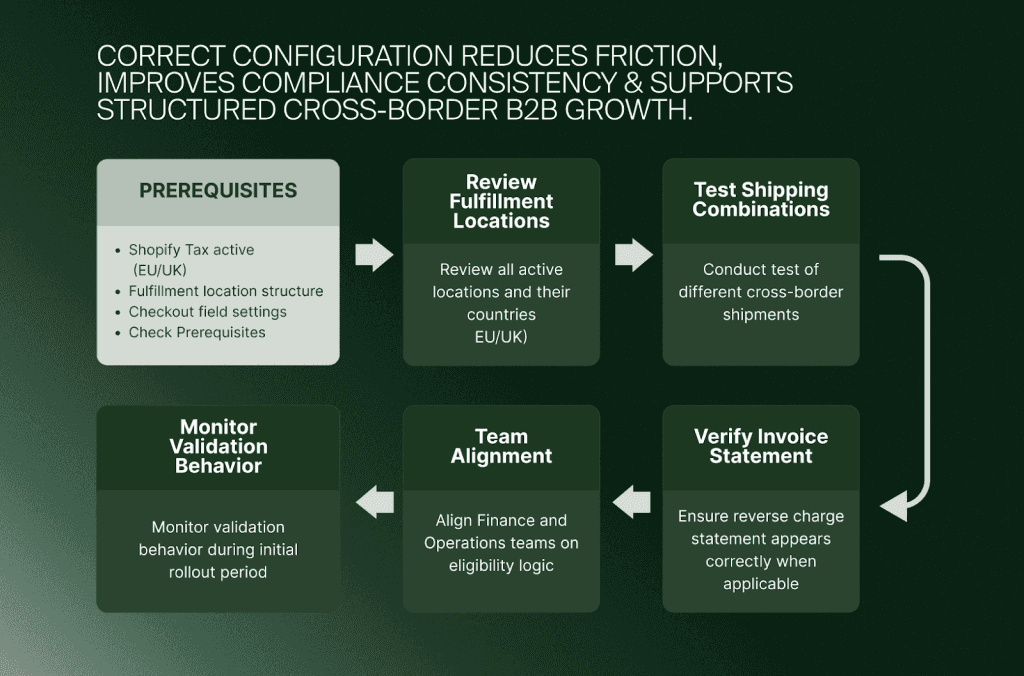
Merchants should assess three areas together:
Shopify Tax configuration
Checkout field settings
Fulfillment location structure
If these elements are not aligned, reverse charge logic may not behave as expected.
For example, enabling the Company VAT number field without verifying fulfillment routing can result in inconsistent VAT treatment. Similarly, activating VAT validation without enabling VAT invoices can lead to incomplete documentation.
A structured configuration process typically includes:
Reviewing all active fulfillment locations and their countries
Testing cross-border shipping combinations
Verifying invoice statements when reverse charge applies
Aligning finance and operations teams on eligibility logic
Monitoring validation behavior during early rollout
For merchants operating at scale, VAT logic should not be treated as a single toggle in checkout settings. It should be part of a broader Shopify tax and operational architecture.
At Flatline, VAT configuration is often addressed within larger Shopify optimization or migration projects. As a Shopify-focused agency, we help merchants evaluate tax setup alongside fulfillment logic and checkout structure. You can explore our approach to Shopify implementations and optimization on our Shopify development services page and see how it connects with broader eCommerce strategy decisions.
Conclusion: preparing your checkout for structured VAT handling
The introduction of VAT number validation in Shopify checkout formalizes reverse charge handling within the transaction flow. For merchants using Shopify Tax in the EU or UK, this update automates VAT number validation, applies exemptions under defined conditions, and stores VAT data for future transactions.
However, eligibility depends on fulfillment location. Validation confirms structural correctness, not authorization. And operational routing decisions directly affect tax outcomes.
Merchants planning to enable VAT number validation in Shopify checkout should:
Review fulfillment setup
Confirm Shopify Tax configuration
Activate VAT invoices
Test cross-border scenarios
Maintain fraud verification procedures
As a Shopify Platinum Partner, Flatline works with merchants to align tax configuration, checkout logic, and fulfillment architecture within a broader eCommerce strategy. That alignment work sits at the core of our ecommerce agency practice, connecting tax and checkout decisions to the wider storefront build. VAT automation delivers real value when it is configured within a structured operational framework.
Related articles