How to set up Shopify multi-currency and local prices per market

By Robin Laseur

Ever browsed an online store and seen prices in a currency you didn’t recognize? Chances are, you hesitated, maybe even left. Now flip the script: your store, your products, shown in your customer’s local currency, without them lifting a finger. That’s a massive trust signal.
Shopify makes it possible to offer a tailored, localized shopping experience that feels native no matter where your customer is. From activating multi-currency options to adjusting prices per market, setting this up isn’t just about going global; it’s about being local at scale.
In this guide, we’ll walk you through how to set up Shopify multi currency and localized pricing step by step, so you can expand with confidence and convert with clarity.
Why multi-currency and localized pricing matter
Selling globally means more than just offering international shipping. It means speaking the language of your customers, including the one printed on their banknotes.
Displaying prices in local currency builds instant credibility. It eliminates the mental math, eases purchasing decisions, and makes your brand feel more familiar, more trustworthy. For new customers, that first impression can be the difference between a completed checkout and an abandoned cart.
Take the example of Moonglow Jewelry, a brand that reached customers in 84 countries within 45 days of launching on Shopify. Their secret? Implementing Shopify’s multi-currency feature to show prices in the shopper’s native currency, right from the start. The result: higher conversions, smoother experiences, and more loyal customers.
And it’s not just about visibility, localized pricing lets you tailor prices based on regional market conditions. Adjusting for local competition, purchasing power, and demand gives your store a competitive edge without changing your global brand strategy.
Whether you’re selling to another country, the ability to customize pricing by location is no longer a bonus. It’s the baseline.
Step-by-step: How to set up Shopify multi currency
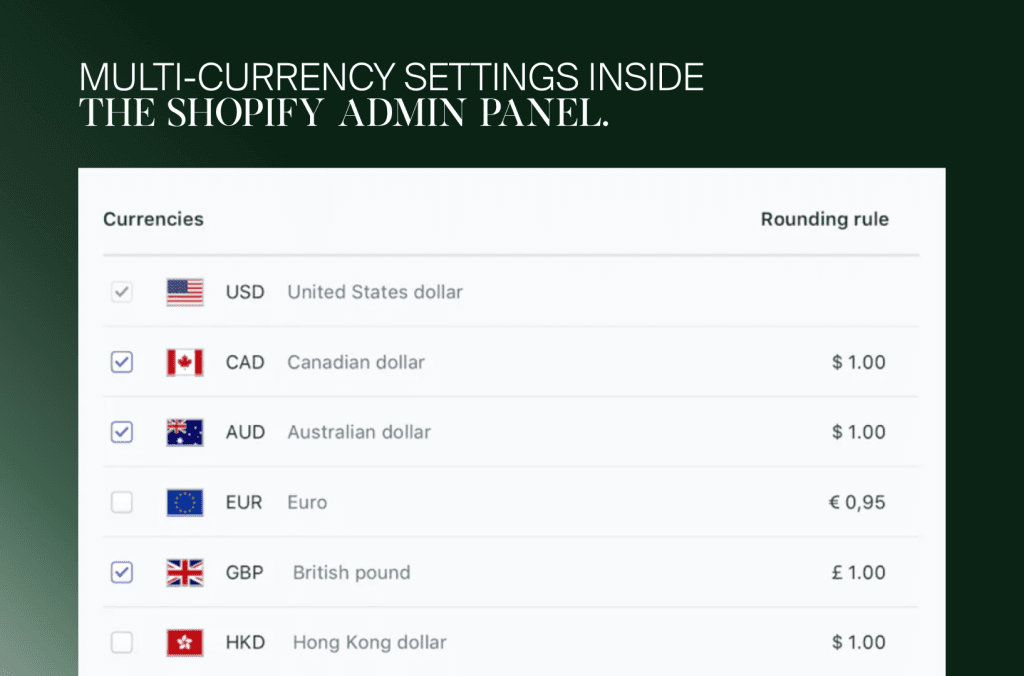
Setting up multi-currency in Shopify is straightforward, but it requires enabling the right features and testing them properly. Below is a practical breakdown of the entire process:
Step 1: Enable Shopify Payments
To start accepting multiple currencies, you must first enable Shopify Payments. This is Shopify’s built-in payment gateway, and it’s the foundation for offering localized pricing.
How to enable:
Go to your Shopify admin panel
Click on Settings > Payments
Under Shopify Payments, click Set up, and follow the instructions
Step 2: Add supported currencies
Once Shopify Payments is enabled, you can select which currencies to offer.
Navigate to Settings > Markets
Click your primary market or create a new one
Under Products and pricing, click Manage
Scroll to Currencies, and enable the currencies you’d like to support
Shopify supports 130+ global currencies, so you can match your offerings to your target market.
Learn more on Shopify’s currency setup guide.
Step 3: Customize how prices display
You can personalize how each currency appears to your customers:
Round prices (e.g., $19.99 instead $20.00)
Show currency symbols or use ISO codes (USD, EUR, etc.)
Add price adjustments (e.g., increase EU prices by 5%)
This is all configurable via Markets > Preferences > Pricing.
Step 4: Add a currency selector
Your visitors need a way to switch currencies manually, especially if automatic geolocation doesn’t catch their preference. There are two options:
Add a currency selector via your theme (some Shopify themes support this out-of-the-box)
Or, install a dedicated currency switcher app from the Shopify App Store
For custom implementation, you can reference this snippet from Shopify’s developer docs:
<form method=”post” action=”/localization”>
<select name=”country_code”>
{% for country in localization.available_countries %}
<option value=”{{ country.code }}” {% if country.code == localization.country.code %}selected{% endif %}>
{{ country.name }} ({{ country.currency.iso_code }})
</option>
{% endfor %}
</select>
<input type=”submit” value=”Change”>
</form>
Step 5: Test everything
Use a VPN or Shopify’s preview feature in the Markets settings to simulate shopping from different countries. Make sure:
The right currency is showing by default
The checkout reflects the selected currency
Prices update correctly when switching between locations
There are no errors during switching (tweaks, lagging)
Localized pricing strategies: Going beyond conversion rates
Currency conversion is just the first step. If you’re serious about scaling internationally, you’ll need to take a more nuanced approach to pricing one that aligns with local market realities.
This is where localized pricing strategies come into play.
Rather than applying a flat exchange rate across the board, localized pricing allows you to factor in things like:
Local purchasing power
Competitive landscape
Regional taxes and shipping costs
Consumer expectations and behavior
Let’s say your store sells skincare products at €25 in Europe. That same price might feel premium in Southeast Asia or appear underpriced in high-income markets like Norway or Switzerland. Localized pricing gives you the flexibility to adjust your perceived value, without eroding brand equity.
Why it matters
Consumers compare prices. If your price feels off even slightly, it can create friction. And friction kills conversions.
According to Shopify’s Enterprise report on global commerce, brands that implement market-sensitive pricing see not only increased conversion rates but also stronger retention in local markets.
How to build localized pricing strategies in Shopify
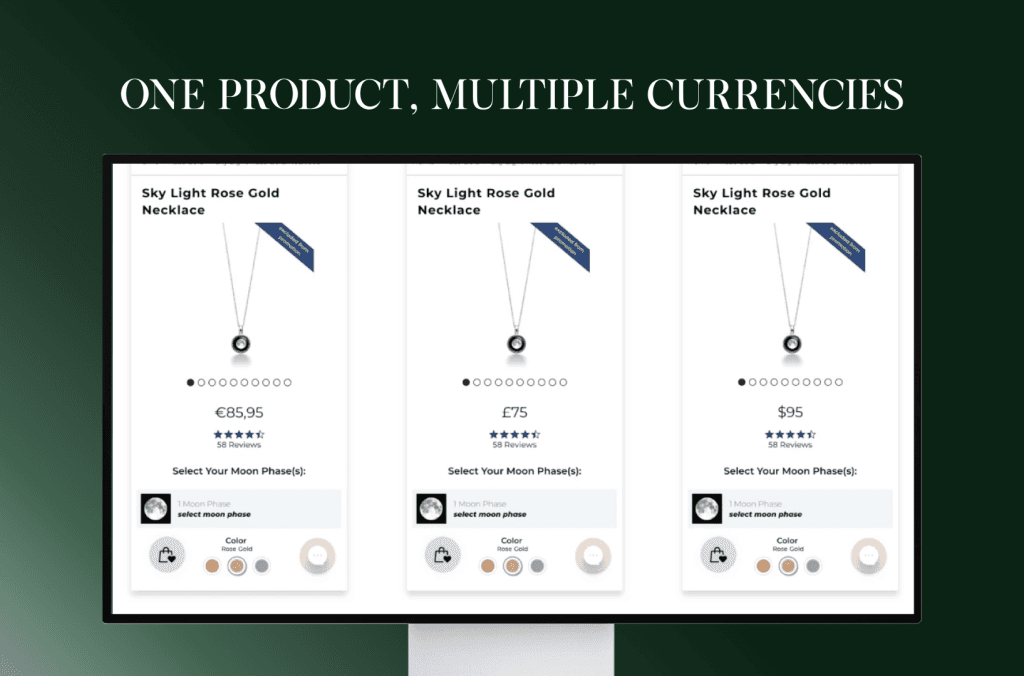
Shopify makes it easier than ever to create localized pricing structures using Shopify Markets and price lists (for Shopify Plus merchants).
For Shopify and Advanced plans:
Use price adjustments via Shopify Markets to increase or decrease product prices by a percentage per market. Learn more about price adjustments in Shopify.
Example: Add a +15% price adjustment for Australia to account for GST and higher logistics costs.
For Shopify Plus:
Use custom price lists per market for greater control. You can set exact prices for every product and variant in a local currency, no math or conversions required.
Perfect for launching pricing campaigns tailored to holidays, sales seasons, or region-specific offers. Learn how to create custom international pricing with Shopify Plus
Bonus tip:
Use apps like Dexter or Prisync to monitor competitor pricing in each region. You’ll get real-time insights and can adjust your pricing to stay ahead of the local competition.
Localizing your storefront (beyond language)
Translation is just the first step. True localization means adapting your entire storefront, visually, culturally, and strategically to fit the market you’re selling in. For European markets like the Netherlands, Germany, or France, this often makes the difference between “just visiting” and actually converting.
1. Create region-specific content
Shopify Markets and landing page builders like Shogun make it easier than ever to create tailored versions of your site. In the Netherlands, for example:
Product visuals featuring urban bike culture or minimalist design resonate more.
Dutch shoppers often look for detailed product specs and sustainability claims, so highlight those benefits.
Use region-specific testimonials (e.g. Dutch reviews, local influencers, or verified bol.com sellers).
Localization isn’t just translation, it’s cultural fluency.
2. Align promotions with local calendars
Black Friday matters, but so does King’s Day (Koningsdag), Boxing Day, or Sinterklaas. Localize your campaigns by:
Timing promotions around local holidays and key shopping periods
Tapping into local pricing psychology (e.g. Dutch consumers are known for being price-savvy)
Offering payment methods preferred locally (iDEAL in the Netherlands, Klarna in Germany, etc.)
With Shopify Markets, these custom campaigns can be assigned per region, without affecting your global strategy.
3. Use dynamic content by region
Want your French audience to see a different hero banner than your Dutch one? You can do that. With apps like GeoIP Country Redirect, or advanced tools like Shopify Functions, you can:
Swap homepage content per country
Show local shipping options or time estimates (very relevant in markets with high delivery expectations like NL or DE)
Highlight different top-sellers depending on the region
This dynamic approach feels personal and performs better.
4. Prioritize mobile performance
In much of Europe, especially in urban hubs like Amsterdam or Berlin, mobile-first shopping is the default. Make sure that your localized store:
Loads quickly through EU-based CDNs
Works perfectly in Dutch, French, and German (Tip: watch out for long word structures)
Maintains consistent UX across all devices and language versions
Localization is about creating familiarity and frictionless experiences.
Currency, payment, and checkout localization
Seeing prices in a foreign currency can feel like walking into a store and realizing you left your wallet at home. You hesitate, you do mental math, and most likely you bounce. That’s exactly why Shopify’s localization engine does more than just translate language. It also ensures your prices, payment methods, and checkout flows feel local, wherever your customer is.
Currency auto-detection, powered by Shopify Markets
With Shopify Markets, you don’t have to set up dozens of different storefronts to sell globally. The system automatically detects a visitor’s location using their IP address and browser settings, and adjusts the display currency accordingly. No coding. No guesswork. Just seamless currency localization.
So if someone in Amsterdam visits your store, they’ll see prices in EUR by default. A customer in Zürich? CHF. London? GBP. And yes, it works across over 130 supported currencies. For devs and store owners who want more control, Shopify also supports manual currency configuration via Shopify Payments settings.
Enable local payment methods (and increase conversions)
Pricing is one thing, but payments are where global shoppers either convert or drop out. A study by Stripe showed that failure to offer local payment options is one of the top reasons for cart abandonment in cross-border ecommerce. Shopify lets you enable region-specific payment methods based on the shopper’s country. For example:
🇳🇱 In the Netherlands, you can offer iDEAL, the country’s most-used online payment method.
🇩🇪 In Germany, consider adding SOFORT and Giropay.
🇫🇷 In France? Cartes Bancaires is a must.
All of these can be configured within the Shopify Payments dashboard or via Shopify’s supported third-party gateways. This isn’t just a nice UX bonus. It’s a conversion booster.
Localized checkout that speaks your customer’s language
Shopify’s checkout has come a long way and Shopify Plus users can now localize every inch of the checkout flow. From language and currency to address formatting, tax display, and even shipping options. Shopify adapts the checkout experience automatically based on user location.
⚠️ Heads-up for devs: checkout.liquid is being deprecated.
Starting August 28, 2025, it will no longer be supported for Information, Shipping, Payment, Thank You, and Order Status pages. Now’s the time to migrate to Checkout Extensibility, a more modular, scalable, and upgrade-safe way to customize Shopify Checkout.
This change is part of Shopify’s push to make checkout faster, more secure, and easier to maintain, especially for high-volume, global stores.
Testing, analytics & compliance across markets
Setting up multi-currency and localized pricing is only half the journey. To truly succeed in global ecommerce, you need to test rigorously, track what’s working, and stay on the right side of international laws, especially in complex markets like the EU.
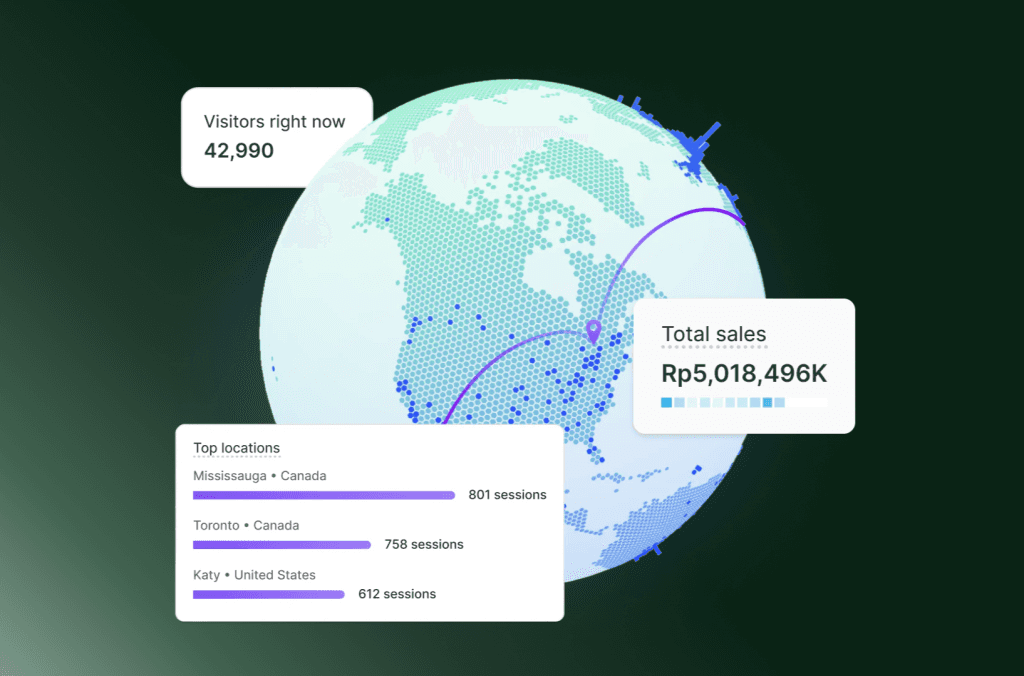
Test from multiple locations and devices
Once your store is configured for multiple currencies and localized experiences, test it like a shopper would. Use VPN tools like TunnelBear or browser-based geo testing extensions to view your store from different countries. Check:
Currency conversion accuracy
Product availability by market
Localized pricing rules
Translation completeness
Checkout flow for international shoppers
This kind of QA ensures your localized experience holds up in real-world use.
Use analytics to evaluate localization performance
Localization should improve engagement and conversions, but only if it’s done right. Use tools like Shopify Analytics, GA4, or Hotjar to track:
Bounce rates by location
Average order value by currency
Cart abandonment rate in specific markets
Time on site and page scroll depth for localized content
These insights will show whether your efforts are translating into tangible results and where optimizations are needed.
Don’t overlook compliance, especially for EU markets
When you sell cross-border, compliance isn’t optional. In Europe, for example, you’ll need to ensure your store supports:
VAT-inclusive pricing (Shopify Markets supports this)
Transparent tax display at checkout
Local consumer rights, like 14-day return windows
Proper cookie consent and GDPR-compliant tracking
For VAT and tax configuration, Shopify has native tools (read more here), or you can integrate apps like Quaderno, TaxJar, or Avalara for advanced use cases.
Iterate based on data
Localization isn’t static. Use the data you collect to experiment with:
Market-specific promotions
Language or tone adjustments
Price sensitivity A/B tests
Alternate payment methods by region
Keep a pulse on what works and evolve quickly. This approach is especially crucial if you’re selling in culturally diverse and price-sensitive regions like Europe.
Conclusion: Winning in the Era of global commerce
Global ecommerce is no longer just about shipping internationally, but meeting customers where they are, in every sense of the word. From accurate currency conversion and localized pricing strategies, to custom product catalogs and compliance-ready checkouts, Shopify provides the infrastructure to help brands thrive across borders.
But the tech is only one piece of the puzzle. Winning globally requires a mindset shift: think local, act fast, and iterate relentlessly. That mindset shift is where a dedicated ecommerce agency adds the most value, turning multi-currency settings into a pricing and localization strategy that actually holds up market by market. At Flatline, we help ambitious ecommerce brands scale internationally without losing sight of what makes them unique. Whether you’re just exploring Shopify Markets or planning to overhaul your cross-border strategy, we’re here to guide you every step of the way. Ready to go global the smart way? Let’s talk!
Related articles


F.A.Q.

Does Shopify support multiple currencies?
Yes. With Shopify Markets and Shopify Payments, your store can show prices and accept payments in 130 currencies (September 2026). With automatic redirection switched on, visitors land in the market that matches their location, so a shopper in Amsterdam sees euros and one in Zurich sees Swiss francs. A country selector lets customers switch themselves, and refunds are paid in the same currency.
How do I set up multi-currency on Shopify?
Activate Shopify Payments first. Then go to Markets in your Shopify admin, create a market, add countries and choose its currency. Decide between automatic or manual exchange rates, switch on rounding, and adjust prices per market with a catalog if needed. Add a country selector through your theme, and test every market with the preview and test orders before going live.
Do you need Shopify Payments to sell in multiple currencies?
To let customers pay in their own currency, yes: Shopify requires Shopify Payments or Adyen. With another payment provider, customers in every market pay in your store's default currency. Setting fixed prices or percentage adjustments per market works on every plan without Shopify Payments, but showing local currencies and manual exchange rates do need it. Check local payment methods, such as iDEAL, per market as well.
Can you set different prices per country in Shopify?
Yes, on every Shopify plan. Through catalogs in Shopify Markets you can raise or lower prices per market by a percentage, or set fixed prices per product and variant in local currency, independent of exchange rates. This used to require price lists on Shopify Plus. With fixed prices you carry the currency risk, and they do not change automatically when you update your base prices.
Why should you show prices in local currency?
Because it removes friction at the moment of purchase. Shoppers do not have to convert prices in their head, the store feels familiar and trustworthy, and there are fewer surprises at checkout. That matters most for first-time customers, where an unfamiliar currency can be the difference between a completed order and an abandoned cart. Combined with local payment methods, it lifts conversion in new markets.