How to set up iDEAL on Shopify

By Robin Laseur
If you live in the Netherlands, you must be familiar with iDEAL payment.
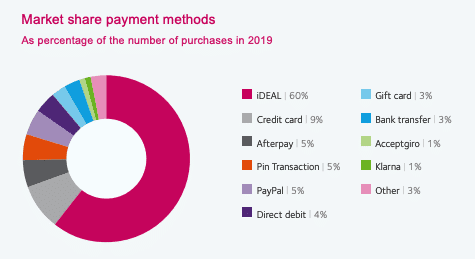
For those who don't know iDEAL yet, iDEAL is an online payment method that enables consumers to pay online through their own bank. Approximately 60% of the payments are done by iDEAL. There's no difference in the payment method preference between online and offline, so your Shopify store also needs to accept iDEAL payment.
Can you pay with iDEAL on Shopify?
Yes, you can pay with iDEAL on the Shopify store. However, you need to be aware of a few things before activating iDEAL.
Firstly, your customers must be located in the Netherlands and make payments in euros when they use iDEAL. Therefore, you need to make sure that your store accepts EUR. You can set this up in Shopify Payments' multi-currency settings if you are not selling to the Netherlands yet. And, you need to deactivate any conflicting payment settings before accepting iDEAL payment.
Activation of iDEAL
You must set up your Shopify Payments account before iDEAL can be activated there. The iDEAL is automatically linked to your store and accessible to your consumers after you set up Shopify Payments.
https://youtu.be/Mm0aph765_g
How to set up Shopify Payments
How the payments with iDEAL work on Shopify
The money is transferred to you on your subsequent payout when a customer places an order and pays with iDEAL. You can get more information about being paid with Shopify payment from Shopify Payments pay periods.
The processing fee that Shopify Payments charged you is not returned if you cancel a transaction that was handled by iDEAL. 180 days after the initial charge, iDEAL payments may be returned.
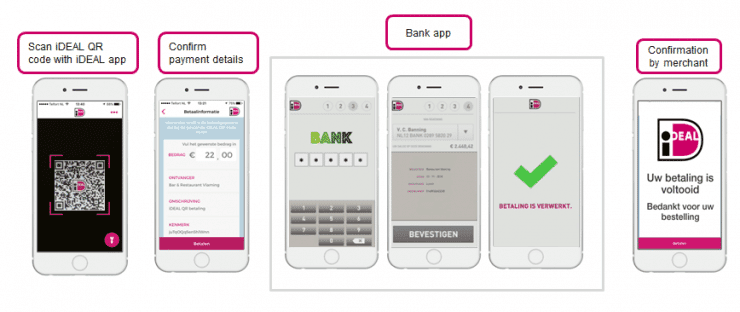
If your customer wants to use iDEAL to pay, then they select it in the checkout. After iDEAL is selected, your customer is prompted to select their bank account. The customer is then redirected to their bank account to complete the purchase.
Related articles


