Accessible Checkout Isn’t Only Compliance: How EAA Fixes Lift Shopify Conversion

By Robin Laseur

The European Accessibility Act reached most teams as a line on a legal roadmap. A directive, a deadline, a conformance standard to document. Owned by legal or engineering, scoped as a cost, sorted somewhere between a cookie banner and a privacy review. That framing is accurate. It is also why the most useful thing about the EAA tends to go unnoticed. The work it asks for, item for item, is a checkout conversion worklist a growth team would have written on its own.
This piece is about that overlap. Not the legal text, which is well covered elsewhere, but the part almost no one connects: the specific changes the Act requires at checkout are the same changes that move conversion for every shopper, disabled or not.
Why the EAA landed on most teams as a compliance cost
The European Accessibility Act (Directive (EU) 2019/882) requires digital products and services sold to EU consumers, e-commerce checkouts included, to be usable by people with disabilities. Enforcement began on 28 June 2025. The technical benchmark is EN 301 549, which incorporates WCAG 2.1 Level AA for web content. It applies by market access rather than company location, so a brand serving EU customers is in scope wherever it is headquartered, with a narrow exemption for microenterprises under ten staff and under €2 million in turnover.
Translated to a checkout, the requirements are concrete and unglamorous. Form fields carry programmatic labels. Errors are announced clearly, not signalled by colour alone. The entire flow works by keyboard, in a logical order, with a visible indicator of where focus sits. Text meets contrast minimums and stays readable when resized. None of that is exotic. It is a list of small structural facts about how a checkout is built.
Here is why the list gets filed where it does. It arrives written in the language of obligation: a standard to conform to, a statement to publish, a date attached. That language routes it to the people who handle obligations. They scope it, document it, and close it. The team that owns conversion rarely reads the same document, so the one group that would recognise every item on it as a friction point it has been fighting for years never sees the list at all.
The same fixes the law requires are the friction your checkout already has
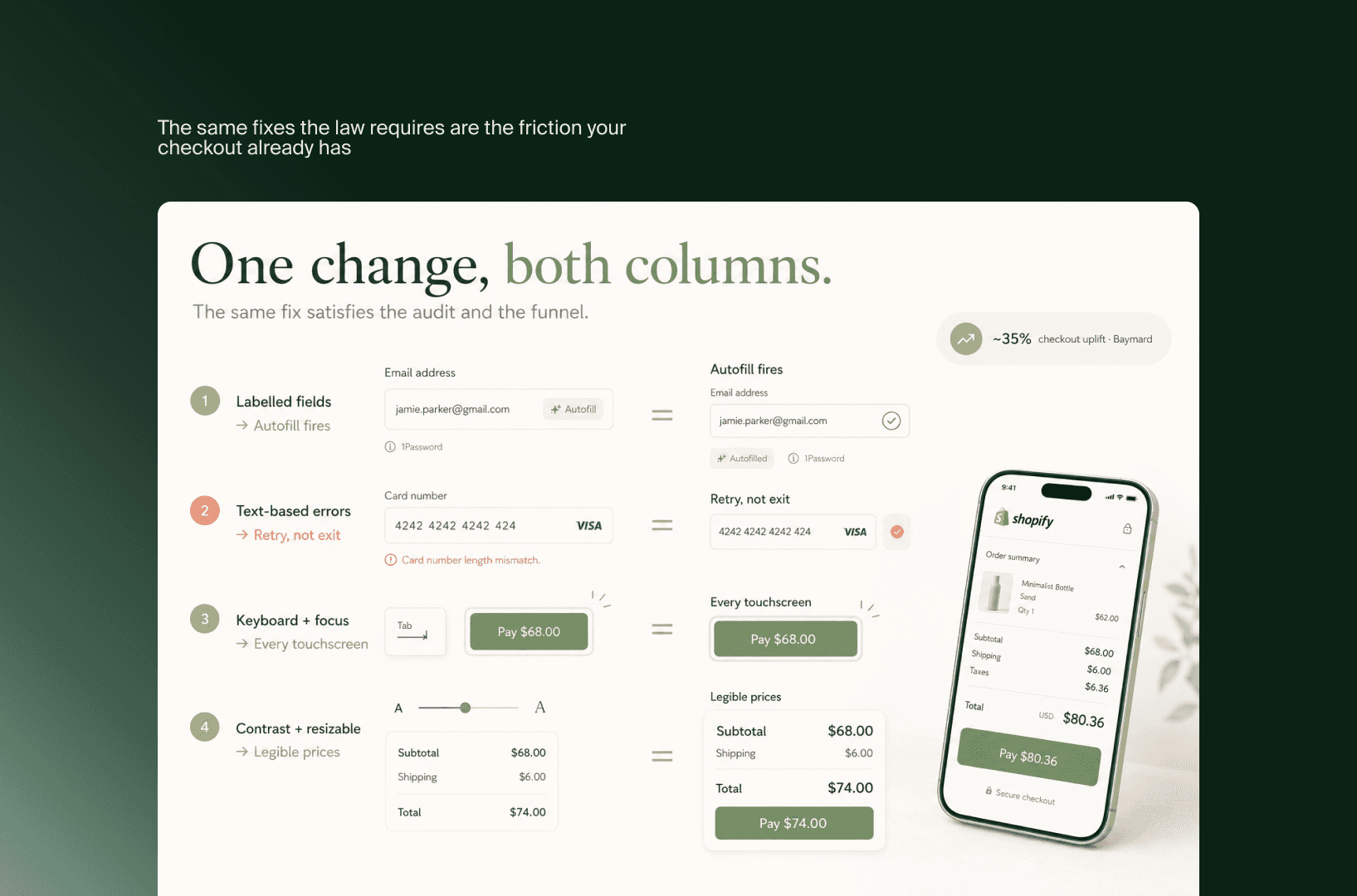
Set the legal document aside and read the checkout-conversion literature next to it. The match is almost embarrassing. The Baymard Institute, which has run usability testing on e-commerce checkouts for over a decade, finds that a typical large-scale store can lift checkout conversion by roughly 35% by clearing UX problems, and the specific problems it lists keep landing on the same elements the EAA names. Two fields of work, two vocabularies, one checkout. Here is where they meet.
A field the browser can read is a field that autofills. The Act requires form inputs to carry proper programmatic labels so a screen reader can announce them. The same label is what lets a browser, a password manager, and mobile autofill recognise the field and complete it. An unlabelled “Address line 2” is invisible to assistive technology and to autofill alike. Label it correctly and you have helped a screen-reader user and shaved seconds off every mobile checkout, which is most of your checkouts.
An error that names the problem turns an exit into a retry. Accessible error handling means the page states what went wrong, in text, tied to the field, not a lone red outline. That is also the single most recoverable moment in any checkout. A shopper who is told “card number is 15 digits, this looks like 16” fixes it and continues. A shopper who sees a field glow red with no explanation guesses twice and leaves. The accessible version and the converting version are the same version.
A checkout that works without a mouse works on every shaky touchscreen. Full keyboard operability with a logical focus order is a hard EAA requirement, written for people who cannot use a pointer. It is also what makes a checkout survive the real conditions most purchases happen in: a thumb on a cracked screen, a trackpad on a train, a tab key in a hurry. When focus order is sane and visible, nobody loses their place, disabled or not.
Readable text serves the shopper with money and ageing eyes. Contrast minimums and resizable text exist so low-vision users can read the page. They also keep your total, your shipping cost, and your pay button legible on a bright phone outdoors, and for the older shoppers who carry a disproportionate share of disposable income. Faint grey-on-white “subtotal” rows fail an audit and lose a reader in the same stroke.
None of these is a trade-off between compliance and conversion. Each is one change that satisfies both columns at once. That is the part the separate guides miss: the accessible checkout and the high-converting checkout are not cousins. They are the same build, described by two teams who never compared notes.
Why compliance and conversion describe the same checkout and never meet
If the overlap is this clean, the obvious question is why it stays hidden. The answer is not that the connection is subtle. It is that two different groups hold the two halves, and nothing in a normal org chart puts them in the same room looking at the same form.
Compliance lives with legal and engineering. Its language is conformance: EN 301 549, WCAG 2.1 AA, success criteria, an accessibility statement to publish. Its definition of done is a documented audit and a closed ticket. Conversion lives with growth, marketing, and CRO. Its language is friction: drop-off, field-level abandonment, error recovery, completion rate. Its definition of done is a number that went up. Both teams spend their week describing the same checkout DOM. Neither uses a word the other searches for.
That vocabulary split is the whole mechanism. Run an accessibility audit and you get a report organised by success criterion: “3.3.1 Error Identification, fails.” Run a CRO analysis and you get a report organised by funnel step: “42% abandon at payment, unclear validation.” Those two sentences are about the identical broken error message. Filed in different systems, owned by different leads, prioritised on different roadmaps, they never resolve into one task. The fix gets done twice, or argued over twice, or done once and credited to whichever team happened to ship it.
There is a quieter reason too. Accessibility work, framed purely as compliance, competes for budget as a cost to be minimised, so it gets the smallest version that clears the standard. The same work, framed as conversion, competes as an investment with a return, so it gets resourced properly. Identical changes, opposite budget treatment, decided entirely by which column they were written in. The store that sees only the legal column does the minimum and books it as expense. The store that sees both columns does the same work and books it as growth.
What an accessible-and-converting checkout actually looks like
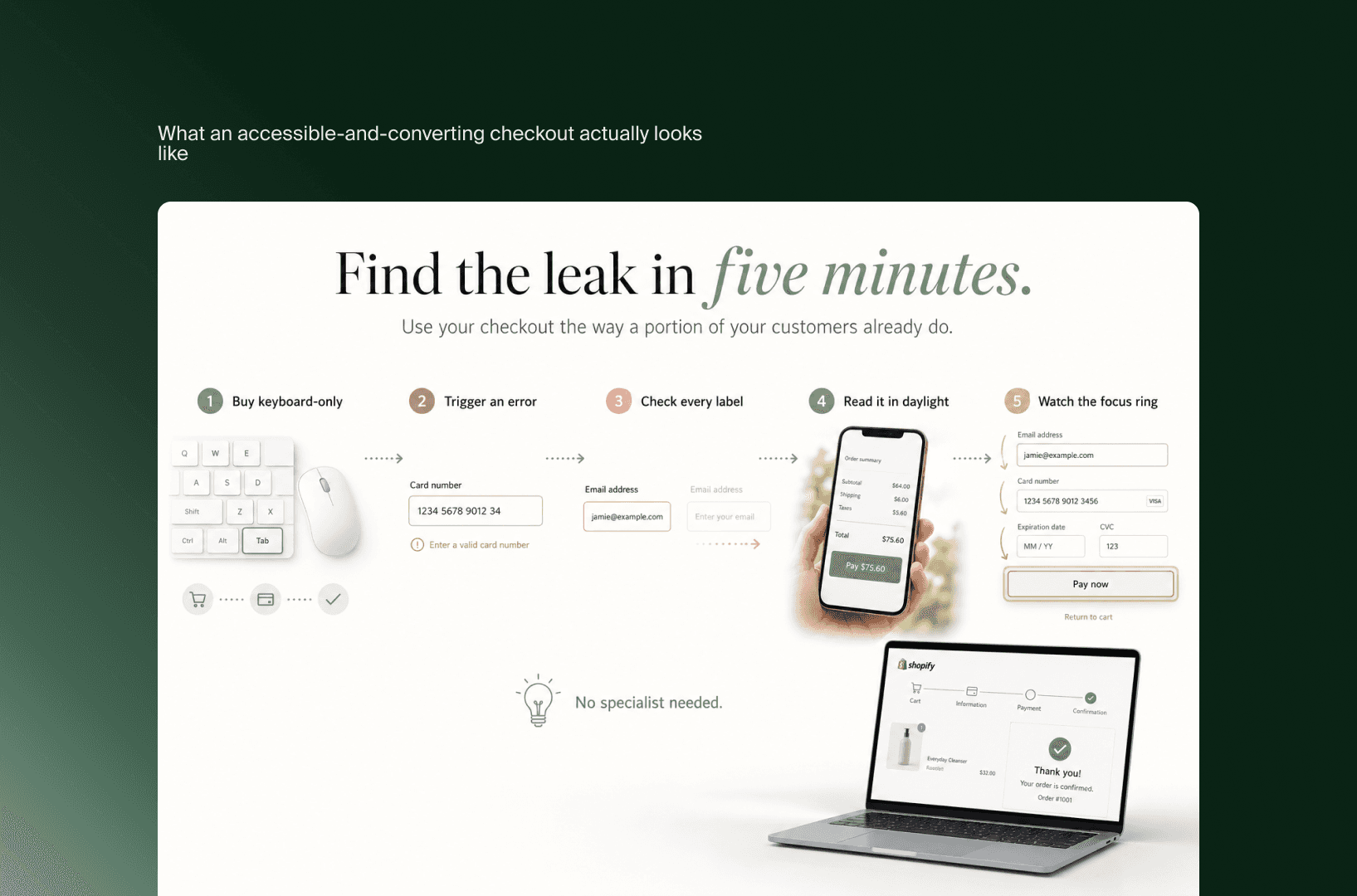
You do not need an audit tool to get a first read on where your own checkout sits. The fastest version is to use it the way a portion of your customers already do, and watch where it stops being usable. None of this is the full remediation work, which is its own job. It is the sense-check that tells you whether the overlap above is theoretical or sitting in your funnel right now.
Buy something on your own store using only the keyboard. Put the mouse away, start at the cart, and Tab through to a completed order. If you reach a step you cannot operate, or you lose track of where focus is, you have found a barrier and a friction point in the same place. This single walkthrough surfaces more than most automated scans.
Trigger an error on purpose and read what the checkout tells you. Enter a wrong card length or a missing field, then look at the response as if you had no idea what went wrong. If the page only changes a colour, the message is failing a screen reader and a hurried buyer at once. If it states the problem in words, next to the field, you are in good shape on both counts.
Check that every field announces what it is. Click into each input and confirm there is a real, persistent label, not a placeholder that vanishes the moment you type. Persistent labels are a conformance requirement and the thing that lets autofill and password managers do their work.
Read the checkout on a phone in daylight. Look at the subtotal, the shipping line, and the primary button. If any of them are faint grey on white or shrink awkwardly when text is enlarged, they are hard for low-vision shoppers and for anyone outdoors, which on mobile is a lot of people.
Watch the focus indicator as you move. Tab through and confirm you can always see which element is active. A visible focus ring keeps assistive-technology users oriented and stops sighted keyboard users from clicking the wrong control.
Each of these takes a few minutes and needs no specialist. What they give you is a map of where your checkout is quietly costing you completed orders, expressed in a way both the accessibility lead and the growth lead can act on, because for once they are looking at the same screen.
The deadline, reframed as a conversion project
Put the two halves back together and the EAA stops looking like an addition to the roadmap. It did not create new work. It described, in legal language, work the conversion roadmap should have prioritised on its own merits. The deadline simply forced the list to the surface and attached a date to it.
That reframe changes who should hold the pen. Read as compliance, the project competes for the smallest budget that clears the standard, and accessibility becomes a layer bolted onto a finished checkout. Read as conversion, the same project earns proper resourcing, and accessibility becomes part of how the checkout is built in the first place. The second version is cheaper over time and converts better, because structure designed in from the start does not need to be retrofitted around. It is the difference between a checkout that passes and a checkout that performs, built from one set of changes either way.
For brands operating in the EU, this is the more useful way to hold it. The standard is now simply the floor, the baseline every store in the market shares. The advantage goes to the teams that treat that floor as a conversion brief rather than a certificate to file, building the checkout standards-native instead of patching it later. That is the same discipline a considered Web Design build starts from, where labelled fields, sane focus order, and legible contrast are part of the foundation rather than a remediation pass.
None of this dismisses the compliance reality. The obligation is real and worth meeting cleanly. The point is narrower and more practical: meeting it through the conversion lens gets you the same conformance plus the revenue, while meeting it through the legal lens alone leaves the revenue on the table. The work is identical. Only the framing, and the result, differ.
Frequently asked questions
What does the EAA require for an e-commerce checkout?
At a checkout level, the Act requires the flow to be operable by people with disabilities, which in practice means properly labelled form fields, errors communicated in text rather than colour alone, full keyboard operation in a logical order with a visible focus indicator, and text that meets contrast minimums and stays readable when resized. The technical benchmark is EN 301 549, which incorporates WCAG 2.1 Level AA for web content.
Does the EAA apply to my store if I am not based in the EU?
Yes, if you sell to EU consumers. The Act applies by market access, not by where a company is headquartered, so a brand serving EU customers is in scope wherever it operates. A narrow exemption exists for microenterprises with fewer than ten staff and under €2 million in annual turnover, though those businesses are still encouraged to meet the requirements.
When did the EAA take effect?
Enforcement began on 28 June 2025. The directive was adopted in 2019 and transposed into national law across member states ahead of that date. Some national transpositions allow a transition period for services that already existed before enforcement, but new products and services were expected to meet the requirements from June 2025.
Is WCAG the same as EAA compliance?
Not quite, but they are closely linked. The EAA sets the legal obligation; EN 301 549 is the technical standard referenced for conformance, and it incorporates WCAG 2.1 Level AA for web content. Meeting WCAG 2.1 AA satisfies the core web requirements, though EN 301 549 adds further requirements for non-web software and documents.
Do accessibility fixes actually help conversion, or just compliance?
Both, because they are the same fixes. Labelled fields enable autofill, clear error states recover abandoned checkouts, keyboard operability serves every shopper on a touchscreen or in a hurry, and readable contrast keeps your prices and buttons legible. Usability research on checkouts independently identifies these same elements as friction points worth fixing, regardless of any legal requirement.
Key takeaways
The EAA arrived as a legal task, but the worklist it produces is, item for item, a checkout conversion worklist.
The Act’s core checkout requirements (labelled fields, text-based error states, keyboard operability with visible focus, readable contrast) each remove friction for every shopper, not only those with disabilities.
Compliance and conversion describe the same checkout in different vocabularies, owned by different teams, which is why the overlap stays invisible.
The framing decides the outcome: read as compliance, the work gets the minimum budget; read as conversion, the same work earns proper resourcing and returns revenue.
For EU brands, the standard is now the floor. The advantage goes to teams that build standards-native rather than patch later.
The accessibility backlog and the conversion backlog, for most Shopify stores, are the same document filed under two names. One is written in the language of obligation and the other in the language of growth, but they point at the same form fields, the same error messages, the same path from cart to confirmation. The teams that notice this get conformance and conversion from one set of work. The teams that do not pay for the work once and collect only half of what it was worth. When EAA compliance lands on your roadmap, our Shopify Plus agency can scope the checkout fixes as a conversion project instead of a legal one, so the same budget does both jobs. Save this for the next time accessibility comes up as a legal line item, and bring the conversion lens into that conversation before the scope gets set.
Related articles


F.A.Q.

What does the EAA require for an e-commerce checkout?
At a checkout level, the Act requires the flow to be operable by people with disabilities, which in practice means properly labelled form fields, errors communicated in text rather than colour alone, full keyboard operation in a logical order with a visible focus indicator, and text that meets contrast minimums and stays readable when resized. The technical benchmark is EN 301 549, which incorporates WCAG 2.1 Level AA for web content.
Does the EAA apply to my store if I am not based in the EU?
Yes, if you sell to EU consumers. The Act applies by market access, not by where a company is headquartered, so a brand serving EU customers is in scope wherever it operates. A narrow exemption exists for microenterprises with fewer than ten staff and under €2 million in annual turnover, though those businesses are still encouraged to meet the requirements.
When did the EAA take effect?
Enforcement began on 28 June 2025. The directive was adopted in 2019 and transposed into national law across member states ahead of that date. Some national transpositions allow a transition period for services that already existed before enforcement, but new products and services were expected to meet the requirements from June 2025.
Is WCAG the same as EAA compliance?
Not quite, but they are closely linked. The EAA sets the legal obligation; EN 301 549 is the technical standard referenced for conformance, and it incorporates WCAG 2.1 Level AA for web content. Meeting WCAG 2.1 AA satisfies the core web requirements, though EN 301 549 adds further requirements for non-web software and documents.
Do accessibility fixes actually help conversion, or just compliance?
Both, because they are the same fixes. Labelled fields enable autofill, clear error states recover abandoned checkouts, keyboard operability serves every shopper on a touchscreen or in a hurry, and readable contrast keeps your prices and buttons legible. Usability research on checkouts independently identifies these same elements as friction points worth fixing, regardless of any legal requirement.