Signs your site needs a rebuild, not a repaint: a pre-spend checklist

By Robin Laseur

The signs a website needs a rebuild are rarely visual. A dated-looking site can be structurally sound, and a polished-looking one can be quietly unmaintainable, which makes appearance the least reliable signal of all. The signals worth checking before anyone approves a budget are structural and operational: what the platform blocks, what the team cannot change without a developer, and what each change now costs in risk. This is the pre-spend checklist for telling a genuine rebuild from a problem a lighter project would fix, with a way to verify each signal yourself and a rule for reading the result.
It matters because a rebuild is the most expensive of the three common interventions, and the one most often approved on the wrong evidence. Teams look at a tired-looking site and reach for a rebuild when a refresh would do, or approve a redesign that repaints a foundation that was the actual problem, and either way the money is spent and the real issue survives. The checklist below is built to prevent that, by making you verify that each signal is structural before you count it, so the decision rests on how the site is built and maintained rather than how it looks on the day someone got frustrated with it.
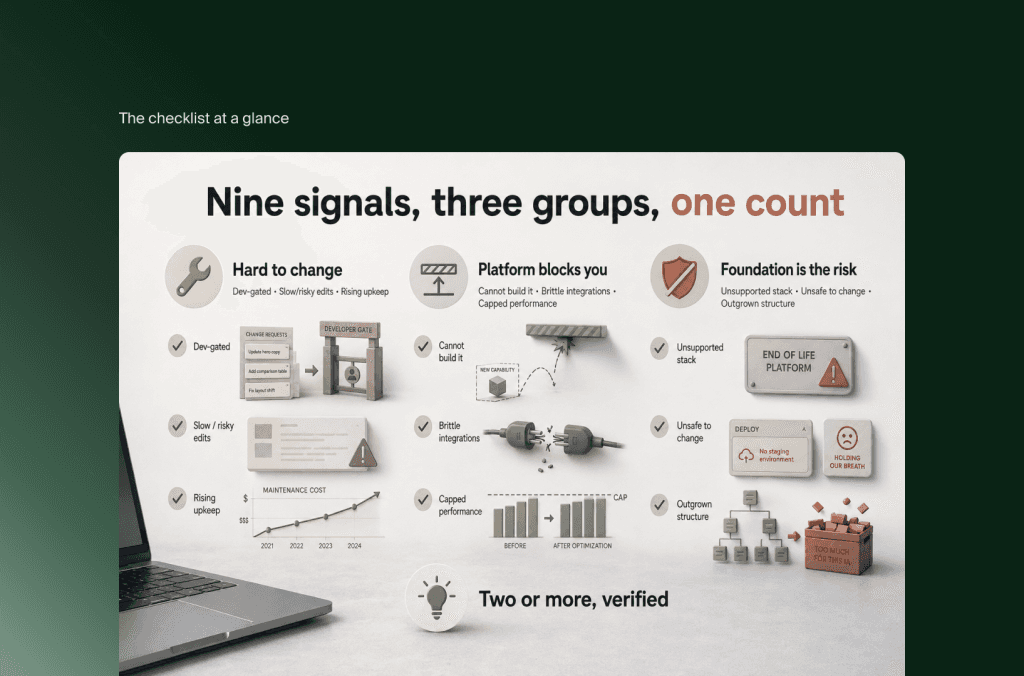
The checklist at a glance
Run through these nine signals in three groups. The detail and the how-to-verify for each follows below; this is the scannable version.
Change and maintenance signals: routine changes require a developer; simple changes are slow or carry breakage risk; maintenance cost is rising rather than steady.
Platform and capability signals: you cannot build what the business needs; integrations are brittle or break on updates; performance problems survive a genuine optimisation pass.
Structural and risk signals: the platform or framework is unsupported or insecure; no one can change the site safely; the business has outgrown the site’s structure, not just its look.
The reading rule, in short: count only the signals you can verify as structural. Two or more is a strong case for a rebuild, and a few of them are decisive on their own. Zero or one usually points to a refresh or a redesign instead. The interpretation section at the end walks through the edge cases.
When the site has become hard to change
The first group is about the cost of change, because a foundation that resists routine updates is a foundation working against the business daily, whatever it looks like.
Routine changes require a developer. If updating copy, swapping an image, or publishing a new page cannot be done by the marketing team and has to be queued for a developer, the build is gating work it should not gate. To verify: ask when a non-developer last edited a live page unaided. If the honest answer is “they cannot,” or “only certain pages,” the site is developer-gated at a level that a rebuild is often the cleanest way to fix.

Simple changes are slow or carry breakage risk. On a sound foundation, a small change is small. If a minor edit reliably takes days, needs testing across unrelated pages, or has a history of breaking something elsewhere, the structure is fragile. To verify: look at the last five change requests and time them from ask to live, and note any that broke something unexpected. A pattern of small changes behaving like large ones is a structural signal, not a scheduling one.
Maintenance cost is rising rather than steady. A healthy site costs a roughly steady amount to keep running. If the monthly maintenance and the effort to keep it stable climb year over year, the foundation is decaying and you are paying interest on it. To verify: compare what it cost to maintain the site this year against two years ago. A clear upward curve, more patching, more firefighting, more “it broke again,” means the base itself is the cost driver.
When the platform blocks the business
The second group is about capability: whether the platform can do what the business now needs, or whether it has become the ceiling.
You cannot build what the business needs. The clearest platform signal is a list of things you wanted to do and could not, not because of budget, but because the platform would not allow it. To verify: write down the last three capabilities the business asked for and did not get. If the blocker was the platform rather than the timeline, the platform is constraining strategy, which is a rebuild-grade problem. The useful test is whether your developer can say “yes, we can do that” to reasonable requests without wincing; if the answer is routinely no, the foundation has run out of room.
Integrations are brittle or break on updates. A modern site connects to other systems, a CRM, a commerce backend, analytics, and those connections should hold. If integrations break whenever something updates, or if connecting a new tool is treated as a major project every time, the architecture is not built for it. To verify: check how many times in the past year an integration broke on its own, and how long the last new integration took to wire in. Recurring breakage is an architectural signal.
Performance problems survive a genuine optimisation pass. This is the signal most often misread, because slowness looks visual and gets blamed on design. The distinction that matters: a site that is slow because of unoptimised images or bloated scripts can be fixed without a rebuild, while a site that is still slow after a real optimisation pass is slow because of how it is built. To verify: have someone do a proper optimisation round, images, caching, scripts, and re-measure. If performance stays capped afterwards, the constraint is architectural, and that is a foundation problem rather than a presentational one.
When the foundation itself is the risk
The third group is about risk that lives in the base of the site, where the consequences are largest and the least visible from the front end.
The platform or framework is unsupported or insecure. If the CMS, framework, or core dependencies no longer receive security updates, or the site runs on a version that is past end of life, you are exposed and the exposure grows with time. To verify: confirm whether every core component of the stack still receives active security support. A no here is one of the signals that is decisive on its own, because patching around an unsupported base costs more over time than replacing it and leaves a risk you cannot fully close.
No one can change the site safely. A foundation you cannot change with confidence is a foundation that has already partly given out. The tells are an undocumented codebase, the original builder no longer reachable, and no staging environment where changes can be tested before they hit the live site. To verify: ask whether a change can be tested somewhere safe before going live, and whether anyone currently on hand understands how the site is built. If deployment is a held breath, that is a structural risk regardless of appearance.
The business has outgrown the site’s structure. Sometimes nothing is technically broken, but the business has changed shape, new services, new audiences, a different model, and the site’s structure cannot express it. New content types, a meaningfully different sitemap, or sections the current information architecture cannot hold are the signs. To verify: sketch the site the business needs now and compare its structure to what exists; if the gap is structural rather than cosmetic, you are closer to a rebuild, and a foundation built to carry the next few years is what closes it. A rebrand alone does not qualify here; a genuine change in what the site has to do does.
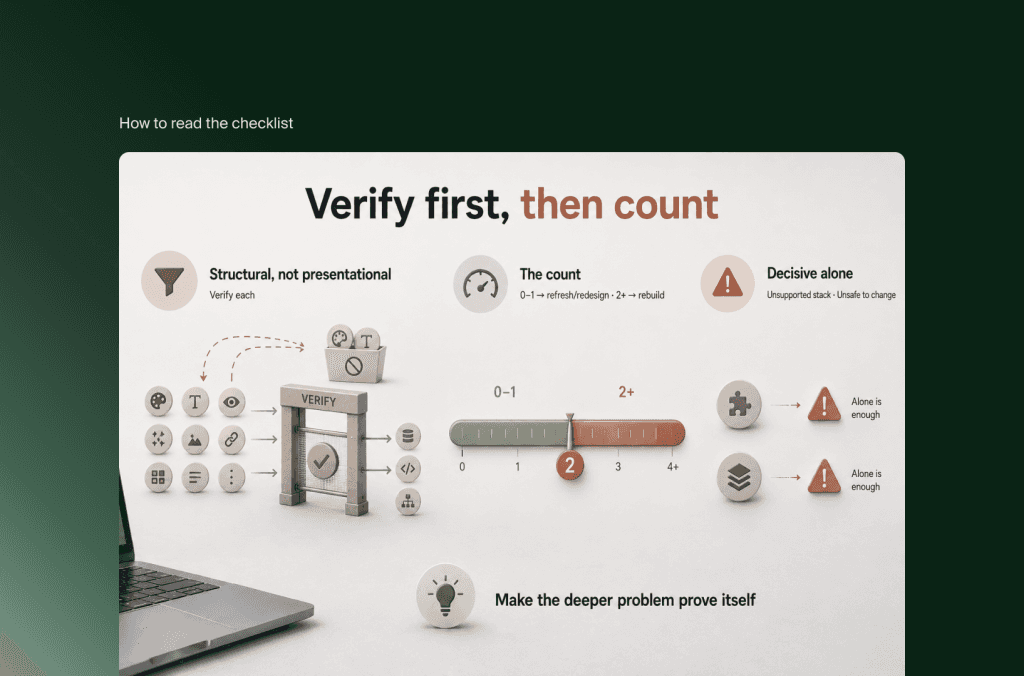
How to read the checklist
Before counting anything, apply the one rule that keeps the checklist honest: verify that each signal is structural, not presentational. A site can look dated and be perfectly sound underneath, which is an appearance problem a refresh solves, and if the only real issues are how the site looks, that is a matter for current design and experience standards rather than a rebuild. Only signals you can trace to how the site is built and maintained belong in the count.
With that filter applied, the reading is straightforward. Zero or one verified structural signal usually means the honest answer is a refresh or a redesign, not a rebuild, and spending rebuild money would replace a foundation that was doing its job. Two or more verified structural signals make a strong case that the foundation itself is the constraint, and that a redesign on top of it would repaint a wall that is quietly cracking. A small number of signals are decisive even alone, an unsupported and insecure platform, or a site no one can change safely, because each is a standing risk that redesign work cannot touch. The wider point, which independent UX research at Nielsen Norman Group makes well, is that the big project should be chosen on evidence rather than frustration: many problems are isolated and fixable with something smaller, so the discipline is to make the deeper problem prove itself before you fund the deeper fix.
If two or more of these signals hold once you have verified them as structural, that is the point at which a scoping conversation earns its place, before a budget is set rather than after. Flatline works on exactly this line between a cosmetic problem and a structural one, as a Framer Enterprise Partner whose corporate-website work is grounded in what the foundation can actually carry rather than how the current site looks. If your checklist is pointing past a repaint, the next question is what a rebuild should be designed to survive, which is worth mapping deliberately before the work is scoped.
Frequently asked questions
What are the signs a website needs a rebuild?
The reliable signs are structural, not visual: routine changes require a developer, simple changes are slow or risky, maintenance cost is rising, the platform blocks what the business needs, integrations are brittle, performance stays capped after optimisation, the stack is unsupported or insecure, no one can change the site safely, and the business has outgrown the structure. Appearance is the least reliable signal, because a site can look dated and be sound, or look modern and be unmaintainable.
How do I know if I need a rebuild or just a redesign?
Check whether the problem is how the site looks and is organised, or how it is built. If the foundation is sound and the issue is visual or structural at the experience level, a refresh or redesign fits. If the platform blocks capability, changes are slow or risky, performance is capped by architecture, or the stack is unsupported, the foundation is the problem and a rebuild is the honest answer. Verify each signal is structural before counting it.
Does a slow or outdated-looking website need a rebuild?
Not necessarily. A dated look is an appearance problem a refresh solves, and slowness caused by unoptimised images or scripts can be fixed without a rebuild. Slowness only signals a rebuild when it survives a genuine optimisation pass, which means the constraint is in how the site is built rather than how it is configured. Test by optimising properly and re-measuring before treating speed as a structural signal.
How many signs justify a website rebuild?
Two or more signals you can verify as structural make a strong case for a rebuild. A few are decisive on their own, such as an unsupported or insecure platform, or a site no one can change safely, because those are standing risks a redesign cannot address. Zero or one usually points to a refresh or redesign instead. The count only means something after each signal has been checked as structural rather than cosmetic.
Will a website rebuild hurt SEO?
Only if the migration is handled carelessly. The main risk is changing URLs without mapping them, so the fix is to map every old URL to its new equivalent and set permanent (301) redirects, which pass most of the ranking signal to the new address. Preserve the pages that already rank, keep URL structure where you can, update internal links, and monitor search performance after launch. Handled properly, a rebuild usually helps rankings over time through cleaner structure and better performance.
Key takeaways
The signals that justify a rebuild are structural, not visual. A site can look dated and be sound, or look polished and be unmaintainable, so appearance is the least reliable signal.
Check three groups: whether the site has become hard to change, whether the platform blocks what the business needs, and whether the foundation itself is a standing risk.
Every signal has a self-check. Time your last five change requests, list the last three things you could not build, optimise and re-measure performance, and confirm whether the stack still gets security updates and whether changes can be tested safely.
Verify each signal is structural before counting it. Slowness that clears after optimisation, or a merely dated look, are refresh or redesign matters, not rebuild ones.
Two or more verified structural signals make a strong case for a rebuild, and an unsupported platform or an unchangeable site can be decisive alone. Zero or one usually means a lighter project is the honest answer.
A rebuild is the right call often enough that it should never be the default and never be the taboo. The way to know is not to look harder at the surface, which is where the least reliable evidence lives, but to check how the site behaves when you try to change it, extend it, and trust it. Run the nine signals, verify each as structural, and count. If the count is low, you have just saved yourself the cost of solving a problem you did not have. If it is high, you now have the evidence to scope the real one before anyone spends against a guess.
Related articles


