Shopify checkout extensibility: what non-Plus stores need to do before August 2026

By Robin Laseur

Most Shopify stores are carrying legacy checkout code that was added years ago and largely forgotten. A pixel pasted into Additional Scripts during a campaign. A custom Thank You page snippet from an agency handover. A GTM container injected by a developer who left two years ago. None of it is visible in the storefront. All of it is about to stop working.
On August 26, 2026, Shopify removed support for checkout.liquid, Additional Scripts, and script tags on Thank You and Order Status pages for every non-Plus store. There is no grace period. Shopify auto-upgrades your store, removes the legacy code, and your tracking goes dark without any warning on the day.
This is not a Shopify Plus story. That is the part many non-Plus merchants are still missing. Plus stores had their deadline in August 2025. The August 2026 date is specifically for Basic, Shopify, and Advanced plan stores, and it applies to every one of them regardless of size or revenue.
The hidden risk is almost never the checkout UI itself. Checkout keeps processing orders just fine. What breaks is the analytics layer underneath it, and that is where the commercial damage accumulates.
This article explains:
What Shopify checkout extensibility replaces and why Shopify made the change
Which customisations stop working on August 26, 2026
What actually breaks, and why tracking is usually the first casualty
How Shopify Pixels differ from additional scripts, and where that matters
The migration mistakes agencies already see in the field
If your store uses Google Ads tracking, a Meta pixel, or any post-purchase scripts, this is worth reading before August gets any closer.
What is Shopify checkout extensibility?
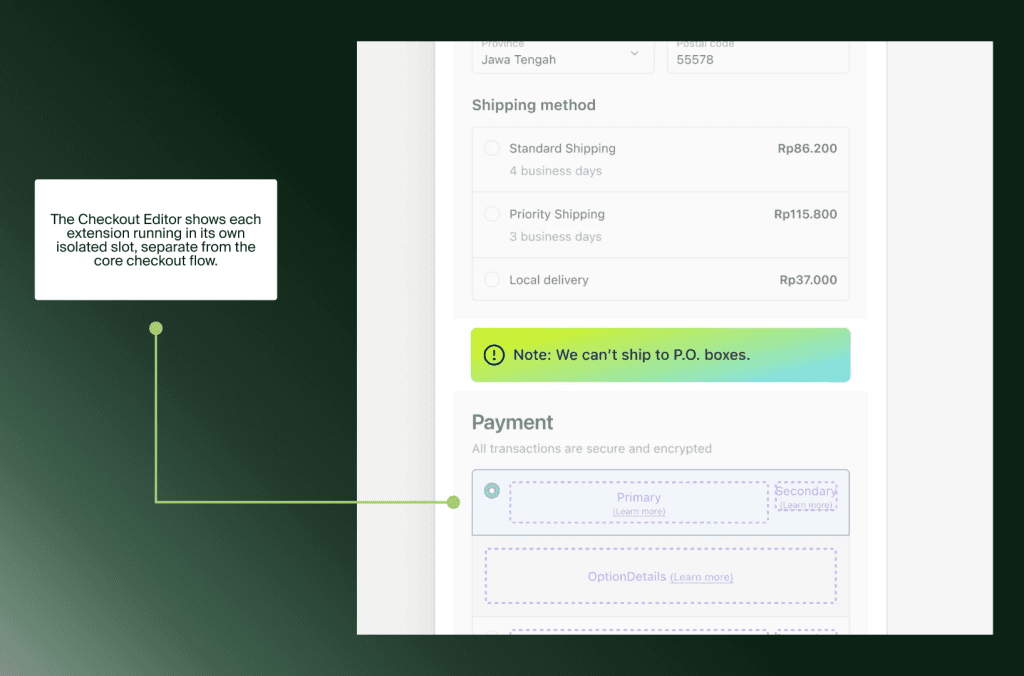
Checkout extensibility is the framework that replaced checkout.liquid as the only officially supported way to customize Shopify checkout. Instead of injecting arbitrary JavaScript directly into checkout pages, merchants now use a structured set of tools: Checkout UI Extensions for interface changes, Web Pixels for tracking, and Shopify Functions for discount and shipping logic.
The shift was driven by a real problem. The old model gave developers almost unlimited access to the checkout page, which led to tracking conflicts between apps, security vulnerabilities, and customisations that broke every time Shopify shipped a platform update. The new framework is sandboxed and upgrade-safe by design.
What it was | Legacy method | Extensibility replacement |
|---|---|---|
UI customisation | checkout.liquid | Checkout Editor + UI Extensions |
Tracking scripts | Additional Scripts field | Web Pixels via Customer Events |
Discount logic | Shopify Scripts (Ruby) | Shopify Functions (WebAssembly) |
Post-purchase pages | Script tags | Thank You + Order Status extensions |
Why non-Plus stores need to act before August 2026
Shopify rolled the deadline out in stages. Plus stores had to migrate their Thank You and Order Status pages by August 28, 2025. That deadline has passed. For Basic, Shopify, and Advanced plan stores, the cutoff is August 26, 2026.
There is also an earlier date to know: Shopify Scripts stop working on June 30, 2026. If your store uses Scripts for custom discount or shipping logic, that functionality disappears on July 1, before the main deadline.
The assumption that checkout extensibility is a Shopify Plus concern is one of the more persistent misconceptions among non-Plus merchants. Shopify’s official guidance is explicit: the August 26 deadline applies to every non-Plus store, and missing it means Shopify removes your legacy customisations automatically.
What breaks if you do nothing
The store keeps taking orders. Customers see nothing wrong. What breaks is invisible to the frontend and immediately damaging to the business layer.
The most common scripts sitting in Additional Scripts are Google Ads conversion tracking, Meta pixel purchase events, affiliate network scripts, and GTM containers. On August 26, every script in that field stops firing. No warning popup, no gradual sunset.
Google Ads campaigns stop receiving conversion signals, ROAS reporting collapses
Meta purchase events disappear from the Events Manager, retargeting audiences degrade
Affiliate platforms receive no data, affecting commission payouts
Post-purchase apps relying on script tags, upsell widgets, survey tools, loyalty triggers, stop working
The pattern that surfaces most often: ROAS drops steadily over several weeks. The marketing team assumes creative fatigue. The agency audits the ad account and finds nothing wrong. Nobody connects it to a missed migration deadline until someone checks Customer Events and sees the pixels have not fired since late August.
What makes this particularly costly is timing. August 26 lands roughly eight weeks before peak season. A store that misses the deadline and spends September diagnosing broken tracking has lost most of its pre-Q4 optimisation window, exactly when ad platform algorithms need clean conversion data to perform going into October and November.
Shopify Pixels versus additional scripts: the honest difference
Web Pixels run in a sandboxed iframe. This means they cannot access the DOM, cannot read third-party cookies, and do not share a dataLayer with the rest of the storefront. Standard GTM containers loaded inside the sandbox fail silently because the sandboxed iframe blocks the DOM access GTM relies on.
Google’s own documentation states explicitly that running Google tags inside Shopify’s Custom Pixel feature is not a supported implementation and data collection cannot be guaranteed. The recommended path is the Google and YouTube app for GA4 and Google Ads tracking.
There is a workaround some developers use: loading a GTM container inside a Custom Pixel, which technically runs it within the sandboxed environment. It works partially. Core signals like pageviews and purchase conversions may come through, but events that depend on DOM access or third-party cookies will not. Scroll tracking fires immediately because the iframe does not scroll. GTM Preview Mode does not work inside the sandbox, which makes debugging harder than it sounds.
For stores with simpler tracking needs, the official app pixels for Google, Meta, TikTok, and Klaviyo will handle most of what the old scripts were doing. For stores spending a meaningful budget on paid ads where attribution accuracy directly affects campaign optimization, server-side tracking through platforms like Elevar or Analyzify is worth evaluating. Server-side routes checkout events through a server rather than the browser, bypassing the sandbox entirely and delivering more reliable attribution across the full funnel.
How to audit your current setup
Start in Settings > Checkout in your Shopify admin. If there is a yellow warning banner, your store has deprecated scripts. Click Review Customisations to open the personalised upgrade report. Even without a banner, open the Additional Scripts field and document everything in it.
Then review your installed apps. Any app that interacts with the checkout or post-purchase pages needs to be confirmed as checkout extensibility-compatible. Check the developer’s documentation, not just the app listing. An installed app is not automatically a migrated one.
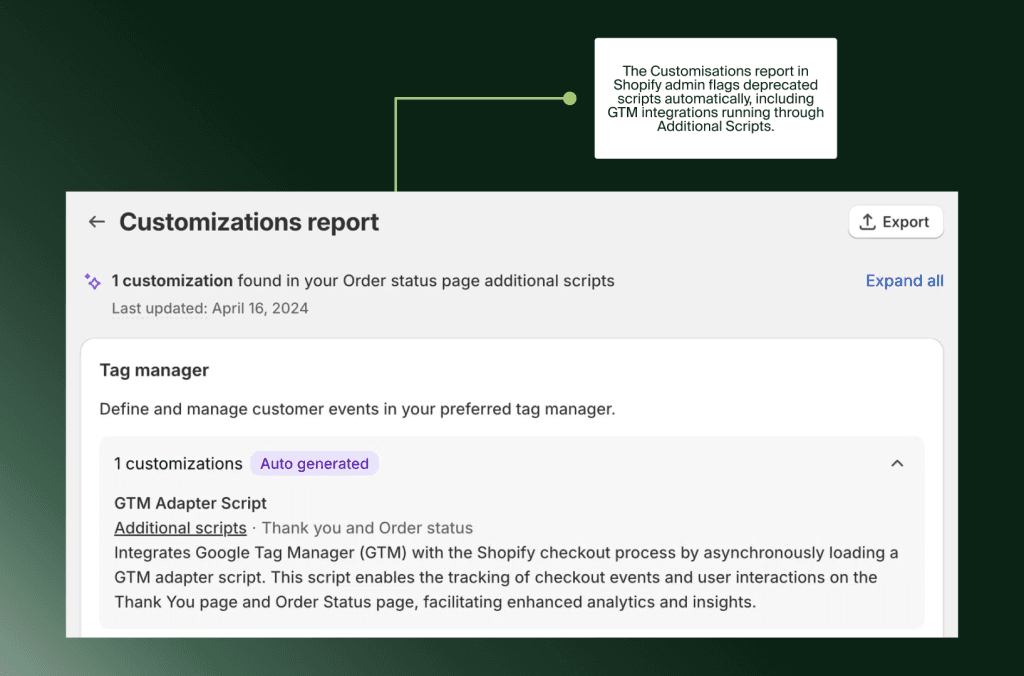
Finally, go through your tracking platforms one by one. For each one, confirm whether it is running through a dedicated app pixel in Customer Events or through a legacy script injection. Meta, Google Ads, TikTok, Klaviyo, and any affiliate tools all need to be checked individually.
Common migration mistakes
Assuming apps handle the migration automatically
App developers have been updating for checkout extensibility compatibility, but not all on the same timeline. Being installed does not mean being ready. Verify compatibility explicitly for every app touching your checkout or post-purchase flow.
Removing old scripts before confirming event parity
Keep the legacy Additional Scripts running in parallel with your new Web Pixels until you have confirmed comparable conversion volumes in Google Ads and Meta. Removing scripts before validating the new setup creates a data gap that is hard to diagnose retrospectively.
Testing only desktop
Mobile checkout flows behave differently inside the sandboxed environment. Test on actual mobile devices before declaring the migration complete.
Ignoring attribution discrepancies post-launch
Monitor Customer Events and cross-check ad platform conversions against Shopify orders for at least two weeks after migration. A discrepancy above 10 to 15 percent means something in the pixel configuration is not capturing events correctly.
What this upgrade means beyond the deadline
Stores on the new checkout framework benefit from customisations that survive future Shopify updates without manual maintenance, fewer app conflicts because extensions run in isolated environments, and access to newer Shopify features that are only available to extensibility-compatible stores.
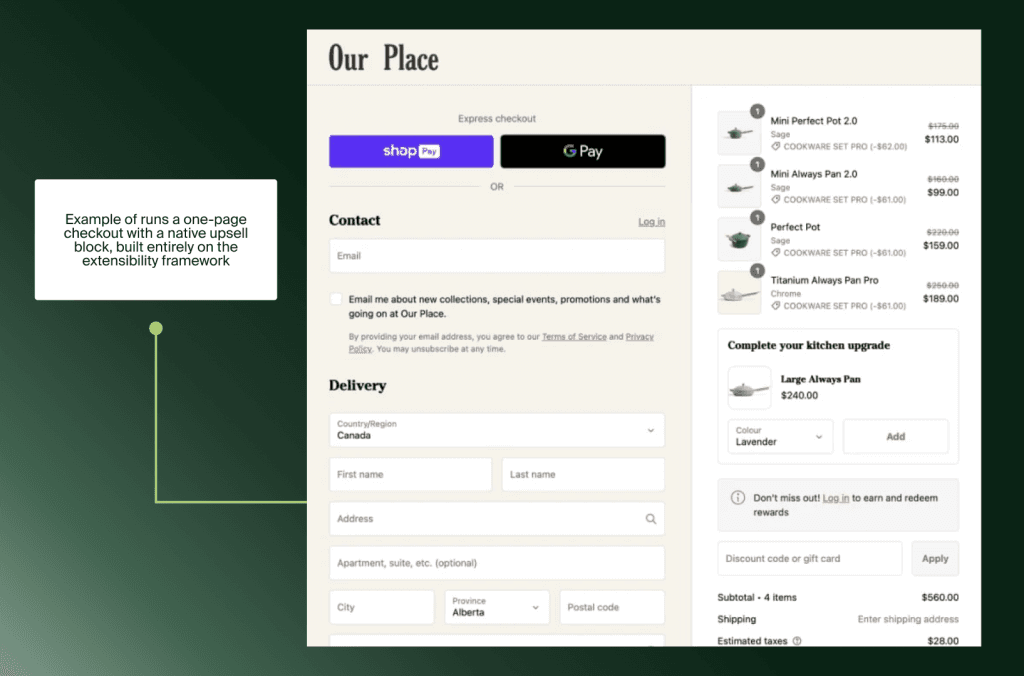
There is also a conversion argument. Research puts the one-page checkout at approximately 7.5% better conversion than the multi-step version. Migrating to checkout extensibility is a prerequisite for enabling that layout. Legacy customisations are not compatible with it.
If you are considering what Shopify Plus unlocks beyond the checkout migration, our Shopify Plus page covers when the upgrade makes commercial sense. For a deeper look at how the Customer Events framework works, the Shopify Customer Events blog is worth reading alongside this one.
Where to start
August 26, 2026 is close enough that starting the audit this week puts you in a comfortable position. Waiting until July means competing for developer time with every other store that also left it late.
Open Settings > Checkout, check the Additional Scripts field, and document what is in there. That audit takes an hour. It tells you exactly what needs to move and how complex the migration is likely to be.
If your store has accumulated several years of agency handovers and nobody is sure what is in the checkout anymore, get in touch with Flatline for a checkout audit before Shopify forces the transition.
Our ecommerce agency team pairs that audit with the broader checkout, performance, and conversion work most non-Plus stores need before peak season.
FAQ
Does checkout extensibility affect non-Plus stores?
Yes. The August 26, 2026 deadline applies to all non-Plus plans including Basic, Shopify, and Advanced. Shopify will auto-upgrade stores that have not migrated and remove all legacy checkout customisations in the process.
What happens to my Additional Scripts?
The Additional Scripts field is deprecated. After August 26, 2026, any JavaScript in that field stops firing. The replacement is Web Pixels in Settings > Customer Events. Each script needs to be migrated manually or replaced by an official app integration.
Can I still customize my Thank You page?
Yes, through the Checkout and Accounts Editor using app extensions. Standard customisations such as upsell blocks, custom messages, and loyalty prompts are available through compatible apps. Script-based customisations that are not rebuilt as extensions will be removed automatically.
How do I know if my store has deprecated scripts?
Go to Settings > Checkout. A yellow warning banner means your store has deprecated scripts. Click Review Customisations to see the full upgrade report. Even without a banner, check the Additional Scripts field directly.
Does Shopify Scripts deprecation affect non-Plus stores?
Yes. Shopify Scripts stop working on June 30, 2026, before the main August deadline. If your store uses Scripts for custom discount combinations, shipping rules, or payment customisations, those stop functioning on July 1. Note that custom Shopify Functions, the direct replacement, require a Shopify Plus plan. Non-Plus stores relying on Scripts need to evaluate their options well before the June cutoff.
What is the difference between Shopify Pixels and additional scripts?
Additional Scripts allowed raw JavaScript to run on checkout pages with full access to the DOM, cookies, and third-party data layers. Web Pixels run in a sandboxed iframe with strict security boundaries. They cannot access the DOM, cannot read third-party cookies, and do not share a dataLayer with the storefront. Most official tracking platforms have released compatible app pixels that work within these boundaries. For more complex tracking requirements, server-side tracking through tools like Elevar or Analyzify is the more reliable path.
Related articles


