Season 3/4: HubSpot Email Campaigns: manage and optimise responses

By Robin Laseur

Learn how to boost your email campaign’s effectiveness using HubSpot’s tools for tracking, optimising, and personalising your email strategies.

Introduction
Email marketing remains a cornerstone of successful digital marketing strategies. As businesses seek more refined analytics and automation capabilities, tools like the HubSpot Email Marketing become indispensable. The platform not only provides robust email marketing solutions but also integrates seamlessly with HubSpot CRM and HubSpot Marketing Automation, making it an ideal choice for comprehensive campaign management.
Email responses and their impact on your strategy
Understanding email responses is crucial for audience engagement and refining communication strategies. With HubSpot Marketing, businesses can monitor a plethora of metrics that reflect audience behaviour and preferences, which is essential for adhering to email marketing best practices. This data is fundamental not only for enhancing email deliverability but also for understanding which aspects of your emails capture attention and prompt action. By analysing trends over time, companies can identify what resonates most with their audience, allowing them to tailor their approaches more effectively.
Setting up your email campaign with HubSpot
Getting started with tracking email responses begins by setting up your email campaigns within HubSpot. This platform is not only user-friendly but also rich with educational resources from the HubSpot Academy and support through the HubSpot Partner network, making the initial setup more straightforward.
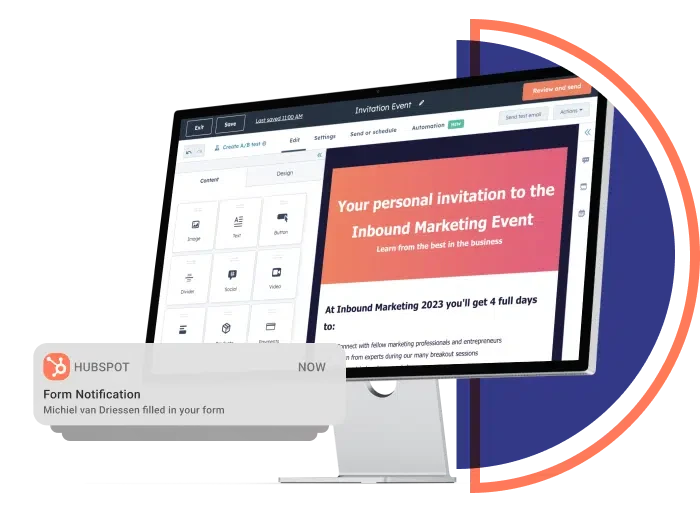
Here’s a step-by-step guide to setting up your campaign:
Access email tool: Navigate to the email section from your dashboard. This area provides a comprehensive view of your email marketing operations.
Create a campaign: Start by creating a new email campaign. HubSpot guides you through each step, from designing your email template to selecting your target audience.
Segment your audience: Utilise the powerful segmentation tools to tailor your messages. You can segment your audience based on various criteria such as demographics, past engagement, or purchase behaviour. This ensures that each group receives the most relevant content, significantly boosting engagement rates.
Craft a message: Use the rich text editor to design your email. Here, you can personalise your content with HubSpot’s personalisation tokens, which automatically fill in details like a recipient’s name or company, adding a personal touch that enhances engagement.
Test and optimise: Before sending your email, use HubSpot’s A/B testing features to test different versions of your email. This helps you understand which elements—be it the subject line, content, or call-to-action—work best with your audience.
Schedule or send: Choose whether to send your email immediately or schedule it for a later time. HubSpot allows for detailed scheduling, which helps in targeting your audience when they are most likely to engage.
How to track email responses effectively with HubSpot
Once your email campaign is active, leverage HubSpot’s robust analytics within the Operations Hub to monitor and refine your strategies. This hub provides essential metrics that inform the success of your emails, crucial for making data-driven adjustments.
Steps to Track Email Campaigns:
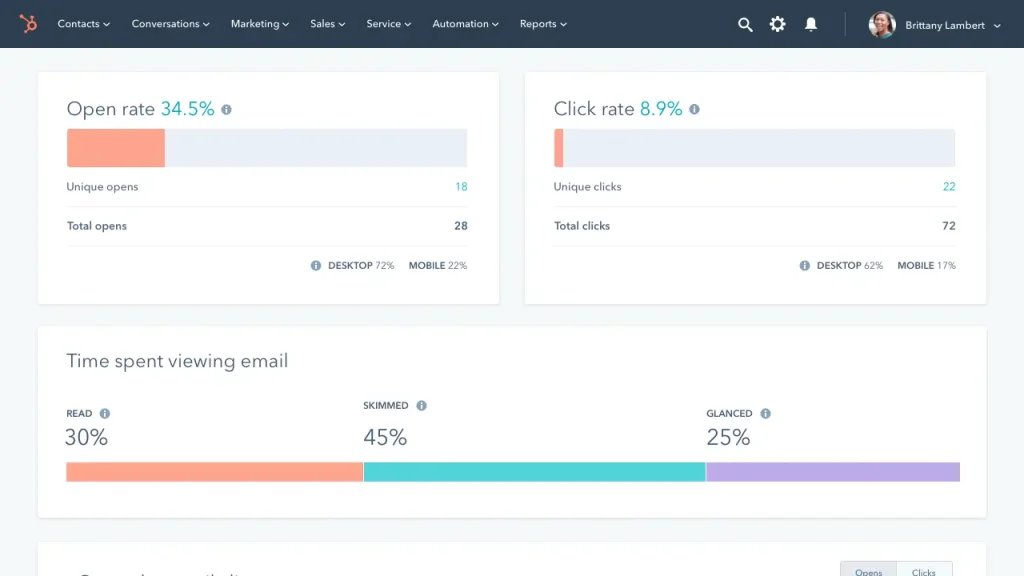
1. Navigate to Operations Hub: Access the dashboard for a comprehensive view of performance metrics such as open rates, click-through rates, and bounce rates.
2. Evaluate Key Metrics:
– Open Rates: Gauge the effectiveness of your subject lines.
– Click-Through Rates: Assess the relevance and engagement of your email content.
– Conversion Rates: Measure the actions taken by recipients, providing insight into the overall campaign impact.
3. Segment and Analyze: Use the segmentation tools to filter data for deeper insights, helping identify what works best for different audience segments.
4. Implement Insights: Utilise these analytics to optimise aspects of your campaigns, from timing and content to targeting, enhancing future performance and engagement.
By following these streamlined steps, you can harness HubSpot’s advanced tools to not only track but also significantly improve the outcomes of your email marketing efforts.
Best practices for monitoring and optimising email campaigns
Effective email campaign management extends beyond tracking metrics; it requires a proactive approach to continuously adapt strategies based on the data you collect. Enhance your email campaigns by regularly revising your segmentation approaches, staying updated with the latest trends in email marketing, content marketing, and social media marketing, and consistently testing new tactics. This could include experimenting with different email formats, subject lines, and call-to-action buttons.
To sum up
HubSpot offers a comprehensive suite of tools that cater to all aspects of modern email marketing. From email automation to detailed analytics, it equips marketers with everything needed to run successful campaigns. By integrating digital advertising, video marketing, and influencer marketing into your HubSpot campaigns, your business can enjoy a holistic marketing approach that drives results. Getting automation, segmentation, and reporting to work together like this is usually where a HubSpot implementation partner earns its keep. If you want to expand your knowledge of Hubspot even further, check out our blog on the top 5 integrations of 2024!
Related articles


